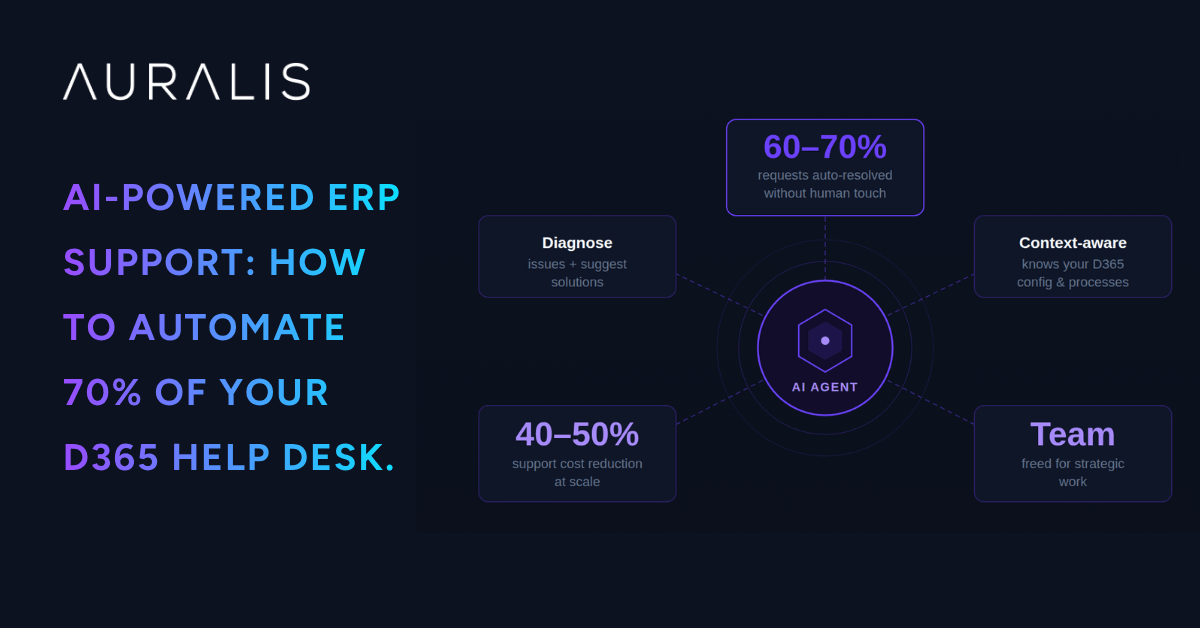
AI-powered ERP support automation can resolve 60-70% of support requests without human intervention by deploying intelligent agents that understand your D365 configuration, data, and business processes. Unlike generic chatbots, these agents function as an extension of your support team—diagnosing issues, suggesting solutions, and escalating complex problems. At scale, this approach cuts support costs by 40-50% while improving user satisfaction and freeing your team to focus on strategic work.
The ERP Support Problem Nobody Has Solved—Until Now
D365 F&O is a powerful system. It’s also infinitely complex. With hundreds of modules, configurations, and integrations, the number of potential user questions is nearly unlimited. Traditional support—help desks, super-users, knowledge bases—can’t scale to meet this complexity. The result is predictable: support costs explode, users get frustrated, and adoption stalls.
Here’s why traditional support fails at scale:
Help desks can’t keep pace: 70% of support requests aren’t system failures—they’re usage questions. Your help desk can’t answer ‘how do I do X in D365’ faster than the user can find the answer themselves if they had guidance.
Knowledge bases become stale: Static documentation worked when ERP was stable. Now, with continuous updates, new modules, and business process changes, knowledge bases decay within weeks of publication.
Super-users burn out: Three people know how to do everything. They’re interrupted constantly, their salary premiums climb, and when they leave, institutional knowledge walks out with them.
Escalation is slow: A user with a problem waits hours or days for an answer from support. By the time they get help, they’ve lost context, and the support rep has lost efficiency.
What if instead, every user had an intelligent assistant—one that understood their role, their company’s configuration, and the specific way they do business—instantly available to help?
What AI-Powered ERP Support Actually Looks Like
AI-powered ERP support isn’t a chatbot. It’s not a search bar with AI pretending to understand. It’s an intelligent agent that:
Understands your D365 configuration: It knows which modules you use, how you’ve configured them, which custom fields you’ve added, and how your business processes are set up.
Knows your business context: It understands your organization’s structure, policies, and terminology. It doesn’t respond with generic D365 advice—it responds with advice specific to your company.
Learns from every interaction: Every support ticket, every resolved issue, every user question becomes training data. The agent improves continuously.
Diagnoses problems in seconds: A user submits an issue. The agent analyzes logs, checks configurations, and identifies the root cause faster than a human can read the ticket.
Suggests solutions proactively: It doesn’t just answer questions—it identifies patterns and suggests improvements. ‘I notice 40% of your AR users are still doing manual reconciliation. Here’s why that’s happening and how to fix it.’
Escalates intelligently: When something is beyond automation, the agent escalates with full context to the right specialist—super-user or external consultant. No re-explaining required.
ERP Support Automation Maturity Levels | Auralis AI
The 5 Levels of ERP Support Automation
From manual support to AI-powered predictive guidance. Understanding the maturity spectrum helps you identify where your organization stands and how to advance.
Level 1
Manual Support
Response Time:4-24 hours
Users submit support tickets. Help desk reads and responds or escalates manually. No automation; all decisions and resolutions depend on human review and intervention.
Typical state: All organizations at ERP go-live
Level 2
Guided Support
Ticket Reduction:30-40%
Users access role-based training, embedded help guides, and process diagrams. Self-service resources empower users to find answers without tickets, reducing volume and resolution time.
Typical state: Organizations with structured training and change management
Level 3
Assisted Support
Time Savings:20-30%
Basic rule-based automation handles ticket categorization, auto-response templates, and intelligent routing. Reduces support burden without addressing ticket volume at the source.
Typical state: IT service management platforms (ServiceNow, Cherwell)
Level 4
Automated Support
Auto-Resolution Rate:60-70%
AI agents handle tier-1 and most tier-2 support independently. Context-aware diagnosis and resolution. Response time measured in seconds. Transforms support from reactive to proactive.
Typical state: Emerging capability with AI-powered ERP support platforms
Level 5
Predictive Support
Issue Prevention:80%+
AI identifies issues before they arise and proactively guides users toward optimal processes. System continuously learns and improves. Prevention replaces response.
Typical state: Aspirational—most organizations are still at Levels 1-3
The Jump to Level 4 Is Where Transformation Happens
Most organizations operate at Levels 1-2. Advancing to AI-powered support (Level 4) delivers measurable ROI—faster resolutions, lower costs, and improved user adoption. Level 5 becomes possible as AI learns from your processes.
Sprint365 + Auralis: 70% ERP Support Automation | Auralis AI
Sprint365 + Auralis: Delivering 70% Automation
How the integration of Sprint365 productivity tools and Auralis AI agents creates a unified support experience that resolves most tickets without human intervention.
70% Automated Resolution
1
Knowledge Foundation
Sprint365 Productivity Toolbox
Build the knowledge layer that empowers users and feeds AI training.
Sprint365 Academy: Role-based training modules
Sprint365 Help: Contextual guidance embedded in D365
Sprint365 Processes: Standardized work instructions and process diagrams
Reduction in Ad-Hoc Requests: 30-40% fewer support tickets
Phase 1 Impact
Every user has immediate access to guidance. Self-service adoption reduces initial support burden before AI is deployed.
2
Intelligent Automation
Auralis AI Agents
Deploy intelligent agents trained on your content, configuration, and historical data.
Analyzes support requests in seconds
Searches Sprint365 guidance for solutions
Checks D365 logs for technical errors
Suggests solutions with step-by-step guidance
Auto-closes confirmed resolutions
Escalates complex issues with full context
Phase 2 Impact
60-70% of tickets resolve automatically. 20-30% reach humans with full context. 5-10% escalate to specialists.
3
Continuous Improvement
System Learning & Optimization
Every interaction teaches the system. Patterns emerge. Gaps get addressed.
Support transforms from reactive firefighting to proactive optimization. The system becomes smarter with every ticket.
How a Ticket Gets Resolved in Phase 2
1
User Submits Ticket
Support request enters the system with user context and D365 session data.
2
AI Analyzes Request
Auralis processes the ticket in seconds, extracting intent and context.
3
Search & Diagnose
Searches Sprint365 content and D365 logs for error patterns and solutions.
4
Suggest Solution
Provides step-by-step guidance with links to relevant training and documentation.
5
User Confirms or Escalates
If resolved, ticket closes. If not, escalates to human with full AI analysis.
Ticket Resolution Breakdown
60-70%
AI Auto-Resolved
Tickets resolved by Auralis agents in minutes without human intervention.
20-30%
Human-Assisted
Reach support team with full context and AI-suggested solutions for faster resolution.
5-10%
Escalated to Specialists
Complex issues requiring specialized knowledge and hands-on troubleshooting.
Phase 3: What the System Learns
Training Gaps
If 40% of GL users struggle with a specific reconciliation process, that's a training gap that gets escalated to L&D teams for course updates.
Configuration Issues
If a particular configuration is causing 10+ tickets per week, that's a design problem flagged for architectural review and remediation.
Process Bottlenecks
Patterns in escalations reveal inefficient workflows. These become candidates for process redesign and automation opportunities.
User Adoption Risks
Recurring questions about specific features signal adoption resistance, triggering targeted change management interventions.
Knowledge Accuracy
When suggested solutions from Sprint365 don't resolve issues, the system flags content for review and updates knowledge base in real-time.
System Effectiveness
Every interaction increases AI accuracy and reduces false positives, creating a virtuous cycle of improvement.
Real-World ERP Support Impact: Before & After Metrics | Auralis AI
Real-World Impact: Before and After
Realistic metrics from a 1,200-user Dynamics 365 Finance & Operations implementation, measured 6 weeks after AI-powered support deployment.
Scenario: Mid-market manufacturing company, 1,200 concurrent D365 F&O users across finance, supply chain, and operations. Support team expanded to 7 FTEs post go-live to handle volume. Auralis deployed in month 6 to address adoption and support backlog.
Before AI-Powered Support
Months 3–6 Post Go-Live
Support requests per week180–220
Avg. resolution time8–12 hours
Support team size7 FTEs
Super-user interruptions/week60–80 requests
User satisfaction (quick help)62%
Monthly support cost$65,000
After AI-Powered Support
6 Weeks Post-Deployment
Support requests per week (human)80–100
Avg. resolution time3–5 min (AI) / 2–3 hrs (human)
Support team size5 FTEs
Super-user interruptions/week10–15 requests
User satisfaction (quick help)84%
Monthly support cost$38,000
95%
Faster Resolution
AI-resolved tickets close in 3–5 minutes vs. 8–12 hours for human-handled requests. Immediate answers reduce user frustration.
+22%
User Satisfaction Lift
84% of users now report getting help quickly, up from 62%. Faster resolution directly correlates with adoption and compliance.
42%
Cost Reduction
Monthly support cost drops from $65K to $38K. 60–70% of tickets resolve automatically, reducing labor demand.
90%
Super-User Relief
Interruptions fall from 60–80 to 10–15 per week. Super-users refocus on change management and strategic adoption.
What Changed in 6 Weeks
The volume of support requests didn't change—teams still submit 180–220 requests per week. But now, 60–70% resolve automatically via Auralis in minutes. The remaining 20–30% reach the support team with full AI analysis and suggested solutions, cutting human resolution time from 8–12 hours to 2–3 hours. The final 5–10% are genuinely complex issues that escalate to specialists with complete diagnostics.
The support team didn't shrink—it refocused. Two FTEs were redeployed: one to process improvement and root-cause analysis, another to change management and user training. The remaining five now handle escalations, quality assurance, and strategy instead of tier-1 triage. Super-users, freed from constant interruptions, drive adoption and optimization instead of fighting fires.
Users feel the difference immediately. 84% now report getting help quickly, up from 62%. Faster resolution removes adoption friction. Process confidence increases. Compliance improves. The ERP investment starts delivering ROI in month 6 instead of month 12.
Key Improvements at a Glance
180–220
Total Requests (Same Volume)
More efficiently handled
60–70%
Auto-Resolved by AI
No human touch needed
3–5 min
AI Resolution Time
vs. 8–12 hours before
2–3 hrs
Human Resolution Time
With full context
$27,000
Monthly Savings
42% cost reduction
90%
Super-User Relief
Fewer interruptions
Support Team Transformation
The team didn't shrink—it evolved. From reactive tier-1 triage to strategic optimization. Two FTEs redeployed to process improvement and change management. Remaining capacity focused on escalation resolution and system tuning.
User Adoption Acceleration
Faster answers remove friction. 84% satisfaction lift signals increased system confidence. Users stop workaround behavior. Compliance improves. The ERP delivers value faster.
Financial Impact
$27,000/month savings is Year 1 ROI material. Payback period: 3–4 months for typical mid-market deployment. Additional value from faster user adoption and reduced training load.
Ongoing Value
The system improves daily. As AI learns patterns, accuracy increases and resolution time drops further. Month 12 outperforms Month 6.
Ready to Achieve These Results?
See how Auralis delivers measurable impact in your ERP environment within weeks of deployment, not months.
Getting Started with AI ERP Support: Requirements vs. Reality | Auralis AI
Getting Started: What You Need vs. What You Think You Need
Organizations often overestimate complexity. AI support automation requires far less setup than most believe. Here's what's real and what's myth.
The Common Misconception: "AI support automation requires perfect documentation, a data science team, massive infrastructure, and months of piloting. We're not ready yet."
The Reality: You likely have everything needed to start in 2–3 weeks.
What You Actually Need
Role-Based Training Content (Academy)
Doesn't need to be perfect—it just needs to exist. Sprint365 templates can be customized in weeks. 80% good is sufficient.
Process Documentation (Help + Processes)
Start with your 20 most common support requests and document those processes. You don't need exhaustive coverage.
Historical Support Data
Your ticketing system (ServiceNow, Jira, etc.) already has this. Export it. That's your training data for the AI.
D365 Configuration Access
The AI needs to understand how you've configured your system. Read-only access to your tenant is sufficient.
What You Don't Need
Perfect Documentation
80% good documentation deployed immediately beats 100% documentation that takes 6 months. The system learns and improves.
Data Science Team
The AI is pre-built and trained. You're configuring it to your context, not building it from scratch. No ML expertise required.
Massive Infrastructure Investment
Auralis runs in the cloud. No on-prem infrastructure needed. No capital expenditure for servers or networking.
Months of Pilot
Deploy to 20% of users, see 60–70% automation within 4 weeks, then expand. Full organizational deployment happens in 8–12 weeks.
Myth vs. Reality
The Myth
We need perfect documentation before we can start.
The Reality
Start with what you have. The system improves as it learns from your tickets.
The Myth
We need a data science team to build custom AI.
The Reality
Use pre-built, proven AI. Your job is configuration, not development.
The Myth
This requires months of pilots and testing.
The Reality
See material impact in 4 weeks. Full scale in 12 weeks.
The Myth
Infrastructure and setup costs are prohibitive.
The Reality
Cloud-based SaaS. No on-prem infrastructure. Subscription model.
Typical Deployment Timeline
Weeks 1–3
Setup & Configuration
Connect ticketing system, export historical data, configure D365 access, customize Sprint365 templates, define initial automation rules. Most organizations handle this with 1–2 resources part-time.
Weeks 4–7
Pilot & Material Impact
Deploy to 20% of users. Within 4 weeks, see 60–70% automation rates, measurable ticket reduction, and user satisfaction lift. Use this period to tune rules and refine content.
Weeks 8–12
Expansion & Scale
Roll out to remaining 80% of users. Support team adjusts workflows. Root-cause analysis and process improvement initiatives begin. System reaches steady-state operations.
Are You Ready? Quick Checklist
✓
Ticketing System in Place
You have a system (ServiceNow, Jira, Zendesk, etc.) that logs support requests. That's your starting data.
✓
D365 Tenant Access
You can provide read-only access for the AI to understand configuration and logs. No admin privileges needed.
✓
Some Documentation Exists
Training materials, wikis, process docs, or even email templates. Doesn't need to be polished or complete.
✓
Support Team Buy-In
Your team understands the goal: free them from tier-1 triage to focus on strategy. Resistance typically melts quickly once they see impact.
✓
1–2 People to Drive It
Someone to manage configuration, connect systems, and gather feedback from users. Doesn't require a full-time project manager.
✓
Willingness to Start Imperfect
The biggest blocker is perfectionism. Launch with what you have. Improve in real-time based on actual usage patterns.
You're Probably Ready Today
Most organizations vastly overestimate the setup burden. If you have a ticketing system and D365 configured, you have what you need to start. Let's talk through your specific situation.
FAQ
Looking for details to help you decide?
Here's why Auralis help you start saving today!
Will AI replace my support team?
No. AI automates tier-1 and routine tier-2 work. Your team shrinks back to original size or stays the same, but shifts from ticket triage to strategic work—process improvement, change management, system optimization. People become more valuable, not obsolete.
What if the AI gives wrong answers?
It can’t resolve a ticket without user confirmation. If a user rejects a suggested solution, the ticket escalates to a human with full context. The AI improves from rejected suggestions. Over time, it learns what works in your environment.
How long before we see ROI?
Most organizations see 30-40% support cost reduction within 60 days, 50-60% within 6 months. ROI breaks even in months 2-3. After that, it’s pure savings.
Do we need to be a perfect customer for this to work?
No. Messy configurations, incomplete documentation, and legacy processes all work. The AI is designed to handle complexity. Start with what you have, improve incrementally, and the AI improves with you.
KEY TAKEAWAY
ERP support doesn’t have to be expensive or slow. AI-powered support automation has solved the scalability problem that’s plagued ERP organizations for decades. By combining role-based training (Sprint365 Academy), embedded contextual guidance (Sprint365 Help and Processes), and intelligent support agents (Auralis AI), organizations cut support costs by 40-50%, reduce resolution time from hours to minutes, and free their support team to focus on strategic initiatives. The transition doesn’t require months of setup or new infrastructure—most deployments show material impact within 4-6 weeks. For organizations running D365 F&O and struggling with support costs or adoption, AI-powered support automation isn’t an option anymore—it’s the new standard. The question isn’t whether to automate, but how quickly you can get there.
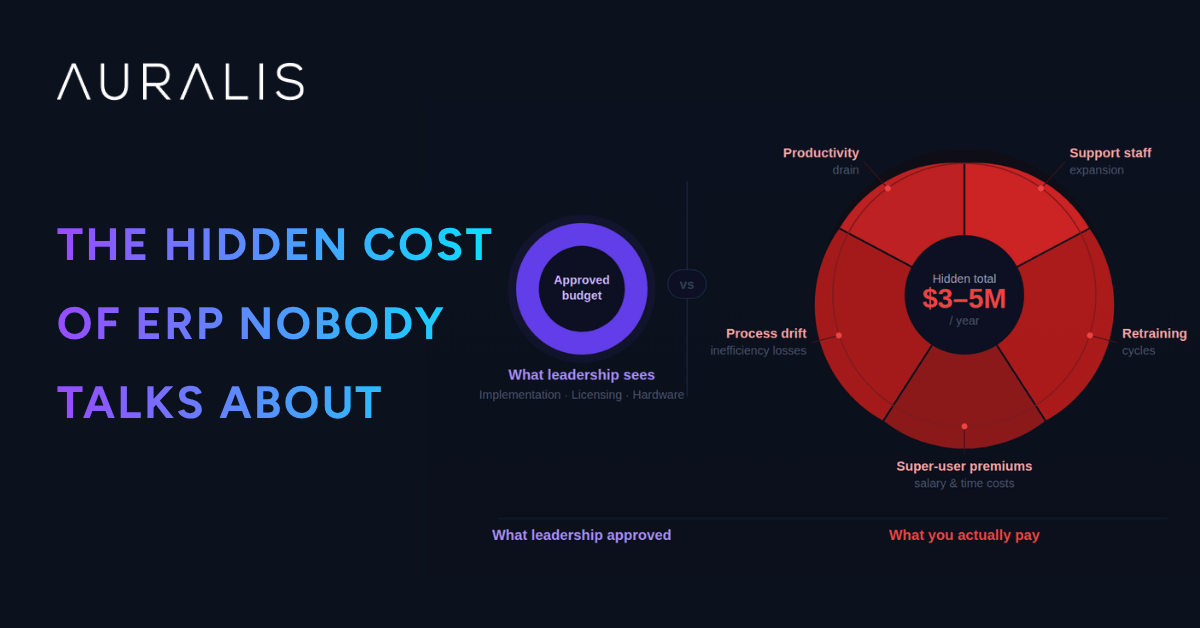
The ERP budget you present to leadership covers implementation, licensing, and hardware. What it doesn’t cover are the hidden costs that emerge post go-live: ongoing support staff expansion, continuous retraining cycles, super-user salary premiums, process inefficiency losses, and productivity drains from unresolved support needs. For a 1,200-person D365 F&O deployment, these hidden costs typically total $3-5M annually—often exceeding the original implementation budget.
Beyond the Implementation Budget: Where the Real Costs Hide
When you close the implementation project, you believe the heavy spending is done. Leadership relaxes. Budget discipline eases. But what actually happens is that costs shift from ‘project’ to ‘operations,’ where they’re no longer scrutinized with the same rigor. Support costs balloon quietly. Retraining happens ad-hoc. Super-users get permanent raises. None of it appears as a discrete line item, so it never surfaces as a problem until you compare actual spend to benefit realization.
Forrester research (2023) found that 71% of organizations underestimate true ERP total cost of ownership (TCO) by 30-50%. The reason isn’t poor arithmetic—it’s that hidden costs are spread across the organization and buried in operational budgets. No single owner is accountable for the total cost, so no one connects the dots.
ERP Cost Intelligence
The 6 Hidden Costs No One Puts in the Budget
Licensing and implementation are just the beginning. For a 1,200-person organization running D365, the operational costs that surface in year one post go-live can exceed a million dollars — none of it in the original business case.
Combined annual hidden cost estimate
$567K – $1.27M / year
1,200-person organization · Post go-live · Excludes licensing & implementation
6 cost drivers
D365 is more capable, more complex, and more integrated than legacy systems. Within 3–6 months of go-live, support tickets exceed capacity. You hire contractors, then FTEs. Most organizations expand support staffing 30–50% in the first 12 months — and that expansion is permanent. A 5-person team becomes 6.5–7.5 FTEs at $85K–$100K fully loaded per person.
Before go-live
5 FTEs
After 12 months
6.5–7.5 FTEs
Annual delta
$127K–$250K
Initial training happened at go-live. Now you have turnover, process changes, and new modules coming online. New hires receive 3–5 days of training at $400–$600/day loaded cost. Process changes trigger refresher sessions. For a 1,200-person organization, annual retraining costs easily reach $300K–$600K — excluding internal resource time.
New hire ramp
$400–600/day
Refresher cycles
Ongoing
Annual total
$300K–$600K
Your top power users are now indispensable — pulled into every decision, every training session, every escalation. They are also prime poaching targets. Retaining 3–5 super-users requires paying 10–20% above peer salary, permanently. That premium is the cost of keeping the system running correctly.
Salary uplift
10–20%
Headcount
3–5 FTEs
Annual cost
$50K–$150K
Users work around D365 when the process is unclear, too slow, or misaligned with how they think. Shadow spreadsheets multiply. A procurement process designed for 10 minutes takes 30. An AR process built for 90% automation stays at 40% manual. Gartner data indicates organizations without continuous reinforcement lose 20–40% of intended efficiency gains within 12 months.
Procurement
3× slower
AR automation
40% vs 90%
Gain erosion
20–40%
A user stuck on a ticket is not working. When support eventually responds, context-switching costs a further 10–15 minutes of recovery. At 3–5 support requests per week, each affected user loses 2–3 hours of productive time. Across 1,200 people with 30% experiencing regular friction, the aggregate loss is 400–600 hours per week — equivalent to 8–12 full-time employees producing nothing.
Users affected
30% (360)
Hours lost/week
400–600 hrs
FTE equivalent
8–12 FTEs
Post go-live, change management does not end — it becomes continuous. Every patch, configuration change, and new integration requires testing, communications, retraining, and risk review. The PMO and training coordinators deployed for the project remain deployed indefinitely. At 0.5–1.5 FTEs, that is $40K–$120K annually with no sunset date.
FTE range
0.5–1.5 FTEs
Annual cost
$40K–$120K
Annual Cost Range by Category
Retraining Cycles
$300K – $600K
Productivity Loss
8–12 FTEs/week
Support Team Expansion
$127K – $250K
Process Inefficiency
20–40% gain decay
Super-User Premiums
$50K – $150K
Change Management
$40K – $120K
See what ERP support automation saves you
Auralis resolves up to 70% of D365 support requests — without adding headcount.
Quantifying the Damage: ERP Hidden Costs Cost Model | Auralis AI
Quantifying the Damage: What These Costs Actually Look Like
A detailed cost model for a realistic 1,200-user D365 F&O deployment in a mid-market manufacturing or distribution company.
Scenario: Mid-market manufacturer with 1,200 concurrent D365 F&O users. Annual license spend: $1.2–1.5M. Implementation completed 12 months ago. Organization is now experiencing the true cost of operation.
Annual Cost Breakdown by Category
Support Team Expansion
1.5 additional FTEs @ $90K loaded
$135,000
Retraining Cycles
1,200 users × 8 hrs/year × $75/hr
$720,000
Super-User Salary Premium
4 super-users × $60K premium
$240,000
Process Inefficiency
600 hrs/week × 52 weeks × $65/hr
$2,028,000
Productivity Loss (Support Friction)
500 hrs/week × 52 weeks × $65/hr
$1,690,000
Change Management Overhead
1 FTE @ $95K
$95,000
Total Hidden Annual Cost
Sum of all categories above
$4,908,000
License Budget
$1.2–1.5M
What you planned to spend annually
Hidden Costs
$4.9M
What you're actually spending every year
True TCO
$6.1–6.4M
License plus hidden costs equals actual spend
Cost Multiple
4–5x
True TCO versus what you budgeted
The Real Cost of Operation
You Expected
$1.5M
License cost only. Standard budget line item.
You're Paying
$6.4M
Licenses plus hidden operational costs annually.
Multiple
4.3x
True TCO versus forecasted budget.
Visibility
0%
Most organizations never see the connection.
Where These Costs Get Lost in Your Organization
Finance/HR
$375K
Support headcount and super-user retention premiums budgeted as permanent staffing.
L&D/Training
$815K
Retraining cycles and change management normalized as continuous function.
Operations
$3.7M
Process inefficiency and productivity loss absorbed as normal operational variance.
Leadership
$4.9M
Total burden invisible. Fragmented across departments. No one connects the dots.
The Visibility Problem
Most of this cost is attributed to 'normal operations' and absorbed across the organization. No one sees the total, so no one questions whether it's necessary.
Finance sees support team headcount expansion. Looks like normal staffing growth for a complex system.
HR sees salary inflation for super-users. Perceived as competitive market adjustment.
Operations sees productivity misses and process delays. Attribution is unclear, considered normal variance.
IT sees change management overhead. Budgeted as business-as-usual, expected cost.
L&D sees continuous retraining cycles. Normalized as ongoing training function.
CFO sees no connection between $1.5M license spend and $6.4M total annual cost.
What If You Could Recover $4.9M?
AI-powered support automation directly addresses every hidden cost. Automate 60–70% of support requests and eliminate team expansion needs. Provide instant guidance to prevent process workarounds. Free super-users from constant interruptions to reduce burnout and retention premiums. Keep users productive instead of waiting for support.
Payback period: 3–4 months. By month 6, you've recovered the entire annual hidden cost. By year 2, the compounded savings exceed the total cost of automation—and the system only improves.
Root Cause Analysis
Why These Costs Stay Hidden
Three structural reasons why post-implementation hidden costs proliferate — and why most finance and IT teams never connect them back to ERP.
No single owner
Implementation has a clear PM and budget. Operations has IT leadership. But no one owns ERP TCO. Costs scatter across support, HR, operations, and finance — each absorbed quietly into existing budget lines, invisible in aggregate.
Budgeted as business as usual
Support expansion gets buried in IT operational budget increases. Retraining shows as scattered training costs. Salary raises look like normal compensation inflation. No one connects these line items back to ERP post-implementation spend.
Incrementalism
Costs do not spike overnight — they grow gradually. One new support hire in month 3, another in month 6. A raise here, a training initiative there. By month 18, you are spending 3–4× more than budgeted, but it feels normal because the increase was gradual.
2025 Shift
How AI Is Changing the ERP Cost Equation
What is new in 2024–2025 is the emergence of intelligent ERP support automation — AI agents that understand your specific D365 configuration and resolve 60–70% of routine support requests without human intervention. This changes the hidden cost equation fundamentally.
Instead of expanding support headcount, you deploy an AI operating layer that handles tier-1 and most tier-2 support. Retraining needs drop because guided support is always available. Process drift decreases because AI agents enforce your configured processes. For the first time, you can point to a clear ROI on post-implementation investment.
Without AI
Support headcount grows 30–50%
Retraining cycles repeat indefinitely
Process drift erodes 20–40% of gains
Super-users become single points of failure
Hidden costs compound year on year
With AI Automation
Support team holds at original size or smaller
Guided support reduces retraining need
AI enforces configured processes at every step
Knowledge distributed through automation
Clear, measurable post-implementation ROI
The Solution
The Sprint365 + Auralis Approach
Sprint365 Productivity Toolbox and Auralis AI address each hidden cost driver directly — not with workarounds, but with structural automation that removes the underlying cause.
Role-Based Academy Training
Keeps knowledge current across your user base, reducing the retraining cycles triggered by turnover, process changes, and new module rollouts.
Retraining costs reduced 40–50%
Contextual Help & Process Diagrams
In-system guidance that prevents process drift and reduces dependency on super-users. Users get the right answer at the point of need — without escalating a ticket.
Super-user premiums stabilized
Auralis AI Support Automation
Intelligent agents that understand your D365 context resolve 60–70% of support requests automatically. Your support team operates at original staffing levels — or smaller.
Support costs reduced 40–50%
Instant Guidance Without Escalation
Users get answers immediately rather than submitting tickets and waiting. Context-switching losses drop. Productivity is recovered across the full user base.
Process efficiency gains of 15–25%
Combined Annual Impact — 1,200-User Organization
Support cost reduction40–50% reduction
Retraining cost reduction30–40% reduction
Process efficiency recovery15–25% improvement
Super-user salary premiumStabilized
Reduction in total hidden costs$1.5M – $2.5M / year
At 150+ active users across multiple organizations, Sprint365 is proving this model works at scale. Combined with Auralis AI's enterprise support automation, organizations finally have a clear answer to: "Why is our ERP costing us so much?"
See what ERP support automation saves you
Auralis resolves up to 70% of D365 support requests — without adding headcount.
Looking for details to help you decide?
Here's why Auralis help you start saving today!
Are these hidden costs real, or am I overspending compared to peers?
They’re very real and nearly universal. Forrester’s research shows 71% of organizations underestimate TCO by 30-50%. If you’re not explicitly measuring post-implementation hidden costs, you’re almost certainly experiencing them at the levels described.
Can we reduce hidden costs without AI automation?
Partially. Better training, process documentation, and change management will help. But you won’t eliminate the cost without automation. AI is the lever that allows you to maintain support at original scale while actually expanding system capability.
How much should we budget for post-implementation hidden costs?
As a rule of thumb, budget 3-5x your annual ERP license cost for the true TCO, including all hidden costs. If your D365 spend is $1.5M annually, your true cost is $4.5-7.5M. If you’re tracking hidden costs and your actual TCO is lower, you’re already ahead of the curve.
How do we avoid these costs in the first place?
Start with an adoption and support strategy that goes beyond go-live. Invest in role-based training, process documentation, and intelligent support automation before costs spiral. It’s much cheaper to prevent hidden costs than to cure them after 12 months of damage.
KEY TAKEAWAY
The ERP costs you budget for in implementation represent maybe 20-25% of the total cost of ownership. Hidden costs—support expansion, retraining, super-user premiums, process inefficiency, and productivity losses—represent 75-80%. For a typical 1,200-user D365 F&O deployment, hidden costs total $3-5M annually and often aren’t tracked as a discrete category. They scatter across support budgets, HR costs, and operational inefficiency, making them invisible to executive oversight. This is why many organizations look back and feel they overpaid for their ERP. The system isn’t expensive—post-implementation execution is. By deploying role-based training (Academy), contextual guidance (Help and Processes), and AI-powered support automation (Auralis), organizations cut hidden costs by 40-50% and achieve true business value realization. The investment in adoption and support automation pays for itself in 2-3 months and delivers multi-year savings.
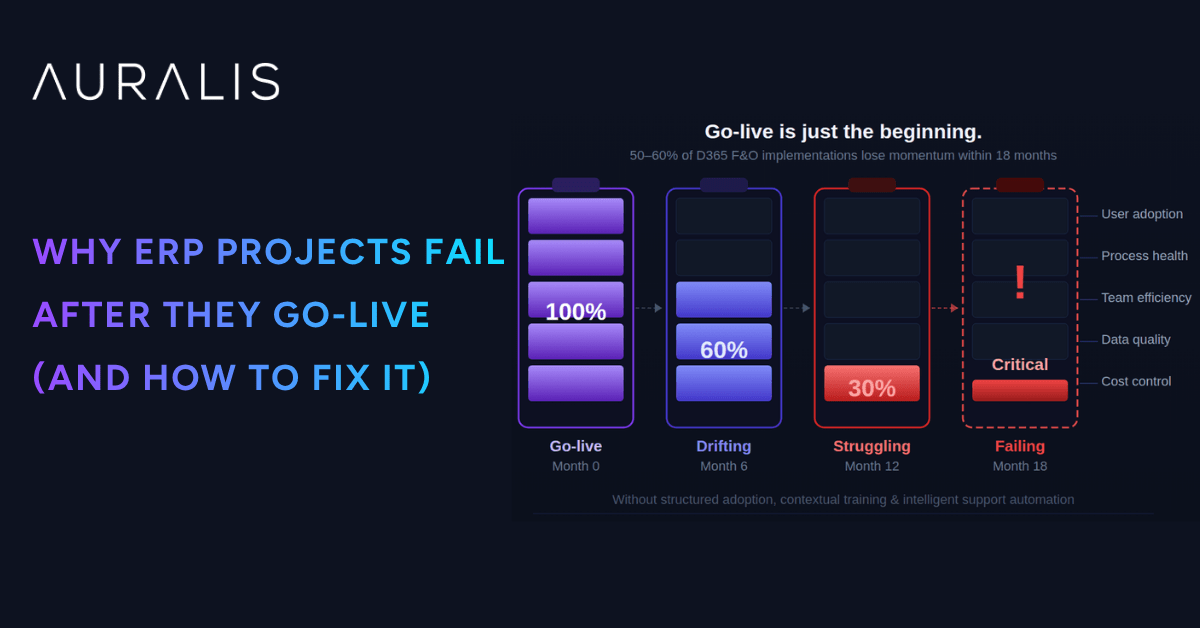
ERP projects don’t fail on go-live day—they fail in the months after. Most D365 F&O implementations achieve successful cutover, but 50-60% struggle with user adoption, uncontrolled support costs, and process drift within the first 18 months. The difference between thriving and failing organizations isn’t the system; it’s whether they invested in structured adoption, contextual training, and intelligent support automation.
The Go-Live Myth
Day 1 Isn't the Finish Line
Organizations celebrate go-live as if crossing the finish line. Implementation partners step back. Budgets close. But go-live is the start, not the end. The real transformation happens in the 3–18 months that follow — when the organization discovers whether users will actually adopt the system, whether processes will hold, and whether support can scale without exploding costs.
62%
of organizations report lower-than-expected system adoption six months post go-live — Panorama Consulting 2024
300–400%
spike in support costs in months 3–6 as users hit real-world scenarios training never covered — Gartner
40%
higher adoption metrics in organizations investing in continuous, role-based guidance post go-live
Failure Patterns
The 5 Most Common Post Go-Live Failures
These failures are not system failures. They are organizational readiness failures — and every one of them is preventable.
01
User Adoption Gaps
Training stops. Support tickets rise. Users revert to workarounds. By month four, you have a two-tier system: power users navigating D365 fluently, and the broader organization working around it. This adoption cliff directly correlates with unmet expectations and poor training ROI.
02
Super-User Dependency
Three people in your organization know how to do things. Every deviation and edge case flows to them. Your super-users become a bottleneck and a retention risk. When one leaves, knowledge walks out with them. This dependency model isn't sustainable and leads to salary inflation and burnout.
03
Support Ticket Overload
70% of support requests are not about system failure — they are about how to use the system. Without intelligent routing and AI-assisted resolution, your support team becomes a drag on value delivery, not a driver of it.
04
Process Drift
You configured D365 to enforce your optimized processes. Three months in, users are working around the system, creating shadow spreadsheets, and reverting to legacy workflows. Without continuous reinforcement and clear role-based work instructions, even well-designed processes decay.
05
Training Decay
Training happened once, at go-live. New hires get nothing. Seasoned users forget. Processes change and training doesn't follow. By month twelve, you are running on tribal knowledge and instinct. Every turnover event cascades into months of lost productivity and retraining costs.
Structural Failure
Why Traditional ERP Support Models Break Down
Traditional ERP support relies on three models. All of them fail post go-live — because they respond after the user is already stuck.
Help Desk Escalation
Users submit tickets. Support triages. Often re-routes to super-users. Every step adds delay, and the user is stuck throughout. Doesn't scale with ticket volume.
Slow, dependent, doesn't scale
Knowledge Base Search
Users search a static library. But knowledge bases are rarely updated post-launch, and users often don't know what to search for. Stale content creates more confusion than clarity.
Stale, hard to navigate
Super-User Phone Call
The fastest path, but the most expensive and least scalable. Concentrates risk in 2–3 individuals and burns them out. One departure creates an organizational knowledge crisis.
Fast but unsustainable
None of these models prevent the problem. They all respond after the user is stuck — support costs rise, adoption stalls, and frustration becomes the dominant user experience.
Financial Impact
The Real Cost of Post Go-Live Failure
Quantified for a 1,200-user D365 F&O implementation. These are not theoretical projections — they are averages drawn from benchmarking data.
Support Team Expansion
62% of orgs expand support staffing 30–50% in months 3–12. For a 5-person team: 1.5–2.5 additional FTEs at $85K–$100K loaded cost per year.
+$127K–$250K
Productivity Loss
Workers interrupted by support needs lose 15–20 minutes per occurrence. With 1,200 users and 20+ unresolved queries per day: 40–60 hours per week lost.
1–1.5 FTEs/week
Delayed Business Value
Poor adoption delays realization of ERP benefits by 6–18 months. For a deployment targeting $2–4M in annual efficiency gains, a 12-month delay represents $2–4M in deferred value.
$2M–$4M deferred
Turnover and Knowledge Loss
Super-user burnout drives attrition. When knowledge workers leave, retraining their replacement costs $25K–$50K in time and external consulting.
$25K–$50K per exit
Annual support cost overrun
300–400%
of the original annual support budget
Deferred business value
$2M – $4M
per year in unrealized efficiency gains
The New Model
A New Approach: AI-Powered Adoption and Support
Leading organizations are rethinking post go-live entirely — building a support layer that prevents problems in the first place, rather than responding to them after the fact.
Pillar 01
Contextual Guidance at Point of Need
Role-based guidance, video tutorials, and process diagrams live inside D365, accessible in one click. Users should never have to leave the system to get help.
35–45% reduction in support requests in first 90 days
Pillar 02
Standardized Processes with Work Instructions
Process diagrams and step-by-step work instructions lock in your optimized workflows. Eliminates process drift and gives new hires a single source of truth from day one.
Process drift eliminated within first 6 months
Pillar 03
AI-Powered Support Automation
Intelligent agents that understand D365 context resolve 60–70% of support requests without human intervention. Reduces support team load by 5×, freeing staff for strategic work.
60–70% ticket auto-resolution rate
Pillar 04
Continuous Learning and Feedback Loops
Support data becomes training data. When certain queries spike, guidance gets updated. When users struggle with a process, that signals a training gap. The system stays current automatically.
Knowledge base always current — not static
Sprint365 Productivity Toolbox and Auralis AI deliver all four pillars together — cutting post go-live risk and support costs within the first year.
60–70%
Risk reduction
40–50%
Support cost savings
Best-in-Class Execution
What Best-in-Class Post Go-Live Looks Like
In organizations running this model well, the post go-live curve looks fundamentally different. Support costs flatten. Adoption climbs. Strategic value arrives on schedule.
Day 1–30
Immediate Access
Users have role-based training, embedded guidance, and AI-powered help from day one. Support requests are 30% lower than industry benchmarks.
Month 2–3
Adoption Stabilizes
Adoption curves flatten at 85%+ user engagement. AI automation prevents the usual support spike that hits most organizations at this stage.
Month 4–6
Support Team Rightsized
Support team stabilizes at original staffing levels or smaller. Super-user dependency diminishes as guidance scales knowledge across the organization.
Month 6–12
Process Alignment Holds
Process drift is minimal. Work instructions and process diagrams keep behavior aligned with intent. New hires ramp in weeks, not months.
Month 12+
Truly Strategic Support
Your team manages exceptions and drives continuous improvement — not triage. ERP business value is realized on schedule, not deferred by 6–18 months.
50–60%
Lower support costs reported by organizations running this model
40%
Higher adoption rates vs. organizations without continuous guidance
18+ mo
Acceleration in business value realization vs. traditional support models
Stop treating go-live as the finish line
See how Sprint365 and Auralis prevent post go-live failure — from day one.
Looking for details to help you decide?
Here's why Auralis help you start saving today!
Isn't support overload just part of any ERP implementation?
It’s common, but not inevitable. Organizations that invest in structured adoption, role-based guidance, and intelligent support automation see 60-70% fewer support requests post go-live. Support overload is a symptom of poor execution, not an inherent ERP dynamic.
Can we really prevent super-user dependency?
Yes, but it requires eliminating the information bottleneck. When knowledge is codified in guidance, process diagrams, and AI agents, super-users shift from being answering machines to being strategic partners. They focus on continuous improvement, not tier-1 support.
How quickly does AI automation show ROI?
Organizations typically see 30-40% support cost reduction within 60 days of AI deployment, and 50-60% within 12 months. ROI breaks even in months 2-3 at most organizations.
What's the time investment to set up guidance and process documentation?
It depends on scope, but most organizations build foundational guidance and process documentation in 4-6 weeks with a small team (1-2 BAs and 1 technical resource). The payoff is immediate – lower support costs within 30 days of launch.
KEY TAKEAWAY
ERP failure post go-live isn’t about the system—it’s about organizational readiness. The organizations pulling the most value from D365 F&O are those that shift from reactive support to proactive guidance and automation. By combining role-based training (Academy), embedded contextual help, process standardization (Help and Processes), and AI-powered support automation (Auralis), you eliminate the most common failure patterns: adoption gaps, super-user dependency, and support cost explosion. The cost of not doing this is three to four times higher than the investment in building it. Go-live is the start line, not the finish line—and how you run the first 12 months determines whether you get a 10x system or a 10x headache.
Cart abandonment is a critical challenge in enterprise e-commerce. Shoppers often reach the final step of checkout but exit without completing their purchase. At scale, even a small percentage of abandoned carts can translate into significant revenue loss for large businesses.
Traditional tactics such as reminder emails and discounts offer temporary relief, but they rarely address the real reasons behind abandonment. Timing, personalization, and seamless engagement are often missing, and modern buyers expect all three. When these expectations are not met, they simply move on.
This is where AI agents bring a sharper and more adaptive approach. By analyzing behavior in real time and providing targeted support, they can bridge gaps, resolve hesitation, and guide customers toward conversion more effectively.
In this blog, we will discuss why customers abandon their carts and how AI agents can help you manage this.
Why Do Customers Abandon Carts in Enterprise E-commerce?
The average cart abandonment rate typically ranges between 70% to 75% in E-commerce, making it a major concern for large businesses. These numbers reflect not just lost transactions but also missed opportunities for engagement and long-term customer relationships.
Understanding the key reasons behind abandonment is the first step toward addressing it effectively. Here’s a closer look at why customers leave their carts behind in enterprise e-commerce:
Unexpected costs at checkout: Nearly 48% of shoppers abandon their carts due to unexpected costs like shipping fees, taxes, or service charges. When these appear late in the checkout process, customers often feel caught off guard and leave before completing the purchase.
Confusion about product details or sizing: Around 70% of buyers drop off when product information is unclear or incomplete. Uncertainty about sizing, specifications, or compatibility can create hesitation, particularly for high-value or bulk purchases.
Lack of payment flexibility: About 13% of shoppers abandon carts due to limited payment options. In enterprise transactions, where order values are higher and buyers may operate across regions, payment flexibility can make or break the sale.
Slow responses to pre-purchase queries: Roughly 53% of customers abandon their carts because their questions aren’t answered quickly. In enterprise e-commerce, even short delays in resolving concerns can disrupt buying momentum and lead to lost revenue.
Limited customer support availability: When support is difficult to access during the buying process, customers often lose confidence and drop off. Buyers expect multiple support touchpoints, live chat, quick escalation paths, or dedicated account managers.
The True Cost of Cart Abandonment for Enterprises
Cart abandonment isn’t just a missed sale. For enterprises, it directly eats into revenue, marketing budgets, and long-term customer relationships. Here’s how it impacts the bottom line:
Billions lost annually
Globally, cart abandonment is estimated to account for over $4 trillion in lost sales every year. For enterprises handling high transaction volumes, these losses accumulate quickly and directly affect quarterly and annual targets. Even small shifts in abandonment rates can lead to meaningful financial swings.
Wasted ad spend on non-converting shoppers
Enterprises spend heavily to bring traffic to their storefronts. When those visitors abandon their carts, the marketing investment used to acquire them yields no return. This drives up acquisition costs and reduces the overall effectiveness of campaigns.
Reduced lifetime value
An abandoned cart often means losing more than a single sale. When a potential buyer doesn’t complete their first purchase, the business also misses future revenue opportunities, such as repeat orders, upgrades, or ongoing contracts that could have built long-term value.
Damaged CX reputation
High abandonment rates can signal to customers that the brand isn’t meeting expectations. Over time, this erodes trust and impacts how customers perceive the business. A reputation for inconsistency or friction during the buying journey can lead to fewer return visits and reduced loyalty.
1. Provide instant help with product and shipping queries
Many shoppers hesitate at the final stage because of unanswered questions about product details, delivery timelines, or return policies.
AI agents can step in immediately, offering real-time responses without forcing buyers to search through pages or wait for a support team. This quick resolution removes friction and builds confidence, making it easier for customers to complete their purchase.
2. Send personalized reminders and offers
AI agents use customer behavior, browsing history, and cart details to send tailored reminders and incentives that are relevant to each shopper. A timely message with a clear next step or a small personalized offer can effectively bring customers back and nudge them toward conversion.
3. Recommend complementary products to increase trust
Shoppers often hesitate when they’re not entirely confident about their choices. AI agents can recommend complementary products that validate and strengthen the buyer’s decision.
For example, suggesting compatible accessories or frequently bought-together items reinforces that they’re making the right choice. This subtle layer of support builds trust and reduces second-guessing at checkout.
4. 24/7 availability to capture global shoppers
Enterprise e-commerce operates across multiple time zones, and shoppers may visit at any hour. AI agents provide continuous support, ensuring no query goes unanswered and no potential sale is missed due to limited service hours. This round-the-clock availability helps enterprises convert interest into sales, regardless of when or where the shopper is browsing.
5. Offer multilingual support to break language barriers
Language is often an invisible barrier in global e-commerce. AI agents can engage shoppers in their preferred language, removing communication friction and making the buying experience feel local and accessible. This inclusivity ensures that potential buyers aren’t lost simply because they couldn’t fully understand or express their queries.
How Auralis Boosts Enterprise E-commerce Conversions
Here’s how Auralis delivers real value and drives conversion in enterprise settings:
1. Conversational AI Agents across web, app, and chat
Auralis interacts with shoppers at various touchpoints. Whether someone is browsing on the website, mobile app, or via chat, the AI agent engages in context-aware conversations capturing intent, answering questions, and nudging toward checkout.
2. Personalized workflows from CRM & behavioral data
Auralis uses data from CRM systems, browsing behavior, and past purchases to shape every interaction. Whether it’s suggesting the right product, sending a targeted reminder, or recommending an upgrade, each workflow is tailored to the individual shopper.
3. Cross-channel support & cart recovery (email, SMS, chat)
When a shopper abandons their cart, Auralis follows up through the channels that matter most. It can send a reminder email, drop a quick SMS, or initiate a chat conversation to re-engage the buyer. By covering multiple channels, Auralis increases the chances of reaching the shopper at the right time and pulling them back to complete the purchase.
4. Multilingual & global reach
Auralis supports over 100 languages, enabling brands to engage customers in their native tongue. This helps enterprises scale internationally without losing clarity or creating language-based friction.
5. Instant query resolution & self-service
Auralis can autonomously resolve common questions, like product specs, shipping timelines, returns policy, and order tracking without human intervention. That reduces the wait time shoppers often face at decision points.
Conclusion
Cart abandonment will always be a challenge in enterprise e-commerce, but it doesn’t have to remain an unchecked revenue leak. The key lies in timely engagement, personalized experiences, and seamless support across every touchpoint.
Auralis brings all these elements together through conversational AI, intelligent workflows, and cross-channel recovery. It reduces abandonment and helps enterprises turn missed opportunities into measurable revenue gains.
If you’re ready to convert more carts, lower acquisition costs, and deliver a smoother buying journey, it’s time to see what Auralis can do for your business.
Field support costs add up fast. One visit might seem harmless, but when multiplied across teams, regions, and repeated issues, it quickly becomes a financial leak.
From engineer dispatch costs to unplanned downtime and repeat visits, the hidden expenses add up fast. And most companies don’t even realize how much they’re spending.
That’s where AI comes in. With tools like predictive maintenance and smart scheduling, businesses can fix issues earlier, avoid repeat visits, and save serious money.
In this blog, we’ll discuss the actual cost of field support visits and, more importantly, how AI for field service is turning that cost curve around.
Why Field Support Visits Are So Costly
Field support might seem like a regular part of operations, but it’s often one of the most underestimated cost centers in service-heavy industries. Each visit sets off a chain of direct and indirect expenses that can quietly snowball over time. Here’s where the real costs lie:
1. Travel and Labor Expenses
Think about it, just getting a technician to the site isn’t free. There’s fuel, tolls, time stuck in traffic, and the wear and tear on company vehicles. Now add the technician’s hourly rate, which usually includes travel time, and sometimes even a premium if the location is far or the issue is urgent.
This is where costs sneak in. One visit may seem manageable. But when you’ve got a team on the road every day, visiting multiple sites? The numbers rack up faster than you think.
2. Lost Productivity Due to Repeat Visits
Repeat visits don’t just double the cost; they slow everything else down. Whether it’s due to an incomplete fix, misdiagnosis, or missing parts, every extra trip eats into technician availability and disrupts schedules.
It also reduces the number of new service calls your team can handle. Over time, this leads to longer response times, a growing backlog, and increased pressure on your staff.
3. Customer Downtime Penalties
If your client’s systems are down, their business is likely on pause, and that pause has a cost. In some cases, contracts include penalties when you don’t meet service level agreements (SLAs). But even without formal penalties, the pressure is real.
You risk damaging the relationship. Customers remember how long they had to wait and how often they had to call back. And if it keeps happening, they might start shopping around for someone more reliable.
4. Delays from Missing Context or Documentation
When technicians don’t have access to information like service history, past repairs, or equipment details, they end up spending time retracing steps instead of fixing the issue.
This slows down the job and often leads to incomplete work or wrong diagnosis, resulting in another visit. That’s more time, more travel, and more cost for something that could’ve been avoided with better documentation.
The Impact on Enterprises and Customers
When field service falls short, the ripple effects are hard to ignore. Inefficiencies don’t just slow things down; they directly impact enterprise performance and customer experience. Here’s how:
Reduced Margins from High Service Overhead
Inefficient field processes quietly chip away at profit margins. Rising internal costs, whether from coordination complexities, longer job cycles, or resource mismanagement, reduce the financial return on every service visit. Even with solid revenue streams, high operational overhead makes it harder to maintain healthy margins over time.
Frustration from Repeat or Slow Resolutions
Customers expect quick and reliable fixes. When issues drag on or require multiple visits, frustration sets in fast. Delays can disrupt their operations, create unnecessary uncertainty, and weaken their confidence in your service reliability. Over time, that dissatisfaction can lead to escalations, strained relationships, or even lost business.
Inability to Scale Field Operations Efficiently
As service demand grows, inefficient processes become a roadblock. Adding more technicians alone doesn’t solve the problem; it often exposes coordination gaps and bottlenecks.
Without better systems in place, teams struggle to manage increasing volumes, response times slow down, and overall service quality slips. This makes it difficult for enterprises to scale smoothly and sustainably.
How AI Agents Reduce Field Support Costs
Here’s how AI agents reduce field support costs:
1. Remote Triage to Avoid Unnecessary Dispatches
Suppose a customer reports that their machine isn’t turning on. Usually, that might trigger a technician visit. But with AI triage in place, the system can walk the customer through a quick series of remote checks, like verifying power supply or running basic diagnostics through sensors.
In many cases, the issue is something simple, like a tripped breaker or a reset error. Instead of sending someone out, the AI helps the customer resolve it remotely.
2. Pre-Load Contextual Knowledge Before Visits
When a visit is unavoidable, AI ensures technicians arrive fully prepared. By automatically pulling service history, past fixes, asset data, and relevant documentation, AI agents give technicians a clear picture of the problem before they step on site.
This reduces time spent diagnosing, minimizes the risk of bringing the wrong parts, and increases the chances of resolving the issue in a single visit.
3. Real-Time Guidance for Technicians On-Site
AI agents give technicians instant access to troubleshooting steps, visual aids, and structured workflows while they’re on the job. Through mobile apps, chatbot assistants, or AR interfaces, they can get the correct information at the right time, without delays. This real-time support helps resolve complex issues more accurately, shortens service times, and reduces the likelihood of follow-up visits, lowering overall service costs.
4. Capture Notes for Predictive Maintenance
Every service visit holds useful data, but it often gets buried in scattered notes. AI agents automatically capture technician inputs, equipment details, and service observations, then analyze them to detect patterns or early warning signs.
This turns routine information into actionable insights, enabling proactive maintenance, fewer emergency callouts, and lower overall support costs.
How Auralis Enhances Field Support
Auralis brings intelligence into every stage of field support, helping teams work faster, smarter, and at lower cost. Below is a closer look at its core capabilities:
1. Live Chat AI Agent: Handles Customer Triage Remotely
Auralis’ Live Chat AI acts as the first line of support. It engages with customers instantly, gathers problem details, performs automated diagnostics, and filters out issues that don’t require physical dispatch. This cuts down unnecessary field visits and lets your team focus on truly critical tasks.
2. Knowledge Assist: Step-by-Step Guidance for Engineers
On the ground, technicians get real-time help. Knowledge Assist surfaces contextual workflows, repair instructions, and reference materials that are relevant to the specific fault or asset they’re working on. This reduces trial-and-error, speeds up repairs, and improves first-time fix likelihood.
3. Insights Analyst: Analyzes Service Data for Maintenance Planning
Auralis’ analytics engine examines all field data from service logs to failure patterns. It helps identify recurrent issues, predict when components will fail, and prioritize preventive interventions. In short, it turns raw data into actionable plans.
By combining triage, guidance, and analytics, Auralis helps reduce repeat site visits, minimize downtime, and control operational expenditure.
Case Study: 45% Cost Reduction and 3× Faster Resolutions
Auralis deployed AI agents to automate event engagement, volunteer scheduling, member support, and donation nudges, while giving teams full visibility and control.
The impact in 60 days:
Event participation rose from 48% to 72%
Volunteer attendance improved from 61% to 89%
Digital giving more than doubled
Admin hours dropped by two-thirds
Annual donations increased by $11,000+
Conclusion
Field support costs often run deeper than they appear, with delays, repeat visits, and inefficiencies quietly eroding margins and customer trust.
Auralis helps close these gaps by bringing intelligence into every stage of service from remote triage and technician guidance to predictive insights that prevent issues before they escalate.
By turning field operations into a smarter, more proactive system, Auralis enables teams to scale efficiently, improve uptime, and control costs without sacrificing service quality.
Support ticket volumes are rising fast. With digital channels multiplying, businesses are facing longer queues, higher AHT, and mounting support costs.
The irony? Most of these tickets are repetitive and straightforward, such as password resets, order updates, and refund checks. Agents spend hours giving the same answers, leading to fatigue and burnout that customers can sense.
This is where AI agents make a difference. They don’t replace human teams; they work alongside them. By automating low-impact tasks and routing only critical queries to agents, AI reduces pressure and frees teams to focus on meaningful interactions.
In this blog, we’ll break down why support burnout happens and how AI agents can help you prevent it.
What Causes Customer Support Burnout?
Here are some common reasons that lead to customer support burnout:
1. High ticket volumes and repetitive inquiries
As a company grows, it’s natural for support ticket volumes to grow alongside it, but the real problem starts when agents spend most of their time answering the same questions repeatedly.
These queries aren’t physically exhausting, but they’re mentally draining. Over time, handling high volumes of repetitive issues leaves little room for focus or creativity, causing stress to build up within support teams.
2. Pressure to meet SLAs with limited resources
SLAs exist to set clear customer expectations, ensure consistent service quality, and provide performance benchmarks. However, they become a challenge when ticket volumes rise and team size remains the same.
Support agents are pushed to meet targets with limited capacity, often leading to rushed conversations and a drop in quality. For example, if three people are expected to clear 400 tickets in a day, it’s not sustainable.
3. Emotional strain from frustrated customers
Not every customer is calm and patient. Many reach out frustrated, upset, or with unrealistic expectations, like demanding an immediate refund for an item still in transit or expecting a complex issue to be fixed within minutes.
Handling these emotionally charged conversations repeatedly requires patience and empathy, which can be draining for support teams.
4. Lack of effective tools and context
Many teams still work with fragmented systems. Without proper tools, agents waste valuable time switching between dashboards, searching for past interactions, or manually piecing together customer histories. This lack of context slows them down, creates unnecessary friction, and makes even simple tasks feel more difficult than they should be.
The Business Impact of Burnout
Here are some business impacts of support team burnout:
1. Increased agent turnover and hiring costs
Burnout is one of the leading causes of agent attrition in the support industry. Replacing a single entry-level agent costs around 30–50% of their annual salary, and even more in the case of senior employees.
High turnover disrupts workflows, slows down response times, increases hiring and training costs, and places extra workload on remaining team members, creating a cascading effect that’s hard to break.
2. Declining CSAT and NPS scores
Burned-out agents struggle to maintain the same quality of interactions. They’re more likely to provide rushed responses, show less empathy, and make more mistakes. This directly impacts customer satisfaction (CSAT) and loyalty (NPS) scores. Over time, this decline damages customer trust, increases churn, and can even affect revenue growth.
3. SLA breaches and slower resolution times
When teams are stretched thin, maintaining response and resolution targets becomes a challenge. Burnout leads to slower handling times and missed SLAs.
Longer queues frustrate customers, escalate complaints, and increase the pressure on already overworked agents, creating a vicious cycle that negatively impacts performance and the customer experience.
4. Hidden costs of disengaged employees
Burnout doesn’t always result in immediate resignations. Often, employees stay but disengage. Disengaged employees work slowly, make more errors, and are absent more often.
Globally, low engagement costs businesses an estimated $8.8 trillion in lost productivity, around 9% of GDP. At the team level, this shows up as reduced efficiency, inconsistent support quality, and quietly rising operational costs.
How AI Agents Prevent Burnout in Support Teams
Here’s how AI agents can help you prevent burnout in support teams:
1. Automate FAQs and repetitive queries
A large portion of support tickets involves simple, recurring questions, like order status, delivery updates, password resets, or basic troubleshooting.
AI agents can resolve these instantly and accurately without involving human teams. By automating repetitive work, they reduce cognitive load and prevent the mental fatigue that comes from answering the same questions hundreds of times a week.
2. Triage tickets to reduce overload
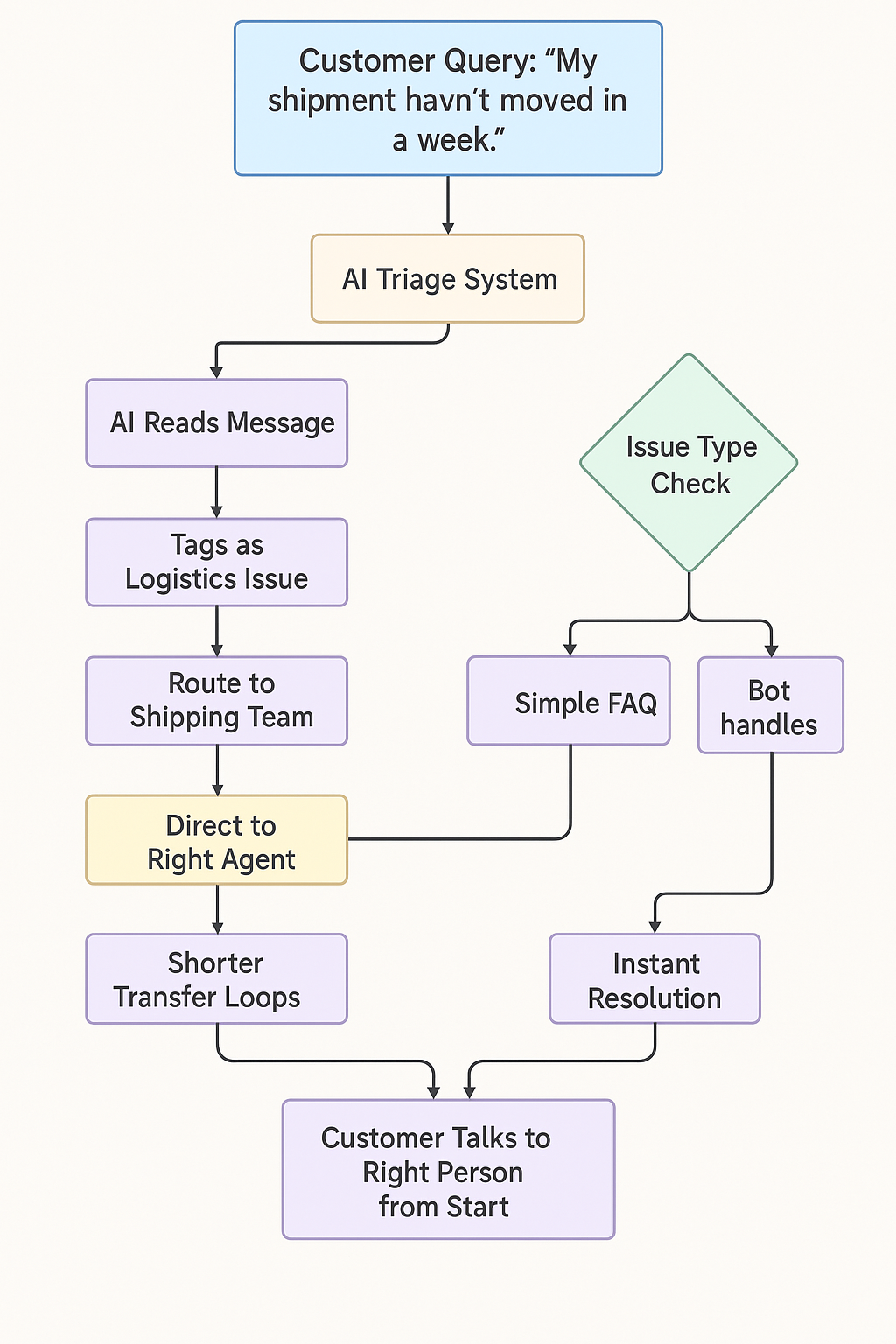
AI agents can read incoming messages, identify the issue type, and route tickets to the right place, whether that’s self-service, bots, a specialized team, or a priority queue.
For example:
A customer writes, “My shipment hasn’t moved in a week.”
The AI detects it’s a logistics-related issue and routes it directly to the shipping team.
Simpler questions, like “Where’s my order?”, are handled automatically by the bot.
This reduces transfer loops, shortens resolution times, and ensures customers are directed to the right team from the start. It keeps queues organized and prevents agents from being overwhelmed by misrouted tickets.
3. Provide contextual knowledge suggestions for faster answers
AI-powered tools can surface relevant articles, past ticket histories, or step-by-step instructions as agents work. Instead of switching between tabs or digging through databases, agents get the right information instantly.
For example, during a live e-commerce support chat, the AI might suggest:
A pre-approved response for delayed shipments
A direct link to the customer’s order tracking page
A step-by-step process to initiate a return
This real-time assistance helps agents respond faster and with greater accuracy, cutting average handle time and allowing them to resolve more tickets without feeling rushed.
4. Enable 24/7 coverage without stretching human teams
AI agents can provide instant support around the clock, handling routine queries outside business hours and escalating only when necessary. This ensures customers get timely responses while human teams aren’t stretched into late nights or constant on-call cycles, significantly reducing stress and burnout.
5. Sentiment analysis for prioritizing escalations
AI can detect tone and urgency in real time. If a customer writes, “This is the third time I’m reaching out!”, the system flags it as high priority and pushes it up the queue.
Since 79% of customers expect faster responses when upset, this kind of prioritization improves CSAT while reducing unnecessary escalations. It ensures agents focus their energy where it matters most.
How Auralis Helps Support Teams Stay Productive
Auralis is a customer support AI platform designed to lighten the load on human agents. It integrates with your helpdesk and knowledge systems, learns from your data, and automates the repetitive parts of support.
Here’s what Auralis brings to the table:
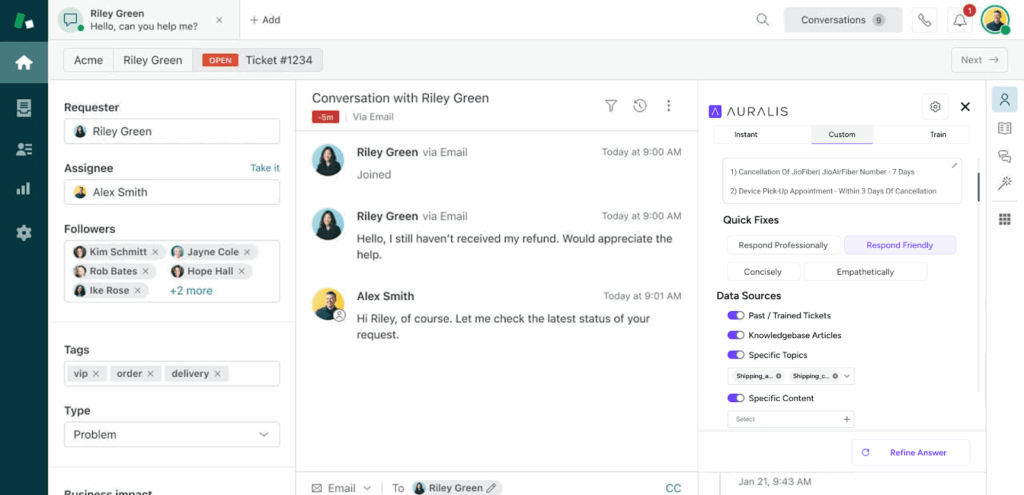
Helpdesk Assistant: Auralis acts as a smart layer within the helpdesk, offering real-time reply suggestions, relevant macros, and recommended next steps. This streamlines responses, reduces manual typing, and helps agents maintain accuracy and speed, especially during high ticket volumes.
Live Chat AI Agent: For common questions like order tracking, password resets, or basic troubleshooting, the Live Chat AI Agent steps in to resolve them instantly. By managing these repetitive interactions end-to-end, it keeps backlogs low and frees agents to handle more complex issues that require human judgment.
CX Coach: Auralis includes a built-in CX Coach that accelerates onboarding. It guides new agents in real time, surfaces relevant information, and reduces the dependency on senior team members for every small question. This shortens ramp-up time and eases training pressure on the team.
Proven outcomes: With Auralis in place, teams resolve 60% of tickets automatically and save 15+ hours per agent each week. Leading to fewer repetitive tasks, faster resolutions, and more focus on meaningful customer interactions without increasing headcount.
Conclusion
Support burnout impacts costs, customer satisfaction, and overall business performance. As ticket volumes rise and expectations grow, traditional support models simply can’t keep up.
AI agents change that. By automating routine work, triaging intelligently, and supporting agents in real-time, they ease the pressure on teams and improve the customer experience simultaneously.
Auralis makes this shift simple. It plugs into your existing stack, handles the repetitive, and helps your team focus on what really matters, resolving complex issues with speed and empathy.
If your IT team handles hundreds of service tickets every day, you know how quickly delays can build up. A single bottleneck in routing or triage can slow everything down, queues grow, SLAs slip, and critical work gets stuck behind repetitive fixes.
Manual triage might seem manageable at first, but at scale, it becomes one of the biggest barriers to efficiency. It drains time, increases costs, and forces skilled teams to focus on low-value tasks instead of strategic work.
In this blog, we’ll break down why manual triage is slowing enterprises down, the hidden costs it creates, and how solutions like Auralis are helping IT teams automate intelligently, improve SLA performance, and clear backlogs before they pile up.
Why Manual Triage Fails Modern Enterprises
Here’s why manual triage fails modern enterprises:
1. Delays from manual routing and classification
Manual triage relies heavily on human intervention to review, categorize, and assign incoming tickets. When volumes are high, this step quickly becomes a bottleneck.
Tickets sit in queues waiting for someone to act, and even minor delays at this stage cascade into longer response and resolution times. What should be a swift, structured process turns into a waiting game that slows everything else down.
2. Misclassification leads to escalation loops
Human error is inevitable when sorting large volumes of requests manually. Tickets often get misclassified, assigned to the wrong team, or tagged with incorrect priorities.
These mistakes trigger escalation loops, where tickets bounce between teams before reaching the right destination. Every handoff adds more time, more frustration, and a higher risk of breaching SLAs.
3. Agents spend time sorting instead of solving
Highly skilled IT agents should focus on solving problems, not manually sorting tickets. However, in many enterprises, a significant portion of their time is spent reviewing and prioritizing requests.
This administrative work drains capacity from actual issue resolution, slows down response times, and lowers overall team productivity. It’s a poor use of talent and time.
4. Lack of visibility into backlog until it’s too late
When triage is handled manually, it’s difficult to maintain a clear, real-time view of what is in the queue. Tickets accumulate silently, and without automated tracking, there’s no immediate signal when volumes start to spike.
Teams often realize the backlog has grown only after delays become visible to end users. By then, SLAs are already under pressure, and IT ends up reacting to problems rather than staying ahead of them.
The Hidden Costs of ITSM Bottlenecks
While manual triage may seem like a manageable hurdle, its ripple effects are far-reaching. These hidden costs often surface quietly but have a measurable impact on productivity, budget, and employee trust.
Longer downtime for employees and systems
Every delay in ticket triage extends the time employees spend waiting for issues to be resolved. Systems stay down longer, business operations are interrupted, and productivity suffers. What might seem like a minor delay at the triage stage often snowballs into significant downtime across teams.
Higher IT support costs and wasted hours
Manual triage requires skilled IT agents to spend valuable time sorting and prioritizing tickets, rather than resolving problems. This creates inefficiencies that drive up support costs and reduce overall team productivity. Over time, these wasted hours compound, stretching already limited IT resources.
SLA breaches impacting trust
When tickets aren’t routed quickly or accurately, resolution times slip and service commitments are missed. Repeated SLA breaches weaken stakeholder confidence in IT’s ability to deliver reliable support. Once that trust is eroded, it becomes complex for IT teams to establish themselves as strategic partners within the organization.
Declining employee satisfaction with IT
Delays in support inevitably affect how employees perceive IT. Slow response times and unresolved issues lead to frustration and lower confidence in the service desk. Over time, this dissatisfaction can influence overall employee morale and reduce trust in IT as a dependable support function.
How AI Agents Solve ITSM Bottlenecks
AI agents transform how IT services operate by shifting triage, routing, and monitoring into intelligent, automated systems.
Rather than waiting for issues to pile up, these agents work around the clock, interpreting requests, managing workflows, and providing insight, so that IT teams can focus on high-value tasks instead of firefighting.
Through a combination of natural language understanding, predictive modeling, and integration with your existing stack, AI agents help eliminate the delays and errors that plague manual processes.
When a ticket comes in, the AI agent uses natural language processing (NLP) to read the subject, body, metadata, and even attachments. Based on training on historical tickets, it classifies the issue (e.g., “Network issue,” “Software install,” “Security alert”) and automatically routes it to the right team or queue.
Example workflow:
A user reports “VPN not connecting after update.”
The AI tags it as “Network/Connectivity.”
The ticket is automatically routed to the network team, bypassing the general queue.
To make automated routing sustainable, teams usually standardize the downstream steps too – approvals, escalations, and repeatable remediation workflows. This is where IT process automation helps reduce handoffs and keeps outcomes consistent as ticket volume grows.helps standardize these workflows end-to-end, reduce manual follow-ups, and keep operations predictable as teams scale.
2. Suggest solutions before tickets reach humans
For recurring or well-understood issues, the AI agent can propose a fix, sometimes even apply it automatically, or send suggestions to the end user. This deflects simple tickets and reduces the load on support agents.
Example workflow:
A ticket says “Forgot password.”
The AI verifies user identity through integration with identity management.
It auto-resets the password or sends reset instructions.
Ends the ticket without human involvement.
3. Monitor for SLA risk and escalate intelligently
AI agents continuously track ticket age, priority, and workload across teams. When an issue nears its SLA threshold, the system steps in before a breach occurs. For example, if an incident remains unresolved for 80% of its allowed SLA window, the AI flags it, raises its priority, and either reroutes it to a fast-response tier or alerts a manager to intervene.
4. Provide real-time dashboards for IT leaders
AI agents feed metrics and status updates into live dashboards. IT leadership gains visibility into queue volumes, bottlenecks, SLA trends, and performance gaps, making data-driven decisions possible in real-time.
How Auralis Accelerates ITSM Efficiency
Auralis combines specialized AI agents with intelligent monitoring to streamline every stage of the IT service lifecycle. From ticket classification to real-time insights, it brings structure, speed, and consistency to IT operations without the overhead of manual triage.
1. Helpdesk Assistant
The Helpdesk Assistant serves as the primary point of IT support. It classifies tickets the moment they arrive, drafts accurate responses using the knowledge base, and routes them to the right team.
Routine issues, such as password resets, access errors, or VPN problems, are often resolved automatically before requiring human intervention. This reduces triage time, prevents misclassification, and keeps Level 1 queues light.
2. Quality Auditor
The Quality Auditor ensures speed doesn’t come at the cost of accuracy. It reviews both AI-generated and human responses for tone, clarity, and compliance before they’re sent to users. By catching errors early, it prevents escalation loops, maintains service quality, and ensures consistent responses across the board.
3. Insights Analyst
The Insights Analyst gives IT teams real-time visibility into what’s happening behind the scenes. It monitors queues, flags SLA risks early, and identifies patterns such as aging incidents or recurring issues. Through live dashboards, leaders can proactively allocate resources and stay ahead of potential delays.
How Auralis Helped Sprint365: From Ticket Overload to Strategic IT
Sprint365, a Denmark-based project management platform for Microsoft ecosystems, was struggling with high ticket volumes. Nearly 40% of their IT team’s time was spent on repetitive Level 1 fixes, leaving little capacity for critical work.
With Auralis, they automated routine requests, accelerated ticket resolution, and gained real-time visibility into support operations. The result was leaner workflows, faster response times, and a team freed to focus on strategic initiatives.
Conclusion
If your IT team is constantly stuck in triage mode, it’s time to rethink your approach. Auralis helps you automate routine requests, route tickets intelligently, and stay ahead of SLA risks, without adding extra headcount.
With faster resolutions, fewer errors, and greater visibility, your team can finally focus on the work that matters.
The fastest way to stall an AI initiative is to choose a platform weighed down by features no one needs.
Enterprises are racing to deploy AI, rightfully so, but the last thing they want is a bulky, slow-moving system that complicates instead of simplifies. These bloated platforms delay time to value, demand steep learning curves, and drain resources, giving competitors a head start.
Managed AI solutions offer a powerful alternative.
They deliver agility, efficiency, and measurable impact without excess complexity. By offloading infrastructure, maintenance, and customization burdens, enterprises can focus on solving real business problems.
In this blog, we’ll break down why traditional AI stalls, and how managed AI fixes it with a faster, leaner way forward.
Why do enterprises struggle with traditional AI implementations?
Despite the excitement around AI, many enterprise initiatives falter before delivering value. Too often, the technology itself is blamed as the misfit, but in reality, it’s the complexity of implementation that causes these projects to fall short.
Traditional deployments demand long timelines, heavy customization, and deep reliance on internal or external experts. Such an implementation is expensive, slow, and difficult to scale.
Long setup cycles
One of the biggest challenges with traditional AI is the time it takes to deploy. Projects often stretch into months as teams wrestle with provisioning infrastructure, building data pipelines, training models, and testing integrations across complex systems.
By the time everything is in place, business priorities may have shifted, customer expectations may have evolved, and competitors may already be experimenting with learner solutions. The longer the rollout, the harder it becomes to maintain momentum and stakeholder confidence.
Over-customization leading to “AI bloat”
In the effort to cover every possible use case, enterprises often over-engineer their platforms. What starts as a tailored solution quickly spirals into a labyrinth of custom features, edge-case workflows, and one-off integrations.
The outcome is “AI bloat”, feature-heavy systems that are difficult to maintain, inflexible to change, and resource-intensive—creating more overhead than efficiency.
High dependency on internal teams or consultants
Traditional AI projects also lean heavily on scarce internal expertise or costly external consultants. The success of these initiatives depends on having the right people across data science, infrastructure setup, and ongoing model tuning.
This quickly creates bottlenecks, makes scaling difficult, and turns every new feature, update, or troubleshooting request into a high-effort, high-cost exercise.
What are managed AI solutions and how do they work?
Let’s look at how managed AI solutions cut through the complexity of building from scratch, giving enterprises ready-to-use, outcome-driven systems that scale with ease:
Pre-built modules tailored for enterprise workflows
Managed AI comes with ready-to-deploy modules for scenarios like customer engagement, risk analysis, or compliance. They eliminate the hassle of building everything in-house, allowing teams to plug these solutions directly into existing workflows.
This not only cuts months of setup but also avoids the trap of over-engineering, paving the way for faster activation and solutions that feel built-in rather than bolted on.
Managed AI comes with ready-to-deploy modules built for scenarios like customer engagement, risk analysis, or compliance. They spare you the hassle of starting from scratch, and your teams can plug these into their existing workflows.
Continuous monitoring and optimization handled by the vendor
Managed AI gives vendors ownership of performance, scaling, and updates end-to-end. Enterprises benefit from AI that’s always tuned, secure, and reliable, without overburdening internal IT teams or relying on expensive consultants.
Continuous vendor oversight also ensures systems evolve alongside shifting business needs and changing data environments, keeping AI efficient without adding internal workload.
Focus on outcomes, not just tools
DIY platforms often leave teams struggling to figure out how to extract value, but managed AI keeps business impact at the core.
Implementations are tied to clear outcomes, including reducing costs, accelerating decisions, and improving customer experience. AI stops being just another technology project and instead becomes a measurable driver of enterprise performance.
What do enterprises gain from fast, lean AI implementation?
When AI is delivered quickly and without excess complexity, enterprises realize benefits that extend far beyond technology, and here’s what’s in store:
Rapid time-to-value (weeks, not months)
Lengthy AI projects often lose momentum before proving their worth. Fast, lean implementations flip this by cutting deployment to weeks instead of months.
Enterprises can test quickly, validate results, and deliver wins early, which in turn secures stakeholder buy-in and accelerates broader adoption. With quick ROI, AI isn’t seen as an experiment and becomes a trusted growth driver.
Reduced IT overhead and staffing costs
Managed AI shifts the heavy IT lift, like infrastructure setup, data pipelines, and model tuning, from internal teams to the vendor.
This keeps IT leaner, budgets more efficient, and talent focused on high-value strategic initiatives instead of maintenance. Over time, enterprises see not only lower total cost of ownership but also greater agility with less overhead.
Minimal disruption to existing workflows
Employee resistance is one of the biggest barriers to AI adoption, especially when tools disrupt established processes. Managed AI avoids this by integrating seamlessly with existing systems like CRM, ERP, and data warehouses, without forcing a complete overhaul.
Employees experience enhancements rather than upheaval, making adoption smoother, reducing friction, and keeping daily execution on track.
Better adoption due to ease of use
Even the most advanced AI fails if employees don’t actually use it. Managed AI encourages adoption with intuitive interfaces and minimal training requirements, so teams across the enterprise can realize value without wrestling with complexity.
Employees focus on outcomes, like faster decisions, sharper forecasts, stronger customer service, and the vendor handles the technical heavy lifting. This ease of use drives adoption enterprise-wide, ensuring impact extends far beyond isolated teams.
How Auralis delivers fast implementation without bloat
Auralis is built around a simple principle: enterprises don’t need more complexity; they need AI that works quickly, seamlessly, and with measurable outcomes.
Plug-and-play AI modules (helpdesk, live chat, insights)
You don’t have to start from a blank slate, because Auralis provides ready-to-deploy modules for common enterprise needs like powering your helpdesk, enabling live chat, or generating actionable insights.
These modules deliver immediate functionality and leave a lot of room for customization. Because you’ll avoid the drag of building systems from the ground up, you’ll see value from day one.
Configured to fit enterprise needs, not overloaded with features
Many AI platforms fail because they try to be everything at once. Auralis takes the opposite approach and delivers lean, purpose-built solutions tailored to what an enterprise actually needs.
By stripping away unnecessary features and zeroing in on business-critical functions, deployments remain light, manageable, and focused on outcomes so your team can experience efficiency without the burden of “AI bloat.”
Ongoing support and optimization as part of managed service
With Auralis at work, your team doesn’t have to dedicate expensive internal resources to maintaining and scaling AI systems. Continuous monitoring, updates, and performance tuning are handled as part of the managed service, so that’s a given.
Auralis ensures AI stays reliable, secure, and aligned with your evolving business needs, sparing your team the hassle of upkeep and freeing them to focus on strategy.
Which use cases benefit most from managed AI?
Managed AI can support a wide range of enterprise functions, but here are some of the use cases that see a stronger impact:
Customer support automation
You can deploy AI-driven chatbots and virtual assistants to handle routine queries instantly, so your human agents get the time to focus on complex issues.
And, when you opt for managed AI, they ensure these systems are continuously optimized, reducing ticket backlogs, improving response times, and delivering more consistent customer experiences, all without demanding heavy in-house oversight.
IT helpdesk workflows
IT teams are often swamped with repetitive service requests like password resets, access permissions, and troubleshooting. Managed AI modules can handle these at scale, cutting down ticket resolution time and reducing IT overhead.
Because the vendor takes care of system updates and optimizations, enterprises get reliable support without piling extra burden on internal staff.
Quality audits and compliance checks
Manual audits and compliance reviews are both time-consuming and prone to oversight. Managed AI can automate document reviews, flag anomalies, and enforce policy adherence in real time. This not only speeds up compliance checks but also minimizes the risk of costly errors or regulatory penalties.
CX coaching and insights analytics
Beyond operational tasks, managed AI empowers leaders to improve customer experience strategies. By analyzing customer interactions across channels, AI identifies trends, pain points, and opportunities for coaching frontline teams. This turns raw data into actionable insights, driving both customer satisfaction and employee performance.
Conclusion
Enterprises can’t realize the promise of AI with massive, bloated platforms.
What they need instead is an approach built on speed, simplicity, and measurable outcomes. Managed AI delivers exactly that: fast deployment, lean configurations, and ongoing optimization without overburdening internal teams.
Auralis takes this philosophy a step further. Offering plug-and-play modules, tailored enterprise customization, and continuous vendor support so organizations can go from idea to impact in weeks, not months.
Are you in search of AI that’s lean, enterprise-ready, and drives tangible business value from day one?
Retail POS at the Edge: What Runs the Store, What Slows It
The operating reality
Retail runs at the lane. Point-of-sale systems, peripherals, payments, price files, promotions, loyalty, and store networks converge in seconds. Tech integrators bind OEM hardware, device drivers, middleware, tax and tender services, and back-office platforms. The estate is intentionally mixed: multiple device models, several software generations, regional variants, partner add-ons. Change is continuous. Seasonal releases, compliance updates, and SKU expansions introduce new behavior every few weeks. Throughput and first-time-right fixes determine whether queues move or stall.
Where operations actually break
Most incidents don’t start with silicon. They start with scattered know-how. Answers sit in PDFs, ticket notes, SharePoint folders, vendor portals, and a few senior technicians’ heads. Search is brittle. Version control is uneven. Three documents describe the same fix differently; none match what the store sees. Escalations occur not because the fault is exotic but because the retail POS documentation in front of the user is wrong for the context. This isn’t a content scarcity problem. It is a knowledge unification problem.
What fragmentation looks like on shift
Five tools open to solve one ticket.
Conflicting SOPs with different step orders.
“Ask Priya” as the real escalation path.
Firmware-specific steps missing from the article at hand.
Private notes outranking official guidance.
Every duplicate article and stale checklist adds cognitive tax. Cognitive tax becomes longer handle time, repeat dispatches, and visible friction at checkout.
Why POS knowledge is uniquely hard
The same symptom hides multiple causes. “Receipt printer offline” can mean driver mismatch, port configuration, spooler behavior, permissions, cable, or a recent image update. The correct path depends on device model, OS build, POS version, and store profile. The frontline needs the right sequence for this configuration, not a generic checklist. When documentation is fragmented, agents and techs cannot reliably choose the correct path inside tight time budgets. Tribal fixes fill the gap. They work until a slightly different setup breaks the assumption and the fix fails on the next shift.
Early signals leaders should track
First-time-fix plateaus because step lists and parts vary by source.
Time to dispatch stretches when skills, SOPs, and parts aren’t visible in one view.
Handle time grows as agents search across tools rather than follow a proven path.
Training duration expands as new hires learn tool sprawl before diagnostic judgment.
Store confidence erodes when two shifts give two different answers to the same fault.
The economics of fragmentation
This is not abstract. A truck roll consumes labor, travel, and lost selling time. Misdiagnosis multiplies that cost with a second visit. During peak, minutes of lane delay cascade into abandoned baskets and lower throughput. In the contact center, Tier-1 volume remains high when the same proven fix is duplicated across systems, labeled differently, or trapped in outdated runbooks. Variability becomes cost. Cost becomes backlog. Backlog becomes churn.
What “unified” actually means
Unification is an architectural correction, not a new portal.
Core elements of a unified knowledge system
Ingest and normalize. Manuals, past tickets, videos, release notes, and vendor bulletins enter a common structure.
Bind to context. Procedures are tied to product versions, device models, store profiles, and hazards.
Govern. Owners, review cadences, and deprecation rules keep guidance current.
Expose where work happens. POS, chat, mobile. Guidance lives in the tools, not behind them.
Make it offline-capable. Critical SOPs are cached; outcomes sync when the network returns.
Add AI copilots. The assistant delivers step-by-step answers with source traceability inside the enterprise.
What changes in the work
Agents stop hunting and start resolving because search friction is removed.
Authors stop duplicating content and start curating one canonical path per fix.
Schedulers see skills, parts, and SOPs together, so dispatches match reality.
Technicians follow one guided sequence aligned to the actual device and software profile.
Training compresses because the assistant teaches workflows, not tool archaeology.
Audit becomes straightforward because answers are traceable to governed sources.
Evidence you can operationalize
When knowledge unification feeds AI copilots, routine resolutions accelerate, cost per ticket declines, and first-time-fix improves. In a retail technology provider environment, unifying the knowledge corpus and deploying an assistant moved a large share of routine queries to auto-resolution, saved double-digit hours per agent each week, and stabilized store uptime near perfect. In field operations, presenting the exact SOP, parts list, and decision path in one flow reduced time to dispatch and onsite cost, with first-time-fix lifting because the correct steps and checks were followed in order. These gains sustain when the corpus is governed and context-bound, not when another static repository is added.
Why start here
Retail POS does not struggle for lack of documents. It struggles when documents compete. The visible symptoms—variable resolutions by shift, repeat visits, long queues—are downstream of an avoidable cause: fragmented guidance. Starting with a durable single source of truth, delivered through AI copilots that understand context and cite internal sources, gives leaders a stable baseline. One place to update. One path to measure. One standard to train against. From that baseline, automation and advanced diagnostics compound rather than mask the problem.
Why More Data Doesn’t Mean Better Decisions in Retail POS
More isn’t clearer
Retail has no shortage of documents. Stores inherit OEM manuals, integrator guides, release notes, runbooks, ticket histories, and tribal notes. Each new rollout adds another layer. The assumption is simple: more content raises coverage. In practice, volume dilutes signal. When the lane stalls, the frontline needs one correct path for this device, this software build, this store profile—now. A stack of PDFs is not a decision. Without a governing structure, teams trade speed for search and replace judgment with guesswork.
Where “more” breaks: signal-to-noise collapse
Unmanaged volume produces three failure modes that block first-time-right outcomes.
1) Duplication (many ways to say the same thing)
The same fix appears in multiple places with different titles, step orders, and screenshots. People bookmark favorites and ignore the rest. Content owners don’t know which one is actually used. Over time, teams maintain parallel truths, and consistency disappears.
2) Drift (content no longer matches the estate)
Firmware changes, driver updates, new images, and peripheral swaps render old steps unreliable. Teams patch locally (“we do step 3 before step 2 here”) but don’t retire or supersede the original. The next shift repeats the error.
3) Dead ends (information without action)
Articles describe symptoms and background but not execution. Missing prerequisites, parts, hazards, or go/no-go criteria force improvisation. Escalations spike because the procedure cannot be completed as written.
The outcome is predictable: time to dispatch stretches, handle time grows, repeat visits multiply, and store confidence erodes—despite having “more documentation than ever.”
Decision budgets at the lane are small
Checkout is measured in seconds. Field tech time on site is tight. Agents juggle concurrency targets. In these constraints, the quality of retail POS documentation is defined by how quickly it turns context into an executable sequence. A good article removes choices; a weak article adds them. A good system delivers one authoritative path; a weak system asks the user to pick between three nearly-identical options under time pressure. Decision friction is the hidden tax that grows with content volume.
From content to decisions: make knowledge computable
The fix is architectural. If the goal is better decisions, knowledge must be structured so both humans and machines can operate it.
Normalize and atomize
Break procedures into addressable steps with unique IDs. Tag each step with device models, OS/POS versions, hazards, parts, tools, preconditions, and expected outcomes. Replace monolithic PDFs with composable, versioned “blocks” that can be reused across models and stores.
Bind to context
Attach each procedure to the configurations it supports. When an agent or tech requests help, the system should already know the device profile, software build, and recent changes, and select the matching path. No manual filtering across near-duplicates.
Encode decision logic
Turn tribal heuristics into explicit checks: if X, branch to Y; if not, escalate with the right artifact collected (logs, screenshots, transaction IDs). Eliminate ambiguous steps like “verify connection” in favor of discrete tests with pass/fail results.
Capture provenance
Every answer should cite its governed source and show its freshness (created, reviewed, superseded). Trust rises when users see where guidance came from and how recently it was validated.
Governance that prevents decay
Volume only helps when content stays true.
Canonicals, not copies: One canonical article per fix. Near-duplicates are merged or deprecated.
Lifecycle rules: Every item has an owner, review cadence, and explicit state (draft, live, superseded, deprecated).
Change hooks: New releases and patches trigger targeted reviews of affected procedures, not broad, infrequent cleanups.
Field feedback loop: Outcome logs and step-level failures feed back into edits. Real failures change the doc, not just the ticket.
This governance is what keeps “more” from rotting into noise.
What “good” looks like at execution time
One answer appears for the detected configuration—no scrolling past look-alikes.
Steps are in execution order with parts and tools embedded at the step that needs them.
Hazards and prerequisites are explicit, not implied.
Go/no-go criteria define when to escalate and what artifacts to capture.
Offline cache ensures critical SOPs work without connectivity; results sync later.
AI copilots deliver the sequence, gather state, and record outcomes—always with source traceability.
When teams operate this way, “more” becomes useful because it is curated, contextual, and computable.
Proof that structure beats volume
Organizations that unified their corpus and exposed it through assistants saw routine queries handled automatically, double-digit weekly hours returned to each agent, Tier-1 cost collapse from tens of dollars to single digits, and store uptime stabilize near perfect. In broader enterprise support environments, unification plus automation cut MTTR, lifted SLA adherence, and deflected a majority of repetitive tickets. The common pattern is not “write more.” It is “decide faster from one governed source.”
Why this matters for scale
As fleets diversify and release velocity increases, content volume will continue to grow. Without structure and governance, each addition raises noise faster than it raises coverage. With structure and governance, each addition makes the whole system sharper: new steps plug into existing trees, supersede what they replace, and become available instantly across channels. That is how knowledge unification and AI copilots turn more information into better decisions, not slower ones.
How Fragmentation Creeps Into Retail POS Workflows
The fragmentation flywheel
Fragmentation rarely arrives in one big break. It accumulates through small, reasonable decisions: a new runbook for a regional variant, a quick workaround for a one-off incident, a local copy of a vendor PDF annotated for a specific store. Each addition solves a problem in the moment while creating a parallel truth for the future. Over time, teams maintain multiple versions of the same fix, none with clear authority. What begins as convenience becomes a system that cannot produce a single correct answer on demand.
Tools create parallel truths
Most estates sit on a stack that includes a help desk, a knowledge base, a document repository, a vendor portal, an LMS, and chat. Each tool has its own search, permissions, and update path. A new SOP often lands in two or three places “just to be safe,” then drifts at different rates. The help desk article includes the quick steps; the PDF has deeper diagnostics; the LMS module has old screenshots; the vendor portal has a firmware caveat that never made it into either. None are wrong on their own. Together, they conflict.
Why each tool drifts in its own direction
Different owners: Support writes KB articles; engineering writes PDFs; training owns LMS modules; procurement tracks vendor notices.
Different cadences: Tickets get updated daily; PDFs quarterly; LMS annually; vendor notices whenever they appear.
Different incentives: Each team optimizes for its own SLAs, not for cross-tool consistency.
Hand-offs fracture knowledge
Retail relies on hand-offs: store to service desk, service desk to field, field to vendor, vendor back to engineering. At each boundary, the problem statement, artifacts, and context get rewritten. The language changes, the attachments change, the assumptions change. If the store logs “printer offline,” the service desk translates it to a driver issue; the field team reframes it as a cable or port problem; the vendor responds with image guidance. None are malicious. Each step loses precision, and the final resolution path no longer matches the original conditions at the lane.
Where the gaps open
Artifact loss: Logs, screenshots, and error codes aren’t preserved across systems.
Ambiguous ownership: It’s unclear who updates the canonical procedure after a new fix is discovered.
Feedback delays: Field insights return as ticket comments, not as updates to procedures. The next shift repeats the same search.
Release velocity fuels version drift
Quarterly releases, ad-hoc patches, payment changes, and seasonal features push constant change into stores. Each release touches procedures: port configurations shift, driver packages update, menu paths move, security policies tighten. Without explicit lifecycle rules, old steps remain live next to updated ones. Two nearly identical articles coexist; one applies to last quarter’s image, one to this quarter’s. Agents and techs choose under time pressure. A wrong choice becomes a repeat visit.
How drift multiplies in mixed fleets
Multiple device models across generations.
Regional variants with different tax or tender flows.
Peripheral combinations that break generic steps.
Pilot stores with changes ahead of the fleet.
Turnover and contractor dynamics
Retail relies on blended teams: full-time staff, contractors, and partner technicians. People rotate across regions and clients. When the system cannot supply a reliable path, individuals compensate with personal notes and private repositories. These work locally but never update the enterprise record. Expertise walks out the door at the end of a contract, and the organization returns to first principles on the next incident.
Multistore, multiregion variants hide edge cases
A fix that is perfect for one region fails in another because of payment flows, language packs, time zone sync, or regulatory prompts at the POS. Without context binding, procedures look universal and behave local. Teams learn to distrust “official” guidance and ask a colleague instead. Informal networks move faster than the system, so the system gets ignored.
Metrics that reward activity over accuracy
If the KPIs emphasize ticket close speed, article count, or training completions, teams will optimize for those outputs. That means closing with partial fixes, creating new articles rather than deprecating duplicates, and publishing courses without validating against live device profiles. Activity rises while accuracy falls. The numbers look good; the store experience does not.
Anatomy of a broken workflow (typical ticket path)
A cashier reports “payments intermittently failing.” The agent searches and finds three articles with similar titles. One references a driver change from an old image; one has the right steps but the wrong menu paths; one is a vendor PDF intended for integrators. The agent chooses the fastest-looking option, which partially clears the issue. The store escalates again after peak. A field tech is dispatched without the precise parts list because the selected article didn’t embed it. On site, the tech learns the image is two builds ahead and the driver guidance is stale. A second visit is scheduled with the correct tooling. The final fix exists—in a ticket from last month—but never made it into the canonical procedure.
The costs you don’t see on a dashboard
Rework, overtime, and travel are visible. Less visible are eroded trust, slower adoption of new releases, and process skepticism at the store. When stores expect guidance to be wrong for their configuration, they escalate earlier and experiment less. That behavior drives volume into the service desk and field even when the underlying issues are routine.
The architectural antidote (kept high level)
The only durable countermeasure is structural: one governed corpus, context binding to device and software profiles, explicit lifecycle rules, and assistants that deliver the right steps in the tools where work happens. When retail POS documentation is unified and computable, hand-offs preserve precision, releases trigger targeted updates, and turnover doesn’t reset the organization’s memory. The frontline stops choosing between parallel truths and starts executing one authoritative path—fast.
From Tribal Knowledge to Unified Intelligence
What a central intelligence layer actually is
A central intelligence layer is not a new knowledge portal. It is the operating core that turns scattered inputs into one governed, computable body of guidance. It ingests manuals, ticket histories, vendor bulletins, release notes, training videos, and field notes, then normalizes them into procedures tied to context—device models, OS and POS versions, peripherals, store profiles, and hazards. It de-duplicates near-identical content, resolves version conflicts, and assigns ownership so every fix has a single, authoritative path. That path is then delivered where work happens: at the POS, in the agent desktop, and on a field tech’s mobile—online or offline.
Dynamic content: Ticket narratives, chat threads, resolution codes, part swaps.
Change signals: Release notes, firmware and driver updates, security policies.
Local wisdom: Field annotations, store-specific constraints, regional variants.
What it produces
Procedures with context binding: One procedure per fix, mapped to the configurations it supports.
Decision trees with explicit checks: If X, branch to Y; if not, escalate with required artifacts.
Source-linked answers: Every step cites the governed origin and review date.
Channel-ready delivery: Same canonical path, presented in POS, chat, and mobile.
Offline-capable guidance: Critical SOPs cached; outcomes sync when connectivity returns.
How it works under the hood
The core mechanics are straightforward and disciplined.
Normalize and model
Unstructured inputs become addressable “blocks” with unique IDs. Steps are tagged with prerequisites, parts, tools, hazards, expected outcomes, and go/no-go criteria. Entities—device model, OS/POS version, peripheral type, store profile—form a lightweight knowledge graph so the right path can be selected automatically for the environment in front of the user.
De-duplicate and govern
Near-duplicates are merged; superseded items are retired. Each canonical procedure has an owner, a review cadence, and a visible state (draft, live, superseded, deprecated). Releases trigger targeted reviews of the procedures they affect. Audit trails capture who changed what and why.
Deliver and learn
An assistant (the AI copilot) retrieves the correct path for the detected configuration, steps the user through it, gathers live state (logs, screenshots, transaction IDs), and records outcomes. Failures or detours are not just “tickets”; they are step-level signals that flow back into editorial review. The body of guidance improves because execution generates data about where guidance worked or failed.
What changes for the frontline
For agents, the search step disappears. Instead of scanning five look-alike articles, they see one sequence already matched to the device and software build. Steps, parts, and hazards are presented in execution order. Go/no-go criteria define when to escalate and what artifacts to capture. For field techs, the mobile flow mirrors the same canonical path, including offline access in low-connectivity stores. For store staff, short-form SOPs remove ambiguity for simple clears while still citing the source, so confidence rises even without expert support on shift.
A simple flow, end to end
Detection: The POS or agent desktop identifies device model, OS/POS version, and peripheral set.
Selection: The assistant selects the canonical procedure bound to that configuration.
Execution: The user follows steps with embedded checks, parts, and hazards.
Decision: Pass/fail logic routes to resolution or a governed escalation.
Feedback: Outcome data and any deviations feed back to content owners.
Governance: Owners adjust steps; the updated procedure becomes the single truth.
What changes for leaders and authors
Leaders move from counting articles to improving outcomes. They see which procedures create the most deflection, where steps routinely fail, and which device models correlate with longer MTTR. Release readiness becomes measurable: which procedures have been reviewed against the new image, which are superseded, which hazards changed. Authors stop competing with one another and start curating a shared canon; every edit has a reason, an owner, and a timestamp. Training becomes systematic because the same canonical paths appear in learning, in the agent desktop, and at the POS.
The impact profile you should expect
When tribal knowledge becomes unified intelligence, variability collapses. First-time-fix rises because the right path appears the first time. Handle time falls because decisions are encoded into the flow. Time to dispatch shortens when schedulers see skills, parts, and SOPs in one view. Cost per Tier-1 ticket drops as routine issues resolve without escalation. Uptime stabilizes as the estate follows one governed sequence rather than parallel truths. These gains persist because the system’s default behavior—one canonical path, source-linked, context-bound—prevents drift from creeping back in.
Why this layer is the right place to invest
Retail POS estates will only grow more diverse as fleets evolve and release velocity increases. Without a central intelligence layer, every new device, driver, or feature adds noise faster than it adds coverage. With it, each addition makes the system sharper: new steps plug into existing decision trees, supersede what they replace, and become available instantly across channels. The enterprise keeps its memory through turnover and partner changes because the knowledge lives in the system, not in individual notebooks. That is how a single source of truth, amplified by AI copilots, turns expertise into a repeatable operating advantage at scale.
Designing a Service↔Field Knowledge Loop
Why the loop matters
A single source of truth is necessary; it is not sufficient. Knowledge only stays true if it is exercised, measured, and improved in the places where work happens. That requires a closed loop between the service desk and field operations: incidents generate learning; learning updates procedures; procedures reduce incidents. When the loop runs, routine issues deflect, dispatches are cleaner, and first-time-fix rises because the frontline follows one proven path that reflects the live estate. In retail tech environments that unified guidance and operationalized it, routine queries moved to automated resolution at scale, cost per Tier-1 ticket fell from tens of dollars to single digits, and store uptime stabilized above 99 percent. In broader enterprise support, similar loops cut MTTR and drove high deflection when AI copilots delivered guidance from a governed corpus.
What flows around the loop
The loop runs on a small, stable set of artifacts. Keep them light, explicit, and computable.
Inputs from the edge
Incident facts: device model, OS/POS version, peripherals, error codes, time of day, store profile.
Context binding: tie procedures to or remove them from specific device models and builds.
Retire/merge: deprecate duplicates; merge near-identical articles into one canonical path.
Operational signals
Deflection: percent of routine tickets resolved by guidance or copilot.
First-time-fix: percent of field visits resolved without revisit.
Handle time / time to dispatch: speed of agent resolution and scheduler decisioning.
Uptime: store and lane availability; practical proof that guidance matches reality.
Loop mechanics (make it executable)
A loop that depends on heroics will stall. Make each step structural.
1) Capture once, use many times
Instrument the agent desktop and field app to capture configuration, steps, checks, and outcomes as a by-product of doing the work. No extra forms; no duplicate entry. Execution creates data that powers improvement.
2) Route facts to owners
Each canonical procedure has an owner. When a step fails frequently, when artifacts are missing, or when a new fix pattern emerges, the system opens a change request against that procedure—pre-filled with context and evidence.
3) Review on a cadence and on change
Two clocks run simultaneously: a fixed review cadence (for example, quarterly for high-volume fixes) and event-based reviews (release notes, image updates, vendor bulletins). Owners accept, modify, or reject changes; superseded content is retired.
4) Publish to every channel at once
When owners update a procedure, the change propagates to the service desk, POS, and mobile flows at the same time. No staggered rollouts by tool. The frontline sees one change, everywhere.
5) Verify with targeted pilots
For material changes, pilot in a slice of stores or a subset of devices. Use pass/fail rates and handle time as the gate to promote to fleet. Every promotion leaves a visible audit trail.
Minimal templates (use them as building blocks)
Incident facts (store-captured)
Context: Store ID, device model, OS/POS version, peripherals attached
Symptom: short label + error code
When: timestamp, load profile (peak/non-peak)
Recent change: image, driver, or release within X days
Artifacts: log bundle ID, screenshot ID, transaction ID
Outcome: resolved / escalated / deferred with reason code
Procedure change request (owner-facing)
Why: step 13 fails at 38% for OS build A.B.C
Evidence: 124 cases, last 14 days, failure clusters at sub-step 13c
Proposed change: move driver reset before port check; add hazard note
Impact scope: device models X and Y, stores in region Z
These templates keep the loop lightweight while ensuring changes are provable and precise.
Governance that keeps the loop honest
Single canon per fix: forbid parallel truths. New discoveries update the canon; they do not spawn copies.
Explicit states: draft, live, superseded, deprecated—visible to all.
Owner accountability: named owners with SLA for review and publication.
Release hooks: every firmware/image note maps to affected procedures; none are “FYI” only.
Metric gates: promote changes when deflection, FTF, and handle time improve in pilot.
How the loop changes behavior
Agents stop escalating by default because the canonical path resolves routine cases. Field techs arrive with the right parts and follow a sequence aligned to the detected configuration. Schedulers plan accurately because skills, SOPs, and store constraints live in one view. Authors focus on the few procedures that drive most volume, guided by step-level failure data. Leaders manage outcomes instead of article counts: deflection up, cost per ticket down, uptime steady. In practice, this is what separates “more documents” from knowledge unification—a living system that improves itself the more the frontline uses it, amplified by AI copilots that deliver the right steps, in the right place, at the right time.
Your Field Techs Don’t Need Another App — They Need the Right SOP Offline
The edge is bandwidth-constrained
Stores are noisy RF environments. Back rooms are dead zones. Remote locations ride shaky circuits. When a lane fails, your frontline can’t wait for a spinner. Connectivity is a design constraint, not an exception. If retail POS documentation assumes perfect networks, it fails the moment it matters most. Field teams need the correct steps, bound to the device and software profile in front of them, available the instant a fault appears—whether the signal is strong, weak, or gone.
Another app won’t fix context
Adding yet another tool increases toggles and training. What techs need is fewer choices, not more screens. The right answer should appear inside the workflow they already use: the agent desktop, the POS overlay, or the field mobile. The assistant should preload context from the environment (model, OS/POS version, peripherals attached, recent image changes) and present one path that fits that configuration. No hunting. No guesswork. No “pick the closest article.”
What “offline-ready” actually requires
Offline-capable isn’t just a cache toggle. It’s a design pattern.
Pre-fetch by risk: Cache the top procedures for each store’s device mix and fault history, not a generic bundle.
Bind to versions: Package the SOP variant tied to the image and driver set that store actually runs.
Embed execution assets: Include screenshots, command snippets, test utilities, and hazard notes inside the step that needs them.
Attach parts to steps: List the tool or part at the exact moment it’s required, not on a separate page.
Encode go/no-go: Make pass/fail checks explicit so escalation is a decision point, not a conversation.
Record outcomes locally: Log step results, artifacts, and timestamps on device; sync when the network returns.
Sequence beats search
Search is fragile at the edge. The better pattern is guided execution: a short intake confirms context (“Model X, OS build Y.Z, payment driver A.B installed?”), then the assistant drives a fixed sequence. Each step contains the action, the check, and the expected result. If a check fails, decision logic branches to the next best action. If an escalation is required, the assistant gathers the right evidence—logs, screenshots, transaction IDs—without extra forms. The user advances or exits on clear criteria, not intuition.
Design the content to survive poor networks
Long PDFs and image-heavy pages stall on weak connections. Break procedures into addressable steps with unique IDs and lightweight assets. Favor vector diagrams over giant bitmaps. Strip decorative elements. Compress media aggressively. Keep the written instruction concrete and compact. Reference only what the user can see on the device in front of them. Every byte that isn’t essential becomes latency.
Keep the cognitive load low
Field work happens under time pressure, often in cramped spaces. Reduce optionality. Avoid “either/or unless” phrasing. Prefer numbered steps over paragraphs. Call out hazards in-line, not in an appendix. Use the same labels as the UI on the device; don’t rename buttons. When a step depends on a precondition, test that precondition inside the flow before proceeding. The best AI copilots aren’t chatty; they are precise, quiet, and predictable.
Synchronize facts, not prose
When connectivity returns, sync structured outcomes, not free text. Step IDs passed or failed, artifacts captured, parts used, elapsed time, resolution status. That telemetry feeds the single source of truth without adding editorial burden. Owners see where sequences fail in the field and adjust the canon. Updates publish back to every channel—agent desktop, POS overlay, mobile—so the next incident starts with a better sequence.
How dispatch improves when SOPs work offline
Schedulers plan cleaner visits when skills, parts, and steps are visible together. The assistant can preflight a visit: confirm the store’s image build, validate the peripheral set, and propose the parts kit based on the most likely branch of the sequence. On arrival, the tech follows the same path the agent saw. No reinterpretation. No rework. First-time-fix rises because the procedure and the kit match reality.
What changes in training and adoption
New hires learn one way to clear a fault rather than three ways to look for it. The assistant teaches the workflow while work happens. There’s less emphasis on memorizing documents and more on executing steps with care and capturing outcomes. Teams stop hoarding private notes because the system reliably reflects the live estate. Adoption grows because the tool removes uncertainty; people stick with what consistently works under pressure.
The operational payoff
When knowledge unification is delivered as offline-capable, context-bound sequences, handle time shrinks even in poor network conditions. Repeat visits drop because the same canonical path appears in every channel. Costs fall as Tier-1 deflects and field time turns into clearances rather than retries. Most importantly, variance collapses: the fix on a Tuesday night in a low-signal store matches the fix on a Saturday morning in a flagship. That consistency is the hallmark of a system that respects the realities of the edge.
Citations Over Confidence: How Source-Linked Answers Build Trust in POS Support
Confidence is not a control
Retail teams move fast. Under pressure, an AI copilot that replies quickly can feel helpful—even when its guidance isn’t anchored to reality. Speed without provenance is a liability. In a mixed POS estate, confident but uncited answers propagate wrong steps, misconfigure devices, and erode trust at the lane. Compliance teams can’t audit them. Trainers can’t fix them. Leaders can’t defend them. If retail POS documentation is the single source of truth, every answer the assistant delivers should point back to that truth with clear, machine-verifiable provenance.
The risk profile of uncited guidance
Uncited guidance fails where it matters most: accountability, repeatability, and change control.
Accountability: No way to see who authored or last reviewed the underlying steps, or when.
Repeatability: Two shifts get two answers with no visible reason for the difference.
Change control: Firmware and driver updates outpace static text; the assistant can’t show whether a step still applies to the image in front of the user.
Escalation quality: Without a cited baseline, escalations carry opinions rather than evidence—slowing resolution and inflating cost.
Audit gaps: In regulated flows (payments, tax, data handling), leadership can’t prove that frontline actions followed an approved procedure.
Confidence is a tone. Citations are a control. Controls survive audits, turnover, and release velocity.
What a “citation” means in practice
Citations are not footnotes. They are a compact chain of custody that travels with the answer.
Source ID: The canonical procedure or asset that informed the step (unique ID, not a file path).
Version & freshness: Version number, last review date, and state (live, superseded, deprecated).
Scope binding: The device models, OS/POS versions, peripheral sets, and store profiles the procedure supports.
Change reason: Why this version exists (e.g., driver rollback guidance added after failures in build X.Y).
Owner: Named owner responsible for accuracy and updates.
Evidence packaging: Required artifacts to collect (logs, screenshots, transaction IDs) when the step fails.
When the assistant presents a step, it presents the citation metadata with it—concise for the frontline, complete for audit.
How to design citation-first AI copilots
A citation-first copilot treats provenance as a first-class signal from retrieval to execution.
Retrieve by context, not keywords. Use environment facts (model, OS/POS version, peripherals) to select the canonical procedure bound to that configuration.
Attach provenance to each step. Show version, owner, and last review date inline, not hidden in a separate view.
Enforce go/no-go criteria. Encode pass/fail checks. If a check fails, the branch logic both cites the next source and captures required artifacts automatically.
Record outcomes against sources. Log step IDs, results, and artifacts to the same source IDs that powered the answer. Close the loop without extra forms.
Block stale or ambiguous content. If version bindings don’t match the environment, warn or block execution and surface the correct variant where it exists.
Publish everywhere at once. When owners update the canon, the change becomes the cited baseline across POS, agent desktop, and field mobile simultaneously—online or offline.
What the frontline should see
Citations must be visible, not performative. The display pattern is simple:
Step label: Action written in the same language as the device UI.
Check: What “good” looks like, with a specific pass/fail test.
Why this step: One-line rationale to build judgment.
Provenance chip: Source ID, version, and freshness in a compact badge.
Hazard & tools: In-line, at the moment they matter.
Escalation criteria: Exactly when to stop and what to collect.
The assistant stays quiet on style and loud on facts. Users learn to trust it because it shows its work.
Operational gains from citation discipline
A citation-first design reinforces the entire operating model:
Trust: Agents and techs follow the path they can see and verify, not the loudest opinion.
Speed: Decisions compress because provenance answers “which version, for which build” immediately.
Quality: Authors fix the step that fails, not the story around it, because outcome logs map to step IDs.
Governance: Owners see where guidance decays and update the canon with measured impact, not guesses.
Auditability: Leadership can demonstrate that frontline actions aligned to approved, current procedures.
When knowledge unification and citations travel together, AI copilots become a force multiplier rather than a wildcard.
An applied scenario
A store reports intermittent payment failures after a driver update. The assistant detects the model and build, selects the payment procedure bound to that image, and presents a sequence with provenance chips on each step. A check fails at the driver handshake. The branch logic instructs a rollback, lists the exact package, and auto-collects logs before execution. Outcome logs tie to the step IDs. Content owners see a spike in failures at that step-version combination, add a hazard note to the canon, and publish a new sequence. The next incident runs the updated, cited path. No folklore required.
The leadership lens
Without citations, AI answers are opinionated text that’s hard to govern. With citations, answers become executable decisions you can measure and defend. In a heterogeneous POS estate moving at retail speed, that difference separates systems that slowly lose credibility from systems that get more reliable with every shift.
Building the Retail POS Knowledge Graph
What it is
A POS knowledge graph is the structural backbone that turns scattered artifacts into decisions. It models the store estate—devices, software builds, peripherals, networks—and binds each procedure to the exact configurations it supports. Instead of serving generic documents, the graph selects one authoritative path for the environment in front of the user. That is how knowledge unification becomes computable and reliable at retail speed.
Why POS needs a graph, not a folder
Folders hold files. Graphs hold relationships. In a mixed fleet, the same symptom can require different steps by device model, OS build, payment driver, or region. A folder can’t express “this procedure applies to Model A with Build X.Y and Driver V, but not to Model B with Build X.Y and Driver W.” A graph can. It encodes those constraints so the assistant can pick the right path in milliseconds, without asking the frontline to decide under pressure.
Core entities (keep them small and stable)
Design a minimal schema you can maintain. It should express the estate and the work.
Normalize everything to step-level blocks with unique IDs. Strip formatting noise. Preserve provenance.
Versioning and variance
Versioning is where graphs earn their keep.
SemVer for content: version procedures like software. Small edits bump patch; step order changes bump minor; safety-critical changes bump major.
Variance by binding: avoid copying a procedure for every model; bind one canonical path to many assets when steps are identical, and override only where they differ.
Supersession: never “update in place” without history. Supersede explicitly so audits and rollbacks are possible.
Context binding and selection
Selection is the moment of truth. Get it right and search disappears.
Auto-detect context: pull device model, OS/POS build, drivers, and peripherals from telemetry or intake.
Resolve conflicts deterministically: if two procedures claim the same scope, choose the higher-freshness, higher-specificity path.
Block mismatches: if no procedure binds to the detected build, show that explicitly and route to the nearest safe alternative or escalation—not guesswork.
Execution surfaces (same canon, many views)
Delivery must meet the user where work happens.
Agent desktop: sequenced steps with inline checks, parts, hazards, and provenance chips.
Field mobile: offline-first, with pre-fetched procedures matched to the store’s asset mix; outcome logs sync later.
Back office: authoring and governance views for owners; change queues and impact maps.
Different surfaces, one canonical path.
Telemetry: capture facts, not prose
Execution should generate structured data without extra forms.
Step results: pass/fail/skip with timestamps.
Artifacts: evidence bundle IDs for logs, screenshots, transaction traces.
Outcome: resolved/escalated/deferred with reason codes.
Resource use: parts consumed, tools required, elapsed time.
These facts flow back to the graph and attach to the same step IDs that drove the answer. That is how you learn where guidance fails and why.
Governance you can run every week
Governance must be light enough to sustain.
One canon per fix: merge duplicates, deprecate near-copies.
Explicit states: draft, live, superseded, deprecated—visible to everyone.
Owner SLAs: named owners with review cadences; changes time-boxed, not open-ended.
Release hooks: each event maps to the affected bindings; targeted reviews replace broad rewrites.
Impact trails: show where a change propagates—stores, assets, training, and reporting.
Quality gates that matter
Measure what protects the lane, not what flatters dashboards.
Coverage: percent of top incidents with a live, bound procedure.
Freshness: median days since last review for high-volume paths.
Selection accuracy: rate of correct auto-selection on first try.
Step reliability: failure rates by step ID, not by ticket.
Deflection and FTF: routine issues resolved without human escalation; field visits resolved without revisit.
Handle time and time to dispatch: before/after deltas as changes ship.
If a metric doesn’t influence action, retire it.
Implementation in three passes
You don’t need a big bang. You need momentum you can sustain.
Stabilize the core (weeks): ingest top incidents; normalize to step blocks; bind to current images and models; publish to agent desktop; stand up owner SLAs.
Extend to the edge (weeks to a quarter): add POS overlay and field mobile; preload offline bundles by store; instrument step-level telemetry; enforce supersession.
Industrialize (quarter and beyond): wire release feeds to review queues; expand bindings across variants; harden selection rules; add preflight kits for dispatch; fold training into the same canon.
Each pass should reduce search, cut handle time, and raise first-time-right outcomes—visible on the same scorecard.
What good feels like in the store
The assistant recognizes the environment and presents one path. Steps are in execution order with checks and parts where they’re needed. Hazards are clear. Escalation is unambiguous. When networks falter, procedures still run; results sync later. Agents resolve instead of hunting. Technicians arrive with the right kit and clear it in one visit. Leaders see which steps fail and fix the step, not the story. The graph doesn’t add process—it removes friction. That is the point: convert documentation into a system that decides correctly, quickly, and consistently at the edge.
Proof in Action: How Retail Service Leaders Are Fixing Fragmentation
The repeatable pattern
Across very different environments—retail POS providers, consumer hardware brands, and enterprise software running inside Microsoft 365—the same sequence delivers results: unify guidance into a single source of truth, bind it to context, and deliver it through AI copilots at the point of work. When knowledge unification precedes automation, deflection rises, handle time falls, and first-time-fix improves. The specifics vary by estate; the improvement curve does not.
Retail tech services provider (POS and back office)
Before unification, queues filled with “printer offline,” “payment not captured,” and “SKU sync” tickets. The same fix existed in multiple places with different step orders. Dispatches carried the wrong kit because parts lists lived in separate documents. After consolidating retail POS documentation into one governed corpus and exposing it through AI copilots in the agent desktop and the field mobile:
Routine queries resolved automatically at scale, shifting the workload mix toward genuinely complex issues.
Average hours saved per IT agent exceeded double digits weekly.
Cost per Tier-1 ticket fell from tens of dollars to single digits.
Store uptime stabilized above 99 percent as the same canonical sequence appeared in every channel.
Why it worked: one procedure per fix, step-level checks, parts embedded at the step that needs them, offline bundles pre-fetched by store profile, and provenance attached to each answer so trust increased instead of eroding over time.
High pre-sales load and post-purchase backlogs hid a simpler root cause: fragmented guidance across site FAQs, manuals, class schedules, and warranty policies. The brand unified content and deployed assistants across web, commerce, and support:
Pre-sales conversion rose from roughly three percent to mid-single digits as sizing and model questions were answered consistently.
First response time fell from hours to minutes; buyers stopped waiting and started acting.
Retention improved across the first 90 days as onboarding and assembly flows became repeatable, not reinvented per shift.
Support cost per ticket fell by more than half; multilingual coverage expanded without a staffing spike.
The driver was not “chat” in isolation; it was a single source of truth powering consistent answers and proactive nudges—class bookings, accessory fits, and warranty registration—from the same canon.
Microsoft-centric task and project platform (in-product support)
A software provider embedded AI guidance directly in Teams and related Microsoft surfaces. Prior to unification, onboarding dragged and support queues absorbed how-to questions that documentation nominally covered. With a governed corpus feeding an in-app copilot:
More than two-thirds of Tier-1 tickets resolved automatically.
Average resolution time dropped from roughly an hour to well under a quarter hour.
Supported languages expanded from single digits to triple digits without duplicating content.
Agent productivity quadrupled as the assistant delivered the exact sequence inside the user’s current context.
Again, the enabling move was computable knowledge: procedures atomized into steps with IDs, checks, and outcomes—so the assistant could drive execution and capture telemetry without extra forms.
Transferable lessons (what actually changed)
One canon per fix: Duplicates were merged; near-copies were retired. Teams stopped arguing about which version to trust.
Context binding: Procedures were tied to models, builds, drivers, peripherals, and store profiles. Selection logic chose the right variant; users didn’t.
Citation discipline: Each step carried source, version, owner, and freshness. Users saw where guidance came from; auditors could prove alignment.
Execution surfaces: The same canonical sequence rendered in the agent desktop, POS overlay, and field mobile—online or offline.
Outcome telemetry: Step results and artifacts flowed back automatically, so authors edited the step that failed, not the story around it.
Indicators that moved first (and stayed up)
Deflection: Routine issues handled by guidance or copilot, not by humans.
First-time-fix: Field visits resolved without revisit because the kit and the steps matched reality.
Handle time: Compressed as search vanished and decisions were encoded into the flow.
Uptime: Stabilized because every channel delivered the same, validated path.
Training time: Shortened as new hires learned workflows instead of tool archaeology.
Confidence: Rose at the store because guidance finally matched what people saw on the device in front of them.
What didn’t move—until the architecture changed
Publishing more documents didn’t help. Adding another portal added another place to go wrong. Generic chat without provenance accelerated bad advice. The shift only happened when leaders treated documentation as an operational system: governed, context-bound, citation-first, and delivered where work happens. That is why the improvements sustained through release cycles, turnover, and peak-season load.
The Roadmap to Knowledge Unification
Start with the reality, not the ideal
Unification succeeds when it targets the incidents that actually move cost and experience, not a theoretical library. Begin with the top recurring faults by volume, handle time, and revisit rates. Limit scope to the asset mix and software builds that drive most traffic today. Define success in execution terms: faster decisions, fewer revisits, consistent outcomes at the lane.
Phase 0 (Weeks 0–2): Align and set guardrails
Create the operating constraints before moving content.
Owner model: Each procedure has a named owner and backup. No anonymous pages.
Lifecycle states: Draft, live, superseded, deprecated—visible to everyone.
Editorial rules: One canonical article per fix; merge near-duplicates; forbid parallel truths.
Safety and compliance: Define hazards, data handling, and audit fields that must appear in any live procedure.
Telemetry baseline: Agree on what to measure from day one: coverage, freshness, selection accuracy, deflection, first-time-fix, handle time, time to dispatch, uptime, training time.
This is the contract that keeps accuracy ahead of activity as volume grows.
Phase 1 (Weeks 2–6): Stabilize the core
Normalize the few procedures that solve most problems. Make them computable.
Ingest and normalize: Manuals, tickets, PDFs, vendor notes, and training modules become step blocks with unique IDs.
Bind to context: Each procedure ties to device models, OS/POS versions, drivers, peripherals, and store profiles.
Encode decisions: Replace vague guidance with explicit checks and go/no-go criteria.
Embed execution assets: Steps include parts, tools, commands, screenshots, and hazards in-line.
Supersede explicitly: Retire look-alikes; preserve history for audit and rollback.
Acceptance criteria: A single, authoritative path exists for each of the top incidents; owners are assigned; states and review cadences are visible.
Phase 2 (Weeks 6–10): Deliver where work happens
Publish the same canon to every execution surface. Do not stagger by tool.
Agent desktop: Sequenced steps with inline checks, hazards, parts, and provenance.
POS overlay: Compact, low-decision mode for in-lane clears; concrete labels that match the device UI.
Field mobile: Offline-first bundles pre-fetched by store device mix and recent faults; local outcome logging with later sync.
Selection logic: Auto-detect model, build, drivers, and peripherals; choose the bound procedure deterministically. Warn or block on mismatches.
Acceptance criteria: Search time collapses, selection is automatic, and the same sequence appears in all channels.
Phase 3 (Weeks 6–12): Instrument and govern
Make improvement a by-product of doing the work, not a separate project.
Change queues: Frequent failures or missing artifacts open change requests against the specific procedure and step.
Dual clocks: Event-based reviews on releases and patches; cadence reviews on high-volume procedures.
Promotion gates: Promote changes when pilot metrics improve: deflection up, first-time-fix up, handle time down.
Acceptance criteria: Owners can trace failures to step IDs; updates ship on schedule; metrics move in pilots before fleet rollout.
Phase 4 (Quarter 2+): Extend and industrialize
Scale the system without reintroducing noise.
Variant bindings: Bind the same canon across device models and regions; override only where steps differ.
Preflight dispatch: Combine skills, parts, and SOPs so schedulers plan clean visits; produce the parts kit likely to match the execution path.
Release hooks: Map each release note or image change to affected procedures; open targeted reviews automatically.
Training integration: Use the same canonical steps in learning; teach workflows, not tool navigation.
Quality dashboard: Track coverage, freshness, selection accuracy, step reliability, deflection, first-time-fix, handle time, time to dispatch, and uptime in one view.
Acceptance criteria: The canon stays small, current, and widely reused; release velocity does not degrade selection accuracy or first-time-fix.
Roles that keep it moving
Knowledge owner: Accountable for accuracy, freshness, and outcomes of assigned procedures.
Author/editor: Maintains step logic, embeds assets, and manages supersession.
SME partner: Validates hazards, edge cases, and device-specific nuances.
Field champion: Confirms steps survive real conditions and poor connectivity.
Release manager: Links changes in builds, drivers, and features to the procedures they touch.
Governance lead: Runs the cadence, reviews metrics, resolves conflicts, and enforces the “one canon” rule.
Ownership is the difference between a library and an operating system.
Minimal schema (keep it maintainable)
Do not overbuild. Express only what drives correct selection and safe execution.
“Paper launch” with no adoption: Publish into existing workflows; avoid new portals unless required.
Selection mistakes at scale: Harden binding rules and warn on mismatches; favor higher-specificity, higher-freshness procedures.
Release-driven drift: Treat release notes as triggers; review affected procedures before peak.
Vendor lock-in via format: Store the canon in portable structures; keep your IDs, bindings, and provenance independent of any one tool.
30/60/90 checkpoints
Day 30: Owners named; guardrails in place; top incidents normalized and bound; first surface live for pilot.
Day 60: All surfaces live for pilot; selection accuracy above a defined threshold; outcome telemetry flowing; first procedure updates promoted from pilot results.
Day 90: Fleet rollout for top incidents; deflection and first-time-fix measurably up; handle time and time to dispatch down; backlog stabilized; review cadence running.
What success looks like at the edge
The assistant recognizes the environment and presents one sequence. Steps are in execution order, with parts and hazards where they belong. Checks are explicit; escalations carry the right evidence. When networks falter, procedures still run and results sync later. Agents resolve instead of hunting. Technicians clear in one visit. Stores get the same answer regardless of shift or region. Leaders manage outcomes from one scorecard. That is knowledge unification working as a system, not a set of documents.
Manage Consent
To provide the best experiences, we use technologies like cookies to store and/or access device information. Consenting to these technologies will allow us to process data such as browsing behavior or unique IDs on this site. Not consenting or withdrawing consent, may adversely affect certain features and functions.
Functional
Always active
The technical storage or access is strictly necessary for the legitimate purpose of enabling the use of a specific service explicitly requested by the subscriber or user, or for the sole purpose of carrying out the transmission of a communication over an electronic communications network.
Preferences
The technical storage or access is necessary for the legitimate purpose of storing preferences that are not requested by the subscriber or user.
Statistics
The technical storage or access that is used exclusively for statistical purposes.The technical storage or access that is used exclusively for anonymous statistical purposes. Without a subpoena, voluntary compliance on the part of your Internet Service Provider, or additional records from a third party, information stored or retrieved for this purpose alone cannot usually be used to identify you.
Marketing
The technical storage or access is required to create user profiles to send advertising, or to track the user on a website or across several websites for similar marketing purposes.

 Amy
on
May 13, 2026
Amy
on
May 13, 2026