Scaling AI from a Departmental Pilot to Company-Wide Rollout

The gap between a successful pilot and an enterprise-wide rollout is where most AI initiatives stall.

Many enterprises begin their AI journeys with small, departmental pilots like a customer service chatbot in support or a document summarizer for legal. These pilots help prove value, mitigate risk, and build early confidence.

But then comes the harder part: scaling.

Taking AI from a narrow use case to a company-wide capability is a different game. It demands robust planning, governance, and alignment across architecture, data, and processes. Without that foundation, AI remains stuck in proof-of-concept mode, unable to deliver real enterprise impact.

In this post, we’ll explore how to make the transition from “AI in one team” to “AI across the enterprise”.

Why do enterprises start with AI pilots?

AI adoption usually starts in small, clearly defined pockets of the business. Pilots act as controlled experiments because they lower risk, prove value, and expose integration challenges before bigger investments are made.

When thoughtfully designed, these early initiatives not only validate technology but also build confidence, surface lessons, and generate the organizational buy-in needed for scale.

1. Lowering risk and building confidence

Pilots allow enterprises to experiment with AI without overextending resources. Leaders typically launch them within a defined set of operations to validate assumptions, identify gaps in data quality, and assess if AI outcomes align with business goals. 

The goal of a pilot is to build confidence, not just in the technology, but also in the organization’s ability to manage change.

2. Proof of concept and ROI validation

Scaling any initiative, especially something as transformative as AI adoption, requires evidence of measurable impact. Without it, large-scale rollouts risk derailing operations, damaging morale, and draining financial resources. 

Pilots provide that proof of concept on a smaller scale, demonstrating improvements in efficiency, cost savings, or customer satisfaction. These concrete results make the business case for adoption and help secure executive sponsorship and budget for enterprise-wide deployment.

3. Opportunity to test AI workflows at scale

A pilot is a safe environment to optimize or redesign workflows to fit AI without disrupting business-critical processes. Teams can test how AI integrates with existing systems, observe how employees interact with the tools, and refine governance policies. 

These insights are invaluable for shaping a scalable AI operating model that can be replicated across the enterprise.

4. Common pilot areas for quick wins

Most enterprises start where AI can deliver immediate, visible value, like:

  • IT Helpdesk: Automating password resets or ticket triage.
  • Customer Experience: Enhancing support with chatbots or knowledge assistants.
  • HR Queries: Streamlining responses to benefits, payroll, or leave policies.

These functions are ideal test beds because they handle repetitive, high-volume interactions where AI can improve response times and free up human capacity.

What are the challenges in scaling AI company-wide?

Moving from departmental pilots to an enterprise-wide rollout is rarely smooth. The process is often as complex as migrating from one core software platform to another. 

Here are some of the structural, technical, and cultural barriers organizations encounter when trying to scale.

1. Departmental silos

AI pilots usually live within confined functions, optimized for their specific workflows, so they can harbor disconnected systems with isolated data. This makes it difficult to extend capabilities across departments. Breaking down silos requires shared platforms, standardized processes, and cross-functional collaboration, which are not really part of the pilot.

2. Inconsistent data and knowledge bases

Pilots can succeed within a single department using its own data. But when enterprises try to scale, the cracks show. Different teams often rely on fragmented data sources, duplicate knowledge bases, and uneven data quality. 

What worked in one department doesn’t translate seamlessly across the organization. AI outputs become unreliable, inconsistent, and difficult for stakeholders to trust, making enterprise-wide rollout far harder than the pilot stage.

3. Lack of enterprise governance

Pilots often succeed because they move fast and bypass heavy governance. But when enterprises attempt to scale, the absence of clear guardrails becomes a liability. Inconsistent security protocols, unmonitored model performance, and compliance risks start to surface. 

What was manageable in a controlled pilot environment quickly turns into exposure at the enterprise level. Without strong governance covering data access, monitoring, and ethics, scaling AI reliably across business units becomes extremely difficult.

4. Resistance beyond the pilot teams

Early adopters may embrace AI, but there’s a chance other teams might resist it. They fear job impact, disrupted workflows, or inadequate training. This cultural pushback stalls scaling efforts, creating friction even when pilots have proven value. 

Overcoming it requires more than technology; it demands structured change management, strong executive sponsorship, and open communication to build trust and drive adoption across the organization.

How can enterprises plan for AI scaling early?

Enterprises that consider scalability during the pilot stage set themselves up for smoother expansion, and here’s how you can do that too:

1. Define success metrics that matter

Don’t treat pilots as open-ended experiments. Set measurable goals from the beginning, like improving customer satisfaction (CSAT), reducing operating costs by a set percentage, or cutting average ticket resolution times. 

Clear targets make it easier to determine if the pilot delivered value, and also serve as proven benchmarks during an enterprise-wide rollout. Without this clarity, proving ROI, winning executive buy-in, and guiding the next stage of scaling becomes much harder.

2. Form a cross-functional steering committee

Scaling AI cannot be the call of a single department alone. You need a steering committee that includes IT, business operations, compliance, HR, and finance. This cross-functional team aligns on data policies, integration priorities, and governance standards from the outset. 

By involving diverse stakeholders early, enterprises can prevent bottlenecks and conflicts later when AI expands beyond its initial pilot scope.

3. Audit and prepare infrastructure for scale

Before expanding AI, enterprises need to confirm that their technical foundation can handle company-wide workloads. This means verifying seamless integration with core systems like ERP, CRM, and HRMS, strengthening data pipelines and storage, and ensuring cloud platforms can scale on demand. 

Without this groundwork, even the most promising pilots risk stalling under technical bottlenecks, making infrastructure readiness the backbone of successful AI scaling.

What does a successful enterprise rollout look like?

A company-wide rollout is not about replicating a pilot at scale. It redefines how AI is embedded across the organization. Here’s what a successful enterprise rollout looks like when pilots evolve into a cohesive, business-wide capability:

1. A unified AI knowledge hub

A successful rollout consolidates information into a central AI knowledge hub, not fragmented knowledge bases across departments. A unified knowledge hub ensures that customer service, HR, IT, and other functions all pull from the same, up-to-date intelligence, eliminating duplication and ensuring consistent responses.

2. Standardized escalation workflows

AI cannot handle every query or process. A mature enterprise rollout has standardized escalation pathways that route complex issues to human experts. This consistency builds trust in AI systems and prevents breakdowns when employees or customers face edge cases.

3. Continuous learning and feedback loops

Enterprise AI isn’t static, it improves with every interaction. A strong rollout builds feedback loops where employee input, customer interactions, and performance data are all fed back into training AI. This keeps models accurate, relevant, and aligned with changing business needs.

4. Consistent user experience across departments

End-users shouldn’t feel like they’re dealing with different systems in each department. A successful rollout ensures a unified, intuitive experience across the board, be it resetting a password, checking benefits, or escalating a customer issue. Consistency builds adoption and strengthens enterprise-wide trust in AI.

How Auralis supports scaling AI across enterprises

Here’s how Auralis enables enterprises to expand confidently from pilot to company-wide adoption:

1. Modular AI agents for gradual expansion

With Auralis, enterprises don’t need to roll out everything at once. The platform offers modular AI agents like the Helpdesk Assistant, CX Coach, or HR Query Bot, allowing teams to start in one department and expand step by step. This step-by-step approach makes scaling manageable while ensuring each agent is fine-tuned for its domain.

2. 150+ integrations for seamless interoperability

Scaling fails if AI can’t connect to the existing systems that your teams rely on. Auralis solves this with 150+ out-of-the-box integrations across ERP, CRM, HRMS, and other enterprise platforms. This interoperability ensures AI is embedded directly into existing workflows, not siloed on the side.

3. Enterprise guardrails for governance and compliance

Scaling AI successfully requires both trust and accountability across the organization. Auralis provides built-in enterprise guardrails covering compliance, security, and governance so organizations can roll out AI with confidence. Standardized oversight ensures every deployment meets regulatory requirements and internal policies, no matter the department.

Conclusion

Scaling AI from a single departmental pilot to an enterprise-wide capability is not just a technical challenge, it’s an organizational shift. 

It means moving beyond isolated wins and creating a unified framework where AI delivers consistent value across every function. That requires foresight, governance, and infrastructure that can keep pace with the ambition to scale.

Enterprises that succeed in this transition don’t just deploy more AI, they transform how the business operates, achieve efficiency, agility, and smarter decision-making at scale.

Auralis makes this transformation achievable. By combining modular AI agents, seamless integrations, and enterprise-grade guardrails, companies can expand AI rapidly while maintaining full control. 

The result is faster scaling, lower risk, and an AI foundation that grows with the enterprise.
Book a demo today.

Hybrid Cloud vs. On-Premise Deployment: Which AI Agent Infrastructure Fits Enterprise Needs?

An AI agent’s intelligence sets the stage, but its deployment decides how far it can take the enterprise.

Enterprises adopting AI agents are discovering that success depends as much on the infrastructure beneath as on the model powering them. The way these systems are deployed directly impacts compliance posture, scalability, integration with existing IT, and even long-term costs.

At the center of this choice are two dominant deployment models: hybrid cloud and on-premises. 

Hybrid cloud offers flexibility and elastic scale, while on-premises deployment provides tighter control over data, governance, and integration with legacy systems.

This post explores the strengths and trade-offs of both approaches to help you identify the deployment model that best fits your enterprise priorities.

What are the deployment options for enterprise AI agents?

When it comes to AI agent infrastructure, enterprises generally weigh three deployment models: on-premises, cloud, and hybrid. Each represents a different philosophy of managing data and workloads. 

The choice isn’t simply technical. It’s about aligning infrastructure with the organization’s compliance obligations, growth ambitions, and ability to adapt to shifting business demands.

On-premises deployment

On-premises deployment gives enterprises maximum control over infrastructure, data, and security. It’s often the go-to model for compliance-heavy industries like finance, healthcare, or government, where sensitive information cannot leave controlled environments. 

This model demands higher upfront investment and ongoing maintenance, but it comes with the benefit of helping organizations meet stringent regulatory standards and keeping critical workloads close to existing systems.

Cloud deployment

Cloud deployment, on the other hand, is designed for elasticity and efficiency. Companies can scale AI workloads on demand without the burden of managing hardware or physical infrastructure. 

This model is particularly attractive for businesses looking to experiment, optimize costs, or support rapidly growing AI initiatives. However, with ease comes trade-offs in control. 

Outsourcing servers and data management to cloud providers means ceding a degree of oversight, which can create governance and compliance challenges, especially for enterprises in heavily regulated industries.

Hybrid deployment

Hybrid deployment blends the strengths of both approaches, allowing enterprises to divide and conquer. Sensitive workloads that fall under strict compliance obligations can remain on-premises, and the cloud can be used for AI agents that benefit from scalability and cost efficiency. 

This model is gaining traction as organizations look for a balance between control and agility, ensuring their AI agents can scale without compromising governance requirements.

What are the pros and cons of on-prem AI agent deployment?

There’s no doubt that on-premises deployment is often the default choice for enterprises in regulated industries that prioritize control and compliance. Here’s a closer look at the advantages and trade-offs of this model:

Advantages of on-premises deployment

  • Stronger security and control: This model keeps both the data and AI workloads of an enterprise within internal infrastructure, which reduces the number of outside touchpoints where breaches or leaks could occur, giving security teams direct oversight of every layer from storage to compute.
  • Compliance assurance: Many regulations, such as HIPAA for healthcare or GDPR’s data localization rules, require sensitive data to stay within defined physical or jurisdictional boundaries. On-premises setups naturally align with these mandates because all information is processed and stored internally, making audits and proof of compliance much simpler.
  • Custom integration: On-premises environments allow enterprises to build AI infrastructure directly on top of their existing IT systems. This means AI agents can be tightly coupled with legacy applications, proprietary databases, or industry-specific tools, without the compatibility issues that often come with third-party cloud platforms.

Challenges of on-premises deployment

  • High upfront investment: On-premises deployment requires enterprises to purchase servers, networking equipment, and storage upfront, often alongside building or expanding physical data centers. They also need dedicated IT teams to monitor, patch, and maintain these systems, costs that can add up significantly before AI agents even begin delivering value.
  • Slower scalability: On-prem scaling cannot be provisioned instantly and depends on physically acquiring and configuring new servers. This process often involves procurement cycles, installation delays, and infrastructure planning, which makes it hard to adapt quickly when AI workloads suddenly spike.
  • Reduced agility: On-prem systems are bound by fixed hardware and rigid architectures, creating friction when experimenting with new AI models, upgrading frameworks, or testing emerging technologies. Each change may demand major reconfiguration or new infrastructure, slowing innovation compared to the elastic flexibility of cloud environments.

What are the pros and cons of hybrid cloud AI agent deployment?

Here’s how hybrid cloud stacks up when enterprises look for flexibility without giving up control:

Advantages of hybrid cloud deployment

  • Flexibility of deployment: Hybrid setups let enterprises keep sensitive workloads on-premises for compliance but run less critical or compute-heavy AI tasks in the cloud. This dual approach allows IT teams to place workloads where they make the most sense, instead of forcing a one-size-fits-all model.
  • Faster scaling: By extending into the cloud, enterprises can burst into additional compute or storage capacity when workloads spike without waiting for new hardware to arrive. This elasticity ensures AI agents can handle unpredictable demand without service interruptions.
  • Lower maintenance burden: Routine patching, monitoring, and upgrades for cloud components are managed by providers. This reduces the operational load on internal teams, freeing them to focus on optimizing AI models and workflows instead of maintaining infrastructure.

Risks of hybrid cloud deployment

  • Integration complexity: Connecting cloud resources with on-premises systems requires careful orchestration of networking, data synchronization, and security policies. If not managed properly, latency, mismatched updates, or broken connections can disrupt AI workflows.
  • Vendor lock-in: Relying on a specific cloud provider for part of the hybrid environment can create dependencies. Over time, switching costs such as re-engineering integrations, retraining teams, or migrating data make it difficult for enterprises to pivot away if pricing or capabilities no longer align.

Which factors should enterprises consider when choosing AI deployment?

Let’s look at the key factors that should guide enterprise decision-making and align deployment with the broader realities of the business:

1. Regulatory requirements

Regulatory frameworks such as GDPR in Europe, HIPAA in the U.S. healthcare sector, and SOC 2 for service organizations are often the first filters enterprises must apply. These regulations define how data can be stored, processed, and transferred across regions. 

If compliance is non-negotiable, enterprises may lean toward on-premises or hybrid solutions, where they can maintain full control over data access and audit trails. Non-compliance not only risks fines but can also erode customer trust, making regulatory alignment a top priority.

2. Data residency and sovereignty

Data residency goes hand in hand with compliance. Many governments enforce sovereignty laws requiring sensitive information to stay within national borders, creating a complex map of obligations for multinationals. 

On-premises deployment ensures full sovereignty, and the hybrid models let enterprises keep sensitive workloads local and move less critical tasks to the cloud. Misalignment with residency rules can block market access or trigger legal challenges.

3. Growth and scaling plans

The speed of AI adoption directly shapes infrastructure choices. Ambitious roadmaps and unpredictable workloads benefit from cloud elasticity, where compute scales in minutes. 

Stable, predictable tasks like processing financial transactions may be more cost-effective on-premises. Hybrid models offer a future-proof path, letting enterprises scale into the cloud as demand grows without discarding existing infrastructure.

4. Existing IT infrastructure

Deployment decisions don’t happen in a vacuum, and existing systems matter. Enterprises with heavy investments in legacy IT, like proprietary databases or specialized hardware, often find on-premises easier to integrate, while retrofitting for cloud can be costly and disruptive. 

By contrast, organizations already running cloud-native architectures and DevOps practices can extract faster value from cloud or hybrid models. The goal is to minimize friction, avoid duplication, and ensure AI agents connect seamlessly to existing data pipelines and applications.

How Auralis adapts to enterprise deployment needs

Auralis is designed to meet organizations wherever they are, offering flexibility without compromise.

1. Supports both hybrid and on-prem deployments

Auralis provides deployment flexibility, enabling enterprises to run AI agents either fully on-premises or in a hybrid setup. This ensures sensitive workloads remain under direct enterprise control when needed, while still allowing businesses to leverage cloud resources for scale and agility.

2. Enterprise guardrails for compliance

Compliance is embedded into the platform. With built-in enterprise guardrails, Auralis helps organizations adhere to frameworks such as GDPR, HIPAA, and SOC 2. Enterprises can define data handling policies, monitor usage, and maintain audit trails, which are all critical for industries where regulatory obligations are non-negotiable.

3. Smooth integration with ITSM, CRM, and ERP platforms

AI agents deliver the most value when they connect seamlessly with existing enterprise systems. Auralis is built to integrate with ITSM tools for operational workflows, CRM platforms for customer-facing processes, and ERP systems for back-office efficiency. 

This reduces deployment friction and allows enterprises to activate AI capabilities without disrupting established infrastructure.

Conclusion

There’s no universal blueprint for deploying AI agents. 

Each enterprise must align infrastructure with its own goals, regulatory obligations, and growth strategies. 

Some organizations prioritize the control of on-premises, others the agility of the cloud, and many strike a balance with hybrid models. What matters most is choosing an approach that ensures long-term scalability, compliance, and seamless integration with existing systems.

With Auralis, enterprises don’t have to compromise. The platform supports both on-premises and hybrid deployments, providing the guardrails, flexibility, and integrations needed to make AI deployment work for enterprise realities today and in the future.

Book a demo today.

Overcoming Internal Resistance: Change Management for AI Agent Implementation

The age of AI agents as ‘productivity enhancers’ is over.

They’re proving time and again how they can drive measurable ROI, streamline workflows, boost customer satisfaction, and cut costs for enterprises. But even the best technology can stall at the threshold of adoption. 

Internal resistance, shaped by fear, uncertainty, and hesitation, is one of the biggest factors that can derail AI implementation before its impact is felt. 

To truly benefit from AI agents, organisations must focus not only on deployment but also on the human side of change. Building trust, easing fears, and empowering teams are just as vital as tuning algorithms and defining workflows.

Without this attention to mindset, even the most technically sound AI initiatives risk being resisted, underused, or misaligned.

In this post, we explore how change management strategies can help enterprises overcome internal resistance to AI implementation. 

What causes internal resistance to AI agent implementation?

Resistance rarely comes from a single factor. It’s usually a mix of emotions, experiences, and concerns that shape how people respond to new technology. Understanding these root causes is the first step toward designing a smoother adoption journey.

Here are some of the most common and critical reasons to be aware of, so you can guide your team and address challenges head-on:

1. Fear of job loss or replacement

Employees often worry that AI agents will come for their jobs rather than assisting them. So, it only makes sense if they feel like they’re training the very system that will take over their role. 

Simply positioning adoption efforts as “productivity enhancers” isn’t enough to ease this fear. The anxiety of redundancy lingers, especially as AI agents become more sophisticated, and for many, that feels genuinely unsettling. 

If left unaddressed, this quiet resistance can take root and quietly undermine even the best implementation efforts.

2. Skepticism about reliability and accuracy

One of the most persistent concerns around AI agents is reliability, often amplified by the widely discussed issue of “hallucinations.” This creates trust issues, where employees doubt the authenticity and accuracy of the support AI agents provide.

Publications and reports highlighting these risks only make skepticism worse. And when an AI agent inevitably makes an error during the pilot phase, it reinforces doubts and makes teams hesitant to rely on the system.

3. Concerns about data privacy and compliance

For enterprises, safety and compliance are make-or-break factors. Because AI agents often learn by capturing and processing data, questions around privacy, security, and regulatory alignment surface quickly.

As a leader, it’s your responsibility to provide clarity here. Without clear guardrails and reassurances, legal, risk, and compliance teams may push back on its adoption, sometimes stalling implementation entirely.

4. Change fatigue from repeated tech rollouts

Your team members across all support functions are already overloaded by a steady stream of new tools and upgrades. Another rollout, especially one they don’t fully understand, can feel like just another burden.

This fatigue breeds cynicism. Employees often wonder: “Will this really stick, or is it just another tool we’ll abandon in six months?” In this context, even valuable AI agents risk being dismissed before they have a chance to prove their worth.

How can enterprises build trust in AI agents?

Here’s how you can win employees over and get them genuinely on board with implementation by moving beyond announcements and training sessions, which on their own are rarely effective:

1. Transparent communication on AI’s role

The goal is to win your employees’ trust without overwhelming them. Start by building clarity around the role of AI agents, and that they’re here to augment human capabilities, not replace them.

This shouldn’t be a one-off announcement that fades over time. Keep reinforcing the message consistently, and demonstrate in real workflows how AI takes over repetitive, low-value tasks so people can focus on strategic, creative, or customer-facing work.

For instance, when an AI agent drafts routine customer responses, it frees up service teams to handle complex cases that require empathy and judgment. Examples like this help ease fears and shift the narrative from “AI as a threat” to “AI as an opportunity”.

2. Sharing success stories and data-driven results

Nothing builds confidence like proof. Showing employees how AI agents work in practice alongside real success stories creates the proof of concept they need in the moment. Better yet, share early wins from within your own organisation, such as reduced handling times in customer support or faster contract reviews.

However you choose to make your case, ensure it’s grounded in tangible outcomes. Pairing stories with data gives employees and stakeholders clear evidence that AI agents deliver on their promise.

3. Pilots with clear metrics before wider rollout

Don’t try to go all in with AI agent implementation. This means, rather than pushing for a large-scale rollout upfront, start small with pilots designed around measurable goals such as reducing ticket resolution times in customer support or speeding up contract review cycles for legal teams.

When employees see that success metrics like cost savings, error reduction, or efficiency gains are achieved in these controlled environments, they’re far more likely to accept AI, and may even become advocates for broader adoption in the future.

What change management practices work best for AI adoption?

Here are the practices that create the foundation for lasting adoption and a sustainable framework where people feel informed, supported, and empowered to succeed alongside new technology:

1. Early stakeholder involvement

Successful AI projects never happen in silos. Bringing IT, customer experience, compliance, and other key stakeholders into the process from the start ensures alignment on goals, risk management, and practical workflows. 

Early collaboration also helps surface blind spots that a single team might miss. By involving stakeholders upfront, you prevent costly bottlenecks later and foster a sense of shared ownership that echoes across all employee levels and departments.

2. Training sessions for employees

Even the best AI agents fall short if employees don’t know how to use them effectively. Training sessions, both hands-on and role-specific, equip teams with the skills and confidence to integrate AI into daily tasks. 

Tailoring the content to different functions makes adoption smoother, while refreshing them and keeping them updated ensures adoption remains strong as systems evolve. This way, employees don’t just learn once, they grow alongside the technology.

3. Feedback loops for continuous improvement

AI adoption should feel iterative, not imposed. Encouraging feedback from users helps surface pain points, iron out adoption hiccups, uncover new use cases, and refine deployment over time, making the technology stronger and more relevant.

When employees see that their input directly influences system updates, it creates a sense of agency. This continuous improvement mindset not only builds trust but also ensures the technology adapts to real-world needs instead of remaining static.

4. Clear escalation paths

AI agents work best when paired with human oversight. Define clear escalation paths, like where and how the system should hand off to your human agents. This process will build trust and reduce anxiety. 

It also gives employees the assurance that they won’t lose control of critical processes, while customers gain confidence that complex or sensitive issues will still be handled by humans. This human-in-the-loop approach balances efficiency with empathy, reinforcing that AI is an ally, not a replacement.

How does Auralis support change management for AI agents?

Here’s how Auralis helps enterprises overcome resistance and ensure successful adoption:

1. Custom workflows tailored to team processes (not generic)

One of Auralis’s strengths is that it doesn’t force organisations into generic workflows. Its AI agents are designed, trained, and optimised on your own data and around existing processes, so employees experience continuity instead of disruption. The goal is to build agents that understand real tasks, reducing resistance from employees and making adoption more intuitive.

2. Guardrails for compliance and accuracy

To address worries about hallucinations, misuse, or data/privacy risks, Auralis puts governance, policy, and security at the front. 

That includes enterprise-grade security standards (ISO-27001, SOC-2, GDPR, HIPAA-ready), controls on what the AI can access, audit logs, thresholds for escalation, and human oversight for sensitive or high-risk actions. These guardrails give both leadership and employees comfort that AI isn’t running unchecked.

3. Proven rollout playbooks to minimize resistance

Auralis supports fast, low-friction deployments. Auralis’s custom bots help you start with pilots having clear success metrics, from where you can gradually expand. 

Also, because integration is “instant” with many existing tools, and because agents are “fully done-for-you” in setup, training, and optimization, enterprises can realize value quickly (in days rather than months) while learning and iterating. 

These playbooks track things like resolution rates, customer satisfaction, handle time, and escalations, making progress visible, reducing fear, and building momentum.

Conclusion

The success of AI agents isn’t just about algorithms or integrations, it’s about people. 

Adoption stalls when fears and doubts aren’t addressed, but with clear communication, strong guardrails, and proven change management practices, enterprises can turn resistance into confidence.

With Auralis AI, agents don’t just get deployed, they get embraced, driving adoption and delivering scalable impact across the organisation. You’ll deploy an AI strategy that’s not only technically sound but also trusted, sustainable, and ready to scale.

Book a demo today.

Comprehensive Guide: What Are AI Agents for Enterprise? 

Static automation is a thing of the past with AI agents that are as good as your best employee (or at least close to it).

AI agents are the next leap in enterprise automation: intelligent systems designed to understand complex data, take meaningful action, and adapt through continuous learning. 

Traditional automation follows rigid rules, but AI agents can improvise, i.e., making context-aware decisions in complex business environments. 

For CX, IT, and operations leaders, this shift unlocks an entirely new level of efficiency, agility, and innovation across the organization, something we’ve never seen before.

This comprehensive guide will break down everything AI agents can do and be for enterprises.

What are AI agents in an enterprise context?

AI agent systems are equipped to take over certain tasks entirely or handle them with minimal human support. They aren’t programmed to simply follow a fixed set of predefined steps or static instructions. Instead, they come with an intelligent core that can interpret data, make decisions, and adjust actions based on changing circumstances. This gives them a level of flexibility and intelligence unmatched by any legacy tool.

Capabilities of AI agents

At their core, AI agents combine several capabilities including the following:

  • Context awareness – AI agents can read and understand inputs, which can be structured data, unstructured text, voice commands, or system signals.
  • Decision making – They can make informed decisions by choosing the best course of action based on goals, rules, and learned patterns.
  • Action-oriented – They can execute the required steps across systems or processes without waiting for manual triggers.
  • Learning and improvement – AI agents constantly improve their performance and accuracy by analyzing outcomes and feedback.

Types of AI agents

Within an enterprise, AI agents can take the following forms:

  • Customer-facing agents – are intelligent chatbots best referred to as virtual assistants that can handle queries, troubleshoot issues, and deliver personalized recommendations.
  • Agent-assist tools – support and assist human employees (like contact center agents) in multiple tasks like suggesting next best actions, retrieving relevant data, or automating repetitive follow-ups.
  • Backend automation agents – manage behind-the-scenes processes like data entry, workflow orchestration, fraud detection, or predictive maintenance without direct human oversight.

Why are enterprises turning to AI agents now?

The following key factors are driving the adoption of AI agents across enterprises:

Managing exploding support volumes

Organizations, especially those operating at enterprise scale, face a massive volume of support requests on both the customer-facing and internal sides. Even small expansions across digital channels, service desks, and contact centers add to the query volumes.

Regardless of how many requests come in, support teams are under constant pressure to maintain service quality and speed. Traditional automation can only go so far and often breaks down with the slightest deviation from a set process. In today’s unpredictable market, AI agents offer a way forward, where they can process high-volume, repetitive requests instantly, freeing human teams to focus on complex, high-value cases.

Delivering 24/7, multilingual service

Customer expectations today are higher than ever. They expect answers and solutions without wait times, at whatever time and in whichever language works for them, not the business. Meeting this demand with traditional staffing models is either logistically challenging or prohibitively expensive.

AI agents are of advantage here because they can operate continuously, respond in multiple languages, and deliver consistent service quality, eliminating delays caused by time zones, translation needs, or staffing gaps.

Reducing costs without hurting CX

Any of your cost-cutting efforts can risk degrading the customer experience, but AI agents are a rare exception. 

By automating routine interactions and backend processes, they lower staffing costs while ensuring faster, more accurate responses. Human teams can then focus on high-touch, relationship-building interactions that drive loyalty and long-term value.

How do AI agents work within existing enterprise systems?

Here’s how AI agents fit into an enterprise’s ecosystem and enhance their functions without replacing anything within the system:

Connecting with core systems via APIs and webhooks

AI agents are not standalone tools that need a separate system. They integrate directly with CRMs, ERPs, ITSM platforms, and other enterprise tools through APIs and webhooks. 

This connectivity allows them to pull customer records, update ticket statuses, initiate workflows, or trigger backend processes without manual intervention. For example, an AI agent connected to Salesforce can instantly update contact details or log case resolutions in real time.

Learning from past interactions and feedback

These agents don’t start from scratch. They can read through historical data such as past tickets, chat logs, and customer feedback, which gives them enough intelligence and context to take action.

They can identify patterns in how issues were resolved, and suggest or execute solutions that have the highest likelihood of success. Over time, their performance improves as they adapt to new scenarios and incorporate feedback from human teams.

Layering over knowledge bases for real-time responses

AI agents are always on top of existing and new updates to knowledge bases like product documentation, FAQs, or troubleshooting guides, and generate instant, accurate answers. 

Employees and customers can get immediate resolutions from the AI agents rather than manually searching for their queries. This reduces response times dramatically and ensures consistent information delivery across channels.

Common myths about AI agents (and the reality)

Let’s clear up some of the most common myths about AI agents that often make enterprises hesitant to explore their full potential:

“AI agents will replace human teams”

Reality: They free humans to do higher-value work

A common fear is that AI agents will eliminate jobs. In reality, they work best as collaborators, handling repetitive, high-volume tasks so human employees can focus on complex, creative, or high-touch work. 

For example, in customer service, AI agents can resolve simple queries instantly, leaving skilled agents free to manage escalations that require empathy and problem-solving.

“AI agents are just fancy chatbots”

Reality: They can run entire workflows

Chatbots sure are one type of AI-powered interface, but AI agents go far beyond scripted Q&A. They can integrate with backend systems, trigger workflows, process transactions, and update records, all without manual input. 

A single AI agent could handle everything from initiating a refund to updating inventory and notifying the customer, making them as much operational as they are conversational.

“You need massive data before you can start”

Reality: You can begin with existing knowledge

Another myth is that AI agents require enormous datasets before they can deliver value. It’s true that more data can improve performance, but most of the modern AI agents can be deployed using existing knowledge bases, historical records, and process documentation. They can start adding value almost immediately, then learn and improve as more interactions happen.

What outcomes can you expect from AI agents?

Enterprises that deploy them effectively often see the following improvements in both operations and customer service:

Faster resolution times and higher NPS/CSAT

AI agents can respond to requests instantly, retrieve relevant information in seconds, and resolve common issues without human intervention. This speed translates into shorter wait times for customers, faster ticket closures for internal teams, and noticeable boosts in satisfaction metrics like Net Promoter Score (NPS) and Customer Satisfaction (CSAT).

Reduction in agent burnout and turnover

By taking over repetitive, high-volume tasks, AI agents relieve human employees from the grind of answering the same questions hundreds of times a day. This allows teams to focus on more engaging, complex work, reducing burnout, improving morale, and lowering turnover rates. Happier, more skilled agents often deliver better customer experiences in return.

Lower cost per ticket and greater operational efficiency

Having AI agents resolve a significant portion of cases autonomously drops the cost per ticket. Enterprises can handle higher volumes without proportional increases in staffing, leading to substantial operational savings.

How Auralis builds AI agents for enterprise needs

AI agents can be built in many ways, and here’s how Auralis focuses on delivering solutions that are both fast to deploy and tailored to industry-specific challenges:

Pre-trained & configurable modules for faster setup

Auralis’s customer AI agents are pre-trained with enterprise modules, so they already understand common enterprise workflows. 

These modules are configured to match specific processes, terminology, and system integrations, reducing implementation time from months to weeks. This means enterprises can start automating faster, with minimal disruption to existing operations.

Custom pipelines for industry-specific needs

Auralis understands that different industries have different demands, which is why it designs custom AI pipelines for specific sectors like telecom, healthcare, and IT. 

This approach ensures that agents can handle use cases unique to each enterprise’s niche, such as troubleshooting network issues in telecom, processing medical claims in healthcare, or managing IT service tickets. This vertical focus delivers relevance, accuracy, and compliance from day one.

Proven performance in real-world deployments

Auralis AI agents have proved their ability time and again by delivering measurable results in live enterprise environments. 

On average, Auralis’s agent assist has reportedly led to a 33% reduction in ticket handling time, a 65% boost in first-response resolutions, and a 40% reduction in operational costs. 

Conclusion

The impact of AI agents is already being seen across industries, and it’s measurable.

With numerous use cases spanning different operations, enterprises are beginning to realize the real value they can deliver and are actively considering adoption.

With platforms like Auralis AI, you can deploy AI agents tailored to your workflows, industry needs, and business goals, turning automation into a true competitive advantage.

Book a demo today.

Best AI Agent Solutions for Enterprises and Modern Companies

The AI agent market is advancing so rapidly that it’s becoming hard to keep up.

New platforms are entering the scene almost every week, and the pace of innovation keeps raising the bar, pushing standards, expectations, and workloads higher with each launch.

Some innovations are truly breaking new ground, while others fall short of the mark.

For enterprises and modern companies, the real challenge isn’t finding an AI agent solution. It’s identifying one that can seamlessly integrate with existing workflows, scale with business needs, and deliver measurable ROI.

In this guide, we compare the leading AI agent platforms on the market to help you choose the solution that works best for you.

What should you look for in an AI agent platform?

Here are the key capabilities to look for beyond flashy features:

Seamless integration with existing tools

An AI agent’s integration capability directly impacts its performance. The best platforms offer native integrations with CRMs like Salesforce, ITSM tools like ServiceNow, and ERP systems such as SAP or Oracle.

Without the right integrations, you risk creating data silos and losing a single source of truth. With strong connectivity, AI agents can deliver accurate, real-time responses.

Custom workflow creation

Every enterprise has its own unique processes, and a one-size-fits-all product simply doesn’t cut it. Enterprises need custom solutions that cater to their workflows, like designing multi-step automations, building conditional logic, and defining exact triggers and actions to fit their business needs.

Look for AI agents that go beyond generic tasks and execute processes the way your teams already operate, reducing friction and minimizing training overhead.

Robust data privacy and compliance

Two factors make data protection non-negotiable: regulatory compliance and your responsibility to customers. Cyber risks hit industries with alarming frequency, and staying protected is crucial.

Your AI agent platform should provide encryption in transit and at rest, role-based access controls, and compliance certifications like GDPR, HIPAA, or SOC 2. This ensures sensitive information remains secure, audit requirements are met, and the platform can be safely deployed in industries with strict oversight.

Comprehensive reporting and visibility

AI agents should never operate as black boxes. The right platform will offer granular reporting dashboards, searchable audit logs, and usage analytics to monitor performance and accuracy.

This transparency helps you track ROI, catch issues early, and refine workflows over time, turning AI from a one-time implementation into an evolving, high-value asset.

How are AI agents different from traditional chatbots?

Here’s what you need to know when choosing the right solution for your business:

Autonomous vs. rule-based design

Traditional chatbots are rooted in rules and strict frameworks, like scripted responses triggered by specific keywords or commands. This makes them perfect for basic FAQs or linear workflows, but they fall short when conversations move beyond the boundaries of their programmed logic.

AI agents, on the other hand, are designed for autonomy, to think and innovate. They can interpret open-ended requests, assess context, and decide on the best sequence of actions to achieve an outcome without being explicitly programmed to do so.

Contextual understanding and multi-step reasoning

Most chatbots follow a single line of process and break with even a slight deviation. They don’t think, remember, or adapt to conversations, so they lack context. They can handle only the queries and tasks they are programmed to do, leaving room for missed opportunities.

AI agents are built to develop context awareness, helping them understand references, follow multi-turn interactions, and execute multi-step reasoning to resolve complex issues. For example, an AI agent could help a user with an issue by proposing a fix based on past tickets, without the user having to re-explain the problem from scratch.

Continuous learning and conversation memory

Chatbots are static, meaning they continue to do what they were initially programmed to do. Human intervention is needed to update scripts, adjust responses, or improve accuracy. Over time, this leads to outdated answers and reduced effectiveness.

AI agents have memory that allows them to understand context, remember conversations, and learn from them. They evolve with every user interaction, feedback loop, and new data source. They can personalize future responses and even anticipate needs. This shift from reactive scripts to proactive intelligence makes them an asset for any evolving business.

Top enterprise-ready AI agent platforms

Let’s quickly learn about the top platforms offering the best AI agents:

Auralis AI

Auralis AI offers an enterprise-grade custom AI agent that shines in customer support automation, real-time agent augmentation, quality assurance, and analytics. Its intelligent conversation engine supports over 100 languages and integrates deeply with existing knowledge systems.

Best For: Large organizations seeking a turnkey, secure solution that can be rapidly deployed across diverse geographies and complex workflows.

Key benefits:

  • High Efficiency & ROI: Handles routine queries, boosts first-contact resolution, and delivers up to 6.5× ROI within three months. 
  • Advanced Agent Support: Real-time macro suggestions, response drafting, performance coaching, and quality checks. 
  • Enterprise Security & Flexibility: Certified compliant (GDPR, SOC 2, ISO 27001, HIPAA), supports on-prem, hybrid, or cloud deployments. 

Forethought

Forethought delivers an “agentic” AI system that does it all from discovering AI-driven insights to solving omnichannel customer issues, triaging requests, and assisting human agents as a co-pilot. It supports 70+ integrations and offers multi-agent systems tailored by role and industry.

Key benefits:

  • Multi-Agent Productivity: Automates resolution, classifies tickets, and guides agents, all without manual scripting. 
  • Fast Implementation: Seamless no-code deployment across helpdesk, CRM, API platforms so you can go live in days. 
  • Compliance Ready: Meets SOC 2 Type II, HIPAA, GDPR, CCPA, and NIST standards with built-in encryption and audit trails. 

Yellow.ai

Yellow.ai combines generative AI with conversational automation to deliver human-like interactions across voice and text channels. Its platform supports multilingual engagement, proactive outreach, and workflow automation for both customer and employee experiences.

Key benefits:

  • Omnichannel & Multilingual Reach: Covers chat, email, social, voice, and messaging apps in global and regional languages.
  • Dynamic AI Workflows: Leverages generative AI to automate complex processes, from ticket resolution to internal HR and IT requests.
  • Enterprise-Grade Security & Compliance: Offers SOC 2, ISO 27001, HIPAA, and GDPR compliance, with advanced encryption and role-based access controls.

Intercom Fin

Fin is Intercom’s highly capable and fully configurable AI agent powered by the Fin AI Engine™, with capabilities for query refinement, safe response generation, and multi-channel support, including chat, email, voice, and social.

Key benefits:

  • Omnichannel Mastery: Supports chat, email, voice, social, WhatsApp, Slack, and more, adapting responses per channel. 
  • Highly Accurate & Safe Responses: Refines queries and validates answers to minimize hallucinations.
  • Insightful Performance Metrics: Offers comprehensive analytics, AI-generated CSAT, unresolved query tracking, and real-time conversation monitoring. 

Zendesk AI Agents

Zendesk’s AI agents, part of its larger Resolution Platform, deliver autonomous resolution capabilities and a powerful Copilot suite for agents, integrated into its omnichannel support ecosystem. It can automate +80% of your interactions. 

Key benefits:

  • Massive Automation at Scale: Can automate over 80% of interactions, reducing ticket volume and agent workload. 
  • Unified Knowledge Foundation: Knowledge graph centralizes all service data and powers both AI and human agents. 
  • Agent Copilot and Workflow Automation: Suggests replies, summarizes tickets, triages by sentiment/urgency, and provides tone adjustment and analytics.

Auralis vs. generic AI platforms: What sets it apart?

Let’s understand how Auralis goes a step ahead of generic AI platforms available in the market:

Modular capabilities for every support need

Auralis isn’t a single AI bot; it’s a collection of specialized modules designed to work independently or together: Helpdesk Assistant, Live Chat Agent, and Quality Auditor. This modular approach allows enterprises to get started immediately and scale in the future.

Deep integration with internal data and industry systems

Generic AI tools are good at pulling information from static knowledge bases. Auralis integrates directly with internal systems like CRMs, ERPs, ITSM tools, and proprietary industry platforms to provide answers with context and take actions based on live business data.

Focus on reliability and reduction of hallucinations

Generic AI agents come with the risk of “hallucination,” churning out confident but incorrect answers. Auralis tackles this head-on by grounding every response in verified, organization-specific data and applying strict confidence thresholds before delivering answers.

Use cases to test before choosing an AI agent vendor

Check out these use cases that quickly reveal how you can put customer AI agents to work: 

End-to-end ticket resolution without human handoff

Test if the AI can take a customer query from start to finish, i.e., understanding the issue, pulling relevant data, performing necessary actions, and confirming resolution, without human intervention. It should manage routine requests and multi-step, moderately complex cases without stalling.

Personalized responses from internal documentation

An effective AI agent should mine internal documentation to deliver accurate, brand-aligned, and customer-specific answers. It should interpret nuanced policies, cite correct technical details, and adapt to a customer’s history and preferences.

Real-time quality audits and coaching

Look for an AI that reviews conversations as they happen, flagging compliance issues, accuracy gaps, or tone mismatches instantly. The best platforms go beyond passive observation, offering live coaching prompts so agents can fix issues mid-interaction, not after.

Conclusion

The best AI agent isn’t the flashiest one; it’s the one that aligns perfectly with your workflows.

Auralis takes all steps necessary to deliver an AI agent that blends into your existing ecosystem, has your business context, draws on internal knowledge, and delivers reliable, enterprise-grade outcomes. 

Book a demo today.

Hallucinations in AI Agents and How to Control Them

A confident but incorrect AI response is more common than you might think.

AI agents are redefining how businesses handle customer interactions, automate workflows, and generate insights. But these powerful capabilities come with a critical risk of hallucinations, confident yet incorrect or fabricated outputs.

In high-stakes business environments, such errors aren’t just harmless. They can spread misinformation, erode customer trust, damage brand reputation, and even lead to regulatory or legal consequences.

In this blog, we’ll explore why hallucinations occur and the steps enterprises can take to actively prevent them.

What are AI hallucinations and why do they happen?

AI hallucinations are responses from generative models that sound coherent and authoritative but are factually incorrect, misleading, or entirely fabricated. These errors can range from minor inaccuracies like misstating a product feature to more serious fabrications, such as made-up data points, false citations, or policies that don’t exist.

Hallucinations happen when the generative model does not have sufficient context or access to reference data or material. It tends to make up responses that are not even close to the truth. 

The common reasons why hallucinations happen are missing or incomplete training data, vague or ambiguous prompts, and a lack of grounding in trusted external sources. In these situations, the model tends to “fill in the blanks” by drawing on patterns from its training data, rather than relying on factual information, resulting in responses that may sound right, but aren’t.

While these mistakes might seem harmless in low-stakes or casual settings, they become significantly more dangerous in enterprise environments. 

For instance, a chatbot giving incorrect tax advice, a virtual assistant fabricating legal terms, or an internal tool misrepresenting customer information can have serious consequences. Such instances can lead to not just confusion or frustration, but real-world financial loss, reputational damage, and even compliance violations.

For any organization, addressing these hallucinations is extremely important because it isn’t just about improving AI accuracy, but protecting brand credibility, ensuring legal and regulatory compliance, and maintaining the trust of both customers and internal teams.

Where are AI hallucinations most likely in customer support?

Here are the most common sources of hallucinations that can quickly tamper with user trust and increase the burden on human agents:

1. Knowledge gaps in FAQs, policies, or documentation

When support documentation is outdated, incomplete, or lacks clear guidance, AI agents are left to infer answers on their own.

This often leads to fabricated policies, incorrect procedures, or misstatements about product functionality, especially when the AI is put under pressure to produce a helpful-sounding response.

2. Unseen edge cases and ambiguous product instructions

When AI models encounter rare scenarios beyond the scope of typical customer queries, such as unusual refund requests, complex integrations, or exceptions to standard policies, they often struggle to respond accurately.

If these edge cases aren’t well represented in the training data or internal documentation, the AI is more likely to guess or make incorrect generalizations. Similarly, vague product instructions or overlapping workflows can cause the AI to misinterpret the task, increasing the risk of hallucinations.

3. Language limitations and poor prompt design

People express themselves differently across languages and cultures, and AI models may not always recognize or adapt to these variations. When a prompt lacks clarity or context, the AI can misinterpret the user’s intent and generate responses that miss the mark or don’t align with user needs.

What begins as a subtle misunderstanding can quickly compound, especially in high-stakes queries, potentially damaging the user experience and eroding brand credibility.

How can enterprises minimize AI hallucinations?

Here are some of the most effective strategies enterprises can deploy to prevent hallucinations beyond just tuning the AI:

1. Ground AI in internal, verified knowledge bases

If you want precision in responses and authenticity in answers, your AI agents should be trained using up-to-date, authoritative internal content, rather than relying solely on their default, open-ended generative capabilities.

Common grounding sources include help center articles, internal policies, customer records, and operational data. Anchoring AI outputs in real, verified information allows the model to respond with far greater factual accuracy instead of relying on generalized language patterns.

2. Use retrieval-augmented generation (RAG) over static outputs

RAG systems allow AI to retrieve information from relevant documents or data sources in real time, rather than relying solely on pre-trained knowledge. 

When a query is received, an AI model powered by RAG pulls information from trusted sources, such as internal knowledge bases, at the moment of generating a response.

This not only improves accuracy but also ensures the AI references the most current and reliable content. By grounding responses in real data, RAG significantly reduces the risk of hallucinations and makes AI outputs more trustworthy.

3. Limit creative freedom in high-risk contexts

AIs are used in multiple contexts, like creative and administrative. But not all queries call for creativity or expansive responses. The AI must be context-aware and respond accordingly.

So, you can fine-tune the AI and restrict its generative freedom in regulated industries like finance, healthcare, or legal services, where structured, policy-driven outputs are required to minimize risk. 

This can be achieved through predefined templates, strict prompt design, and clear fallback mechanisms when the AI is uncertain. Such guardrails help ensure compliance, accuracy, and customer safety.

What are the best practices for training AI agents responsibly?

Use these foundational best practices to ensure a continuous, iterative, and responsible deployment process:

1. Conduct regular audits and include human-in-the-loop checks

Fine-tuning your AI isn’t a one-time task, but rather an ongoing effort to minimize even the slightest risk of hallucinations. Constant monitoring is essential to catch and correct errors early.

And, regular audits help identify response patterns, detect systemic issues, and refine model behavior based on any changes you observe. It’s also wise to integrate a human-in-the-loop, especially for sensitive or high-impact interactions, adding a critical layer of oversight that machines alone can’t provide.

2. Implement guardrails for high-stakes decisions

Certain interactions carry more risk than others. For example, an AI used to make financial recommendations or summarize legal clauses. It must be held to a higher standard of precision compared to an agent that’s fine-tuned for creativity. 

Setting up guardrails like restricted output formats, stricter prompts, or escalation protocols helps contain the model’s behavior and reduce exposure to costly mistakes.

3. Create feedback loops from real interactions

Another valuable asset in refining AI is real user feedback. Fetching insights from an AI agent’s actual interactions with a user reveals how it is performing in the real world. You must capture customer satisfaction scores, flag inaccurate responses, and analyze actual chat logs to understand the agent’s strengths and where it is lacking. 

These continuous feedback loops are essential for improving the system over time. You can use the feedback to identify recurring issues, refine intent detection, and correct misleading or incomplete answers. 

More importantly, it allows the AI to adapt to evolving user behavior, business priorities, and language patterns, ultimately reducing hallucinations.

How Auralis AI reduces hallucinations in enterprise workflows

Auralis’s custom AI agent is purpose-built for organisations where accuracy, trust, and accountability are non-negotiable, and the following features help dramatically reduce the risk of hallucinations:

1. Knowledge-grounded, modular agents with source tracking

Auralis doesn’t rely on general-purpose language models alone. Its modular AI agents are tightly integrated with company-specific knowledge bases and internal systems. 

Every output is grounded in real, verifiable content such as policy documents, CRM entries, or product manuals, and includes source references. This ensures transparency and makes it easy for users to validate responses.

2. Configurable confidence thresholds for escalation

With Auralis, you have the flexibility to set custom confidence thresholds for different types of interactions. Based on these thresholds, if the AI agent isn’t confident in its response, it will automatically escalate the query to a human agent or prompt the user for additional information.

This proactive fallback mechanism helps prevent guesswork that could lead to misinformation or compliance risks, ensuring every response maintains a high standard of accuracy and integrity.

3. AI summarization with context awareness and auditability

Auralis AI operates with full context awareness, so it modifies its response according to the query type, like summarizing support tickets, generating follow-up emails, or condensing legal content. 

It understands the business domain, user intent, and historical interactions, leading to more accurate and relevant summaries. By staying grounded in relevant context, Auralis minimizes the risk of hallucinations, ensuring every output is both useful and trustworthy.

Conclusion

AI hallucinations are not inevitable, and you can minimize the intensity of these risks.

With the right architecture in place, including grounding models in verified knowledge bases, using retrieval-augmented generation (RAG), and adopting responsible AI practices, businesses can dramatically improve output accuracy.

Auralis goes a step further by enabling confidence thresholds, integrating human-in-the-loop systems, and supporting continuous feedback-driven refinement. This makes your AI agents not just smarter, but also more reliable.

With responsibly, continuously trained models, organizations can deploy AI that enhances customer experiences, improves operational efficiency, and builds rather than breaks trust.

Book a demo today.

Top 25+ AI Agent Use Cases for Enterprises (2025)

AI agents are no longer simple chatbots that answer customer queries. 

Today, they make up a significant part of core enterprise operations like automating repetitive tasks, streamlining complex workflows, accelerating response times, and driving down costs. 

What AI agents do differently from traditional software or static automation is that they bring contextual understanding, adaptability, and autonomy to business processes. They are equipped with what it takes to build efficiency, scale decision-making, and improve customer and employee experiences across departments.

In this guide, we break down 25+ practical use cases that show exactly how AI agents are delivering real-world impact across functions.

What are AI agents and why are they important for enterprises?

AI agents are autonomous systems built to achieve specific goals with minimal human intervention. They are task-oriented but do not follow static rules passively, rather actively observe, decide, and act with context and real-time data.

Instead of running on fixed rules like traditional software, AI agents learn from data, adapt in real time, and operate with a high degree of autonomy.

AI agents are often mistaken for chatbots, which is far from their reality because they do so much more beyond scripted conversations. Chatbots rely on predefined flows, while AI agents possess contextual understanding, can integrate with enterprise systems, and make decisions based on historical data, user behavior, and business logic. 

They’re also capable of initiating actions, collaborating with other systems, and even adjusting their approach based on outcomes, making them far more powerful and versatile.

For enterprises, AI agents offer a path to true operational scalability. They help streamline processes, reduce human error, and ensure consistent execution across departments. Be it automating customer support, managing IT incidents, or optimizing financial workflows, AI agents allow teams to do more with less while maintaining speed, accuracy, and efficiency at scale.

How do AI agents work in a business setting?

AI agents operate at the intersection of natural language processing (NLP), machine learning, and enterprise system integration. At their core, they’re designed to understand human input through voice, text, or structured data, and take intelligent action based on that understanding.

These agents are typically embedded into existing tech stacks, where they act as a smart layer over systems like CRMs, ITSM platforms, ERPs, and communication tools. Once integrated, they can monitor real-time events like a support ticket creation or an incoming customer query, and trigger workflows autonomously.

For example, when a ticket is raised, an AI agent can immediately triage it, check for similar past incidents, assign priority, and route it to the right team, without any manual input. 

In more advanced setups, it can even resolve the issue entirely using pre-learned actions or help the human agent by suggesting the next best step.

Depending on the use case, AI agents can function in either self-service mode, where they interact directly with end-users to resolve issues, or in agent-assist mode, where they work behind the scenes to support human employees with recommendations, insights, or task automation

This dual capability allows businesses to strike a balance between automation and human oversight, ensuring efficiency without sacrificing experience or control.

Customer experience use cases

Here are some key ways AI agents are enhancing the customer experience at scale:

1. AI-Powered live chat and helpdesk assistants

AI agents learn from conversation history and adapt to customer behavior, acting as the first line of support for chat, email, and voice queries. They can resolve FAQs, help with simple troubleshooting steps, and escalate to a human agent when necessary.

2. Predictive routing and triage

AI agents can be put to work on incoming support tickets or chats. They can analyze the tickets by detecting keywords, urgency, sentiment, and history and automatically assign the issue to the most relevant team or agent, reducing lag and ensuring priority cases are handled faster.

3. Customer feedback summarization and sentiment analysis

AI agents can sift through large volumes of feedback that comes from surveys, emails, or chat transcripts, and summarize key points, flag recurring issues, and detect shifts in sentiment. This gives CX teams actionable insights without the manual effort of combing through raw data.

4. Multilingual support and 24/7 assistance

With advanced language models, AI agents can understand and respond in multiple languages, offering consistent support to global customers. Available 24/7, they ensure users receive immediate help even outside business hours, boosting satisfaction and reducing backlog.

IT & internal support use cases

Here’s how AI agents are making an impact in IT and internal support:

5. Automated ticket handling and triage in ITSM tools

AI agents can integrate with platforms like ServiceNow, Jira, or Freshservice to automatically classify, prioritize, and route IT tickets as they’re created. They analyze ticket content to determine urgency and assign it to the right team.

6. Password resets, VPN issues, and access control troubleshooting

AI agents can handle common IT requests like password resets, VPN troubleshooting, and access issues. They guide users through step-by-step resolutions or perform backend fixes autonomously, reducing L1 support workload significantly.

7. Knowledge retrieval and resolution suggestions

AI agents can find and surface relevant knowledge base articles or previous solutions to users, saving support teams time and helping employees self-resolve issues. They also assist human IT agents by suggesting next steps based on historical data and case similarities.

Operations and process automation use cases

Check out how custom AI agents are driving operational efficiency by helping enterprises streamline internal processes:

8. Automating procurement and supply chain inquiries

AI agents can independently handle repetitive queries like order status, inventory, vendor updates, and shipments. Integrated with supply chain systems, they retrieve data, trigger updates, and provide real-time responses, freeing up operations teams for more strategic tasks.

9. Handling employee onboarding workflows

AI agents can orchestrate end-to-end onboarding, like provisioning access and guiding new hires through policies and training. They ensure timely completion, reduce reliance on HR or IT, and deliver a smooth, consistent experience.

10. Policy or SOP assistance across departments

When employees struggle to find the right policies or procedures, AI agents act as intelligent assistants, surfacing documentation, answering questions, and clarifying steps based on role and context, reducing time spent searching or misinterpreting guidelines.

Product and engineering use cases

Check out how AI agents are being used to streamline development and product decision-making:

11. Aggregating customer feature requests

AI agents can be used to scan tickets, forums, emails, and CRM notes to identify recurring feature requests. They can summarize and structure this feedback, helping product teams prioritize features based on real demand, without sifting through scattered inputs manually.

12. Ticket clustering and prioritization

When large volumes of bug reports or requests come in, AI agents automatically group similar tickets, spotting duplicates, surfacing common issues, and highlighting high-impact problems. This helps engineering teams triage faster, especially during releases or outages.

13. AI summaries for bug reports or release feedback

Instead of reviewing every bug report or user comment post-release, you can have AI agents generate concise summaries that highlight key themes, recurring issues, and positive feedback. This saves a lot of time and gives product teams a clear view of what’s working and what’s not.

Analytics and quality use cases

Here’s how AI agents are contributing to smarter analytics and better outcomes:

14. Monitoring interactions for compliance

AI agents continuously monitor support and sales conversations across voice, chat, and email to flag non-compliance, missed scripts, or tone issues. Unlike manual QA, they offer 100% coverage and deliver consistent, unbiased feedback.

15. Real-time coaching for support or sales reps

By analyzing live conversations, AI agents provide real-time prompts, recommend next-best actions, flag frustration, or remind reps of missing details. This instant guidance improves call quality and outcomes without waiting for post-call reviews.

16. Extracting patterns from unstructured tickets or chat logs

Support teams produce massive amounts of unstructured text that AI agents can mine to uncover recurring issues, sentiment trends, and product pain points. Teams can turn scattered inputs into clear themes that inform product, training, and process improvements.

How Auralis helps Enterprises implement custom AI agents

With a focus on measurable outcomes and seamless integration, here’s how Auralis helps businesses deploy agents that drive real impact from day one:

17. Custom workflows for industry-specific needs

Auralis’ custom agents can automate key operations across industries, like patient intake in healthcare, outage triage in telecom, or IT request resolution in large enterprises. Each agent is built around industry-specific processes, making them context-aware, aligned with business goals, and ready for real-world use.

18. Pre-trained modules with built-in extensibility

Auralis offers a library of pre-trained modules for common functions like ticket classification, knowledge retrieval, and sentiment analysis. These can be easily customized or extended to fit evolving needs, enabling rapid deployment without sacrificing flexibility or control.

19. Proven results: 60% ticket resolution and 15+ hours saved per agent weekly

On average, enterprises can have the Auralis AI agent resolve 60% of incoming tickets without human intervention, freeing up teams to focus on high-impact tasks. They also report saving over 15 hours per agent each week from faster workflows and reduced manual effort.

Conclusion

AI agents are consistently proving their value by transforming how modern enterprises operate.

Organizations that understand their potential and have a clear strategy for deploying them can unlock significant gains in productivity, efficiency, and customer satisfaction.

At Auralis, we handle this complex part by building and deploying AI agents tailored to your exact workflows, industry needs, and performance goals, ensuring real impact from day one.

Book a demo today.

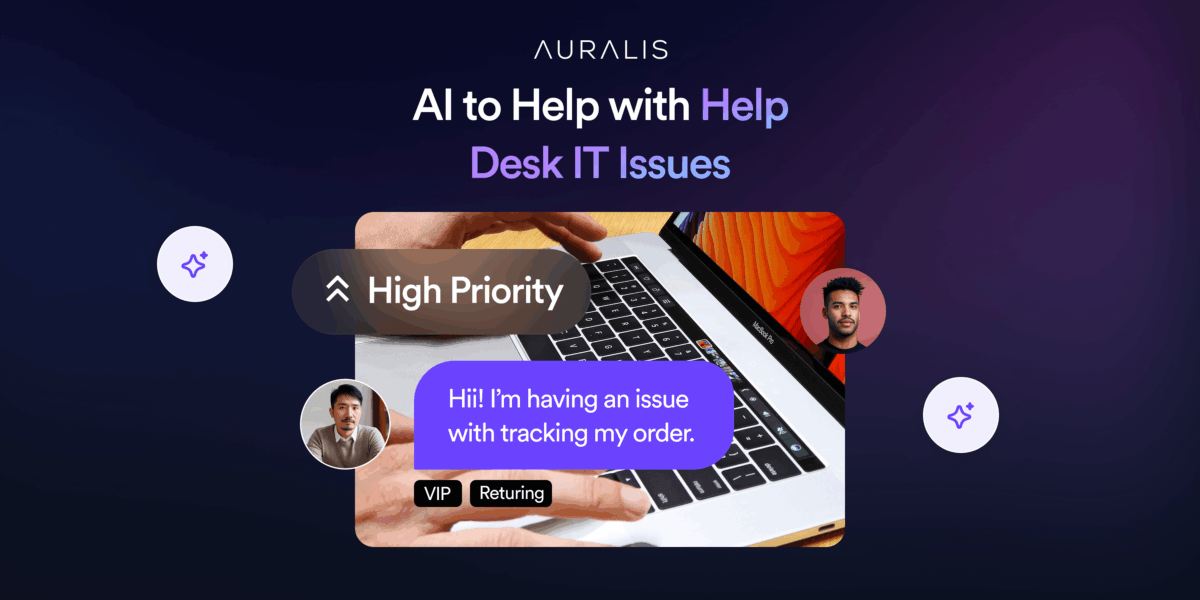
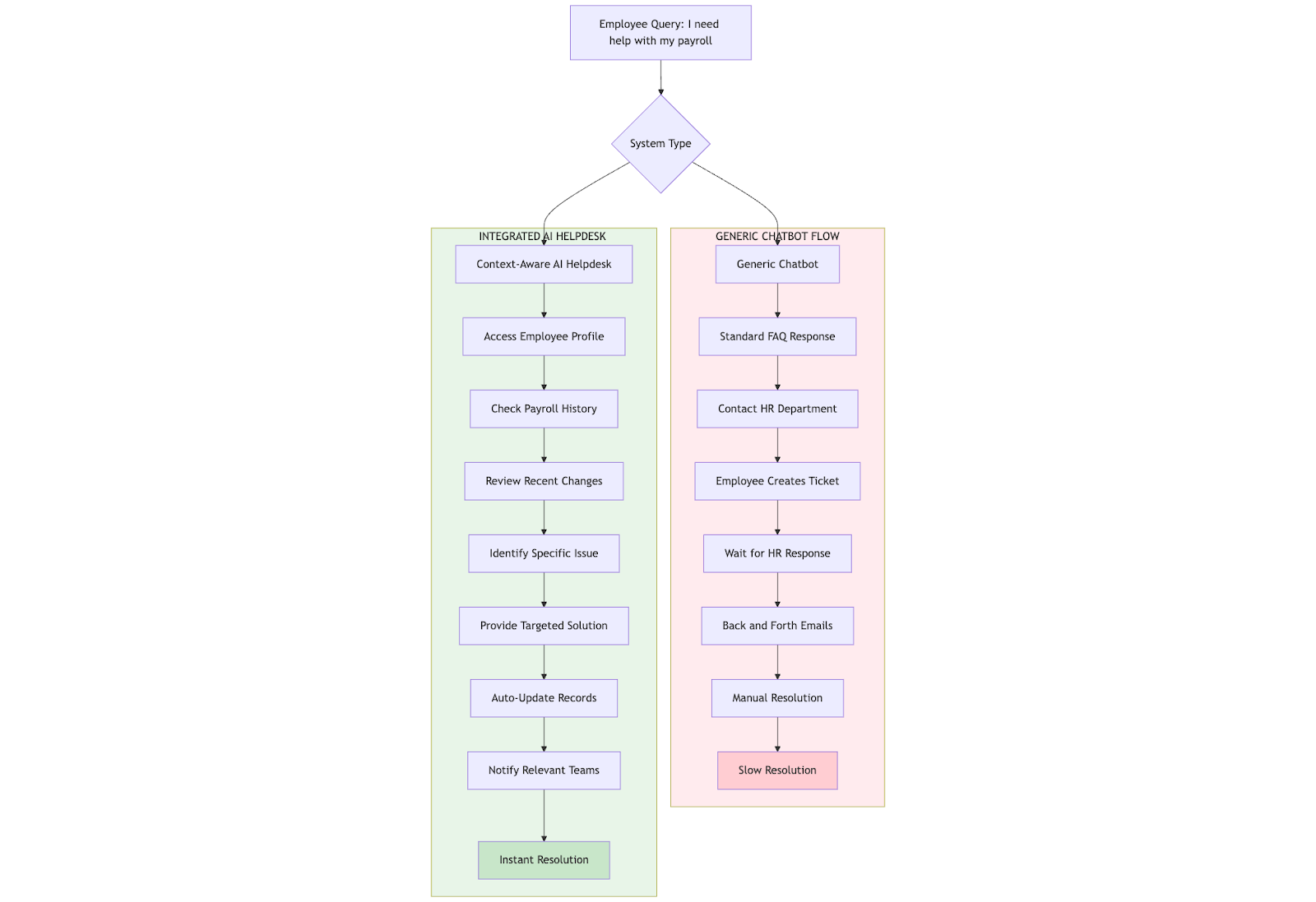
Best AI to Help with Help Desk IT Issues: Auralis vs. Generic Chatbots 

IT helpdesks are swamped. Password resets, access issues, software glitches, etc., are the same tickets that pile up daily. That’s why companies turn to AI to lighten the load. But not all AI solutions are created equal. 

Generic chatbots promise quick fixes. In reality, they often end up giving canned responses, missing the context, and frustrating employees who just want their problem solved. They might handle FAQs, sure, but when it comes to deeper IT issues, they fall flat. 

This is where advanced AI platforms like Auralis come in. Instead of acting like a glorified FAQ bot, Auralis dives into your systems, understands workflows, and resolves issues at the root. It’s the difference between sending your employees/customers in circles and actually fixing their problems on the first go.

In this blog, we’ll break down how Auralis stacks up against generic chatbots and why your helpdesk deserves more than just scripted replies. 

The Limitations of Generic Chatbots for IT Help Desks 

There’s no shortage of limitations with generic chatbots. Sure, they were relevant in 2018, but now, with what everyone expects on an individual level due to the rise of AI, it can’t be fulfilled by chatbots that lack context. 

Script-based responses with no contextual understanding 

Most generic chatbots are programmed to recognize a few keywords and spit out preloaded answers. This might help with “What’s the Wi-Fi password?” but falls apart when someone says, “My Outlook keeps crashing after the last update, and I can’t access shared calendars.” 

Generic bots can’t parse context, diagnose root causes, or understand the nuances of enterprise IT. This results in repetitive back-and-forth that frustrates users and leads to escalations. 

Inability to integrate with enterprise ITSM tools

Your IT team relies on robust systems, such as ServiceNow, Jira, Zendesk, or other ITSM platforms, to manage tickets, track assets, and ensure compliance. A generic chatbot operates outside this ecosystem. 

It can’t create or update tickets, pull device inventory, or check software entitlements. That means employees still end up opening tickets manually, and your helpdesk misses out on automation that could actually reduce workloads. A disconnected chatbot does little to improve real IT efficiency. 

Poor resolution for complex or multi-step queries

Enterprise IT issues are rarely one-liners. They involve layers like user permissions, network checks, and device configurations. Generic chatbots aren’t built to handle these. They can’t execute diagnostic scripts, reset AD credentials, or trigger multi-step workflows across systems. 

So, when an employee comes in with “I can’t access the finance drive after changing departments,” a generic bot either gives an unhelpful FAQ link or escalates immediately. No learning, no proactive fix, it just leads to more delays. 

What Makes Auralis AI Different?

What sets Auralis apart from generic chatbots is the advanced layer of intelligence that understands, integrates with your data, and proactively resolves issues. While generic chatbots just respond. 

Auralis’s AI-powered support automation acts like an extension of your IT team. Here’s how:

Context-aware responses 

Auralis doesn’t rely on static scripts. It taps into your internal knowledge base, analyzes historical tickets, and pulls in real-time data from systems to understand the full context. That means when an employee says, “I’m locked out after multiple password attempts,” Auralis knows their device history, recent changes, and even failed login logs. This gives a tailored response that actually fixes the issue instead of sending them a generic reset guide. 

Integration with ITSM platforms 

Unlike standalone bots, Auralis plugs directly into your ITSM stack (ServiceNow, Jira, Zendesk, and more). It can create, update, and close tickets automatically, check asset ownership, validate user roles, and maintain audit trails. This integration streamlines operations, ensures compliance, and gives your IT team complete visibility without manual juggling between tools. 

Modules for end-to-end support

Auralis isn’t just a conversational interface. It comes with specialized modules:

  • Helpdesk Assistant resolves user issues in real time.
  • Quality Auditor reviews interactions to ensure process adherence and compliance.
  • Insights Analyst surfaces patterns, bottlenecks, and trends so your IT team can make data-driven improvements. 

Together, these modules turn Auralis into a 360° IT support powerhouse, reducing resolution times, improving user experience, and freeing your team to focus on strategic initiatives. 

Key Benefits of Auralis AI for IT Help Desks

Auralis, by embedding intelligence and automation into every layer, drives smoother workflows and measurable impact. Here’s what that looks like in practice:

Faster triage and ticket resolution

Auralis automatically pulls user details, device status, and historical tickets from your ITSM the moment a request comes in. It runs initial diagnostics, suggests fixes, or executes approved scripts before a human ever steps in. This shaves hours off typical resolution times, so employees aren’t waiting days for what could be solved in minutes. 

Reduced agent workload and onboarding time 

With Auralis handling repetitive IT support tasks, such as password resets, software installations, or access validations, your agents spend less time on mundane tasks. New hires also ramp up faster because they can rely on Auralis to handle standard processes, reducing the need for extensive shadowing or manual training on every workflow. 

Better compliance and reduced error rates

Through its integration with ITSM platforms, Auralis logs every action, maintains audit trails, and follows predefined approval workflows. This means no steps get skipped, no changes go undocumented, and your helpdesk stays audit-ready at all times. Human error in executing policies drops dramatically. 

Enhanced user satisfaction and SLA performance

Because Auralis resolves more tickets on first contact and does it faster, employees get back to work with minimal downtime. No more chasing updates or getting bounced between departments. This directly lifts satisfaction scores, helps you hit SLA targets, and positions IT as an enabler rather than a bottleneck. 

5 Example Use Cases of Auralis AI IT Helpdesk 

Wondering what this looks like day-to-day? Here are some examples of how Auralis transforms IT help desk operations:

1. Password resets and account unlocks handled autonomously

Instead of waiting hours for an agent, employees can chat with Auralis, which verifies their identity, resets passwords, and unlocks accounts instantly. It logs the activity in your ITSM, ensuring compliance while cutting typical resolution times from hours to seconds.

2. AI suggesting resolutions for printer setup or VPN troubleshooting

When someone says, “I can’t print from my laptop,” Auralis checks device drivers, network printer status, and past incidents. It then walks the user through tailored steps or executes a fix itself. Same for VPN issues: Auralis reviews logs, pushes config updates, and restores access without manual hand-offs. 

3. Live coaching to improve agent performance

During live chats, Auralis can offer real-time AI assistance for agents with recommended troubleshooting steps, relevant KB articles, or compliance reminders. This not only speeds up ticket handling but also ensures consistent, policy-aligned responses across your entire support team. 

4. Automated software provisioning and license checks

When an employee requests new software, Auralis verifies their role, checks existing entitlements, and either auto-approves installation or routes it for quick manager sign-off. It then updates your asset inventory and license counts, all without tying up an agent.

5. Pattern detection to prevent recurring issues

Auralis’s modules scan ticket histories to flag patterns like repeated Wi-Fi drops on a floor or constant credential issues in a department. IT can proactively fix systemic problems, reducing tickets over time and improving overall infrastructure reliability. 

Conclusion 

Auralis is far better than a generic chatbot. It’s an enterprise-grade AI that automates, integrates, and improves your entire IT help desk. From faster resolutions to smarter compliance, it’s built for real business impact. 

Ready to see how Auralis can transform your IT support and boost user satisfaction? 

Book a demo today!

Customer Feedback Loops: Leveraging AI for Actionable Insights

Like everyone else, you might also be looking to unlock serious growth. The easiest hack to do this is to start by listening to your customers. 

Customer feedback is pure gold. In fact, 77% of consumers view brands more favorably if they actively seek and apply feedback. That’s huge. But it’s really easy to drown in the rabbit hole called surveys and reviews. Turning them into clear, revenue-driving actions is a tough business. 

This is where AI comes in. With intelligent algorithms, businesses can transform scattered comments into patterns, predictions, and game-changing decisions. Instead of letting feedback collect dust, AI turns it into a living, breathing growth engine. 

What Are Customer Feedback Loops? 

So, what exactly are customer feedback loops? Think of them as a continuous cycle where you collect, analyze, act on, and then follow up on customer feedback. It’s a system designed to keep you in tune with your customers’ needs, constantly improving products, services, and experiences based on what they’re telling you. 

Here’s how it works: you gather feedback through surveys, reviews, or support tickets. Then, you dig into this data to spot trends and pain points. Next, you make meaningful changes. Finally, you circle back to customers, showing them you’ve listened and acted. That’s what builds loyalty and trust. 

However, traditional feedback loops come with serious limitations. Manual analysis is time-consuming and often misses hidden insights. Plus, by the time teams respond, customer frustrations might have already snowballed. The result? Missed opportunities and slow growth. That’s where AI steps in to completely change the game. 

How AI Enhances Customer Feedback Loops 

AI is reshaping every type of B2B customer support automation that involves collecting insights from natural language. By automating and scaling the process, AI helps businesses move from passive listening to proactive action. 

Let’s break down how AI transforms each stage of the loop with real-world applications and technical workflows. 

Automates data collection from multiple channels 

AI dramatically improves the first step of the feedback loop by automating data collection from every possible customer touchpoint. Instead of relying on manual exports or waiting for surveys to accumulate, AI systems continuously extract data from surveys, chat conversations, support tickets, product reviews, and even social media comments. 

These tools use APIs and automated workflows to gather unstructured feedback from diverse channels into a single repository. For example, a retail brand can integrate its Shopify reviews, Zendesk tickets, and Instagram comments into one AI platform, ensuring no piece of feedback ever slips through the cracks. This guarantees a steady, real-time stream of AI-driven customer support insights

Uses NLP to identify themes, sentiment, and urgent issues 

Once data is collected, AI deploys Natural Language Processing (NLP) to turn raw comments into actionable insights. NLP algorithms process text to identify recurring themes, sentiment scores, and even detect the urgency of an issue. This means a system can automatically highlight that customers are frequently complaining about “checkout errors” or praising the “speed of delivery.” 

For example, an airline might use NLP to scan thousands of survey responses and instantly flag all mentions of “lost luggage” as critical. By automatically classifying comments as positive, neutral, or negative and pinpointing urgent matters, AI helps teams prioritize what needs fixing right now versus what can be improved over time. 

Segment feedback by product, region, or customer type 

AI goes a step further by intelligently segmenting feedback, making it easier for businesses to take targeted action. 

Machine learning models can cluster feedback based on specific products, regions, or customer personas. This means a SaaS company can quickly understand what small business users love versus what enterprise clients find frustrating. Or an eCommerce brand can see that complaints about delayed shipping are coming mainly from one region. 

With this level of granularity, teams can roll out solutions tailored to the exact segment experiencing the issue, driving more effective improvements. 

Enables real-time dashboards for decision-making 

Finally, AI powers real-time dashboards that bring these insights to life. Instead of waiting for monthly reports, teams can log into a dashboard that updates by the minute, showing live sentiment trends, common complaints, and sudden spikes in negative feedback. 

A fintech company might spot a sharp dip in sentiment right after a new app release and quickly investigate, fixing bugs before churn increases. By combining automated collection, NLP, intelligent segmentation, and live dashboards, AI converts customer feedback loops into a fast, precise, and highly strategic growth engine. 

Examples of AI-Driven Feedback Insights 

AI finds insights that would be nearly impossible to spot manually. Here are some examples of how businesses use AI to turn feedback into sharp, actionable strategies. 

Identifying Product Defects Faster Through Support Chat Analysis

Support chats are often the first place customers voice frustration about bugs or defects. AI systems can analyze thousands of chat transcripts in real-time, using NLP to detect spikes in specific complaint keywords like “app crash” or “payment failure.” 

For example, a tech company might discover that after a recent update, mentions of “login error” surged by 300%. With these instant signals, engineering teams can prioritize fixes immediately, reducing downtime and preventing negative reviews from piling up.

Uncovering Common Onboarding Issues from Customer Surveys

Onboarding is a critical stage where many customers decide if they’ll stay or churn. AI tools process survey feedback to find recurring pain points in the first days or weeks of product use. 

A SaaS provider might see that new customers repeatedly mention confusion around “setting up integrations.” This insight can drive updates to onboarding flows, improved tutorials, or proactive outreach from customer success teams, helping boost retention right at the start. 

Detecting Emerging Customer Expectations or Trends

Perhaps most valuable, AI can surface emerging trends and shifting expectations hidden in everyday feedback. By continuously scanning reviews, social media, and surveys, AI might reveal that more customers are now asking for “carbon-neutral packaging” or features like “one-click reordering.” 

Spotting these early means, businesses can innovate ahead of competitors, tailoring products and messaging to meet evolving demands. Ultimately, AI doesn’t just react to problems; it helps companies stay ahead of what customers will want next, turning feedback into a strategic growth advantage. 

How Auralis Supports AI Feedback Loops 

Auralis is built to improve your customer feedback loops. It connects directly with your existing feedback sources, surveys, AI-powered support chats, reviews, and even social media, and ingests this data in real time. 

No need to overhaul your current systems. Auralis seamlessly integrates, pulling data from tools you already use like Zendesk, HubSpot, and Google Reviews. This means you can start uncovering insights without disrupting your workflows. 

Automated Analysis with NLP and ML

Once data flows in, Auralis applies advanced NLP and machine learning models to identify themes, sentiment, and urgency. It automatically flags frequent issues, like “checkout errors” or “account setup problems,” and shows them on intuitive dashboards with all the customer support and service metrics to track. If a sudden spike in complaints happens, you’ll see it immediately, with context on exactly where and why it’s occurring. 

Faster Issue Resolution

Because Auralis spots patterns the moment they emerge, your teams can fix problems faster. An enterprise using Auralis, for instance, reduced resolution time for shipment issues by 40% simply by catching negative sentiment trends in support tickets within hours instead of weeks. This speed keeps customers happy and prevents small problems from turning into reputation-damaging crises. 

Smarter Product Iterations

Beyond fixing issues, Auralis helps guide your product roadmap. By segmenting feedback by customer type, product line, or geography, you see precisely which groups struggle with which features. This enables product teams to prioritize updates based on real-world data, rather than just intuition. Over time, these data-driven improvements lead to smoother onboarding, more intuitive experiences, and higher retention. 

Building a Proactive Business

With Auralis, customer feedback transforms from a passive dataset into a proactive growth engine. You get to resolve issues quickly, fine-tune products, and even spot emerging customer demands, giving you an edge in staying ahead of expectations and competitors alike. 

Conclusion 

AI takes customer feedback from scattered comments to a strategic growth engine. It helps you resolve issues faster, refine products smarter, and even predict what customers will want next. That’s how brands move from guessing to confidently leading their markets. 

Want to learn how Auralis’ AI can transform your customer feedback loops? Book a demo today!