Customer Feedback Loops: Leveraging AI for Actionable Insights

Like everyone else, you might also be looking to unlock serious growth. The easiest hack to do this is to start by listening to your customers. 

Customer feedback is pure gold. In fact, 77% of consumers view brands more favorably if they actively seek and apply feedback. That’s huge. But it’s really easy to drown in the rabbit hole called surveys and reviews. Turning them into clear, revenue-driving actions is a tough business. 

This is where AI comes in. With intelligent algorithms, businesses can transform scattered comments into patterns, predictions, and game-changing decisions. Instead of letting feedback collect dust, AI turns it into a living, breathing growth engine. 

What Are Customer Feedback Loops? 

So, what exactly are customer feedback loops? Think of them as a continuous cycle where you collect, analyze, act on, and then follow up on customer feedback. It’s a system designed to keep you in tune with your customers’ needs, constantly improving products, services, and experiences based on what they’re telling you. 

Here’s how it works: you gather feedback through surveys, reviews, or support tickets. Then, you dig into this data to spot trends and pain points. Next, you make meaningful changes. Finally, you circle back to customers, showing them you’ve listened and acted. That’s what builds loyalty and trust. 

However, traditional feedback loops come with serious limitations. Manual analysis is time-consuming and often misses hidden insights. Plus, by the time teams respond, customer frustrations might have already snowballed. The result? Missed opportunities and slow growth. That’s where AI steps in to completely change the game. 

How AI Enhances Customer Feedback Loops 

AI is reshaping every type of B2B customer support automation that involves collecting insights from natural language. By automating and scaling the process, AI helps businesses move from passive listening to proactive action. 

Let’s break down how AI transforms each stage of the loop with real-world applications and technical workflows. 

Automates data collection from multiple channels 

AI dramatically improves the first step of the feedback loop by automating data collection from every possible customer touchpoint. Instead of relying on manual exports or waiting for surveys to accumulate, AI systems continuously extract data from surveys, chat conversations, support tickets, product reviews, and even social media comments. 

These tools use APIs and automated workflows to gather unstructured feedback from diverse channels into a single repository. For example, a retail brand can integrate its Shopify reviews, Zendesk tickets, and Instagram comments into one AI platform, ensuring no piece of feedback ever slips through the cracks. This guarantees a steady, real-time stream of AI-driven customer support insights

Uses NLP to identify themes, sentiment, and urgent issues 

Once data is collected, AI deploys Natural Language Processing (NLP) to turn raw comments into actionable insights. NLP algorithms process text to identify recurring themes, sentiment scores, and even detect the urgency of an issue. This means a system can automatically highlight that customers are frequently complaining about “checkout errors” or praising the “speed of delivery.” 

For example, an airline might use NLP to scan thousands of survey responses and instantly flag all mentions of “lost luggage” as critical. By automatically classifying comments as positive, neutral, or negative and pinpointing urgent matters, AI helps teams prioritize what needs fixing right now versus what can be improved over time. 

Segment feedback by product, region, or customer type 

AI goes a step further by intelligently segmenting feedback, making it easier for businesses to take targeted action. 

Machine learning models can cluster feedback based on specific products, regions, or customer personas. This means a SaaS company can quickly understand what small business users love versus what enterprise clients find frustrating. Or an eCommerce brand can see that complaints about delayed shipping are coming mainly from one region. 

With this level of granularity, teams can roll out solutions tailored to the exact segment experiencing the issue, driving more effective improvements. 

Enables real-time dashboards for decision-making 

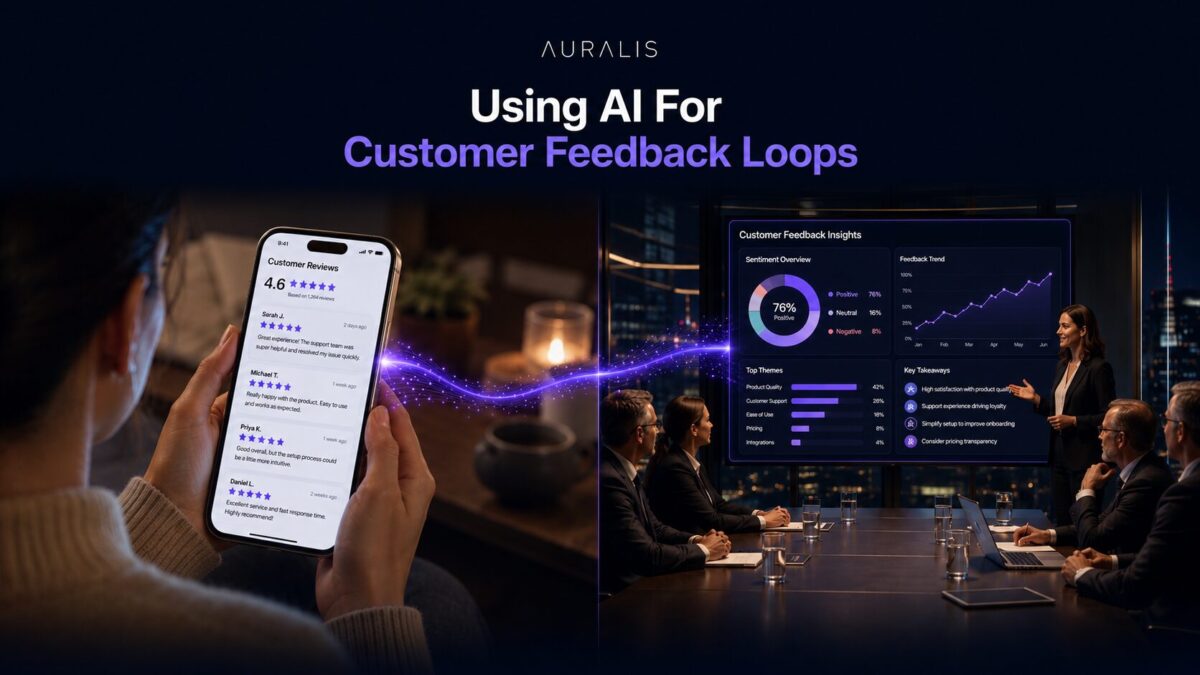
Finally, AI powers real-time dashboards that bring these insights to life. Instead of waiting for monthly reports, teams can log into a dashboard that updates by the minute, showing live sentiment trends, common complaints, and sudden spikes in negative feedback. 

A fintech company might spot a sharp dip in sentiment right after a new app release and quickly investigate, fixing bugs before churn increases. By combining automated collection, NLP, intelligent segmentation, and live dashboards, AI converts customer feedback loops into a fast, precise, and highly strategic growth engine. 

Examples of AI-Driven Feedback Insights 

AI finds insights that would be nearly impossible to spot manually. Here are some examples of how businesses use AI to turn feedback into sharp, actionable strategies. 

Identifying Product Defects Faster Through Support Chat Analysis

Support chats are often the first place customers voice frustration about bugs or defects. AI systems can analyze thousands of chat transcripts in real-time, using NLP to detect spikes in specific complaint keywords like “app crash” or “payment failure.” 

For example, a tech company might discover that after a recent update, mentions of “login error” surged by 300%. With these instant signals, engineering teams can prioritize fixes immediately, reducing downtime and preventing negative reviews from piling up.

Uncovering Common Onboarding Issues from Customer Surveys

Onboarding is a critical stage where many customers decide if they’ll stay or churn. AI tools process survey feedback to find recurring pain points in the first days or weeks of product use. 

A SaaS provider might see that new customers repeatedly mention confusion around “setting up integrations.” This insight can drive updates to onboarding flows, improved tutorials, or proactive outreach from customer success teams, helping boost retention right at the start. 

Detecting Emerging Customer Expectations or Trends

Perhaps most valuable, AI can surface emerging trends and shifting expectations hidden in everyday feedback. By continuously scanning reviews, social media, and surveys, AI might reveal that more customers are now asking for “carbon-neutral packaging” or features like “one-click reordering.” 

Spotting these early means, businesses can innovate ahead of competitors, tailoring products and messaging to meet evolving demands. Ultimately, AI doesn’t just react to problems; it helps companies stay ahead of what customers will want next, turning feedback into a strategic growth advantage. 

How Auralis Supports AI Feedback Loops 

Auralis is built to improve your customer feedback loops. It connects directly with your existing feedback sources, surveys, AI-powered support chats, reviews, and even social media, and ingests this data in real time. 

No need to overhaul your current systems. Auralis seamlessly integrates, pulling data from tools you already use like Zendesk, HubSpot, and Google Reviews. This means you can start uncovering insights without disrupting your workflows. 

Automated Analysis with NLP and ML

Once data flows in, Auralis applies advanced NLP and machine learning models to identify themes, sentiment, and urgency. It automatically flags frequent issues, like “checkout errors” or “account setup problems,” and shows them on intuitive dashboards with all the customer support and service metrics to track. If a sudden spike in complaints happens, you’ll see it immediately, with context on exactly where and why it’s occurring. 

Faster Issue Resolution

Because Auralis spots patterns the moment they emerge, your teams can fix problems faster. An enterprise using Auralis, for instance, reduced resolution time for shipment issues by 40% simply by catching negative sentiment trends in support tickets within hours instead of weeks. This speed keeps customers happy and prevents small problems from turning into reputation-damaging crises. 

Smarter Product Iterations

Beyond fixing issues, Auralis helps guide your product roadmap. By segmenting feedback by customer type, product line, or geography, you see precisely which groups struggle with which features. This enables product teams to prioritize updates based on real-world data, rather than just intuition. Over time, these data-driven improvements lead to smoother onboarding, more intuitive experiences, and higher retention. 

Building a Proactive Business

With Auralis, customer feedback transforms from a passive dataset into a proactive growth engine. You get to resolve issues quickly, fine-tune products, and even spot emerging customer demands, giving you an edge in staying ahead of expectations and competitors alike. 

Conclusion 

AI takes customer feedback from scattered comments to a strategic growth engine. It helps you resolve issues faster, refine products smarter, and even predict what customers will want next. That’s how brands move from guessing to confidently leading their markets. 

Want to learn how Auralis’ AI can transform your customer feedback loops? Book a demo today!

Contact Center Automation: Reducing Costs and Boosting Efficiency with Auralis AI 

Running a contact center today isn’t cheap. Labor, training, and technology costs continue to rise. In fact, global contact center spending is expected to reach $496 billion by 2027. Yet, 60% of customers still report facing long wait times and repetitive questions. 

That’s where automation comes in. By using AI-driven tools like Auralis AI, businesses can reduce costs while enhancing the efficiency of their support teams. AI helps handle routine queries, frees up agents for complex issues, and ensures customers get faster, smarter service. 

In this blog, we’ll discuss how contact center automation trims expenses and improves customer experiences.  

The Problem: Cost and Efficiency Challenges in Contact Centers 

Most contact centers face the same set of challenges. High volumes of repetitive queries take up a huge chunk of agent time. Simple questions like “Where’s my order?” or “How do I reset my password?” keep coming in, leaving skilled agents tied up with tasks that automation could easily handle. 

Long resolution times are another concern. When agents are overwhelmed, customers wait longer. This directly impacts key metrics like CSAT and NPS, putting customer loyalty at risk. A few bad experiences can push customers to competitors, hurting long-term growth. 

Then there’s the issue of training and onboarding. It takes weeks, sometimes months, to get new agents up to speed. And with high attrition rates common in support roles, companies often find themselves stuck in a costly cycle of hiring and retraining. 

These problems drive up operational costs. More staff are needed to handle volumes, yet overall efficiency remains low. Without the right systems in place, contact centers struggle to scale while maintaining service quality. 

That’s why many are now turning to AI and automation to take the load off human agents and deliver faster, more consistent support. 

What Is Contact Center Automation? 

Contact center automation uses AI and machine learning to handle routine customer interactions and backend processes. It includes tools like chatbots, intelligent IVRs, automated ticket routing, and real-time analytics. 

These systems can answer common questions, guide customers through self-service, and even assist agents with instant suggestions. The goal is to reduce manual work, speed up responses, and ensure consistent service. 

By automating repetitive tasks, businesses let human agents focus on complex issues that truly need a personal touch. And it results in lower costs, happier customers, and a more efficient contact center operation. 

How AI Drives Cost Reduction 

Time and again, AI has proven to cut costs in almost every domain. For example, a mid-sized contact center handling 50,000 tickets monthly could save up to 30% in support costs by automating repetitive inquiries alone. That translates to thousands of dollars each month, which can be reinvested in growth or improving customer experiences. 

Automating repetitive tickets

AI-powered chatbots and self-service tools can instantly handle common requests like password resets, order status updates, or return instructions. This means fewer tickets ever reach human agents. Customers get immediate answers, and businesses cut down on staffing needs without sacrificing quality. 

Reducing agent workload, enabling leaner teams

When AI takes care of routine tasks, agents are freed up to tackle more complex or high-value issues. This lowers the overall workload, allowing companies to operate with leaner teams. Instead of hiring more staff to keep up with rising volumes, businesses can rely on AI to absorb the surge, saving significantly on payroll. 

Faster onboarding with AI-powered knowledge assist

AI doesn’t support agents as much as it supports customers. Tools like AI-driven knowledge bases and real-time answer suggestions help new hires get up to speed quickly. They don’t have to memorize every policy or product detail. As a result, training time drops, and agents become productive faster, cutting onboarding costs. 

Less overtime and burnout-related turnover costs

Heavy workloads often lead to overtime pay and high employee turnover. Replacing an agent can cost thousands in hiring and training. By easing the load with automation, businesses reduce burnout, improve job satisfaction, and lower turnover rates. This directly reduces the hidden costs tied to frequent hiring and lost productivity. 

How AI Improves Contact Center Efficiency 

AI makes your entire support operation run smoother and smarter. Here’s how. 

Intelligent triage and routing to the right agents

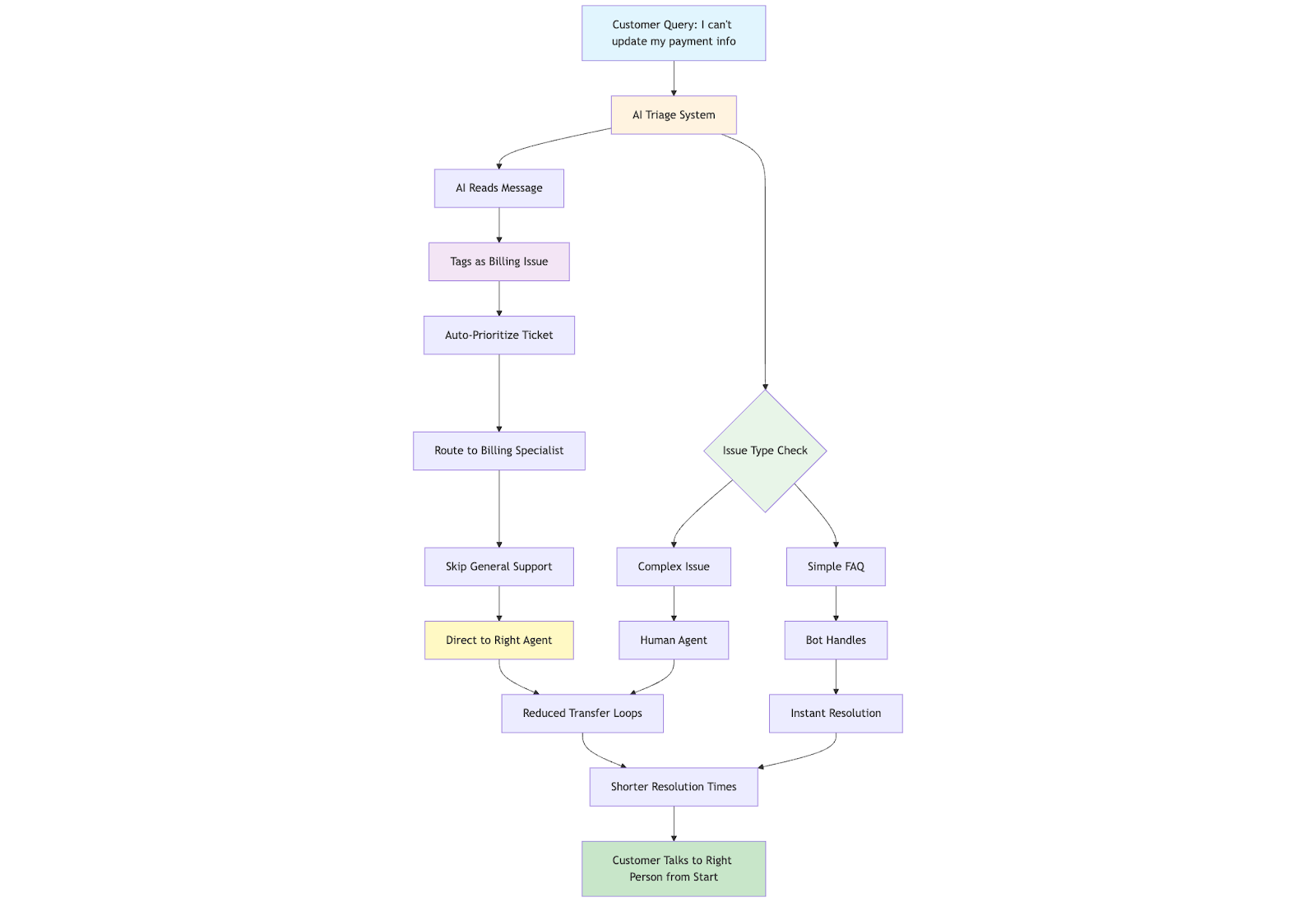
AI systems can instantly read incoming tickets or calls, identify the issue type, and route it to the most qualified agent. For example, a typical workflow might look like this:

  1. The customer sends a query, e.g., “I can’t update my payment info.” 
  2. AI reads the message and tags it as a billing issue.
  3. The ticket is auto-prioritized and sent to a billing specialist, skipping general support.
  4. Meanwhile, simpler issues (like FAQs) are handled by bots.

This reduces transfer loops, shortens resolution times, and ensures customers talk to the right person from the start. 

AI suggestions during live chats to reduce handling time

AI can act like a virtual sidekick for agents. During live IT helpdesk chats, for instance, it might instantly suggest: 

  • Commands to restart a server
  • Links to patch updates
  • Step-by-step password policy resets

This cuts down the time agents spend searching for answers. As a result, average handle time (AHT) drops by up to 20-30%, letting your team close more tickets in less time. 

Sentiment analysis for prioritizing escalations

AI also analyzes language and tone in real time. It flags messages that show frustration or urgency, like “This is the third time I’m reaching out!” and bumps them up in the queue. 

Studies show that 79% of customers expect faster responses when upset, so prioritizing these tickets can boost CSAT scores dramatically. It also helps avoid escalations that might otherwise turn into costly churn. 

Why Choose Auralis AI for Contact Center Automation 

Not all automation tools are created equal. Auralis AI stands out by offering a complete suite that’s purpose-built to tackle the biggest challenges in contact center automation. 

Powerful capabilities built for modern support teams

Auralis comes with three core modules that work seamlessly together:

  • Helpdesk Assistant: Automates responses to repetitive tickets, integrates with your knowledge base, and ensures customers get instant, accurate answers even during off-hours.
  • Live Chat Agent: Provides AI-driven assistance to human agents in real-time, pulling from policies, past tickets, and product documentation to speed up resolutions.
  • CX Coach: Analyzes conversations to identify gaps, suggest coaching opportunities, and ensure your team consistently meets quality standards. 

This combination enables you to automate as much as possible while building a smarter, more responsive support operation. 

Real-world impact: Lower costs, better service

Businesses using Auralis AI have reported up to 35% reductions in support costs, thanks to lower staffing needs and fewer escalations. SLA compliance also improves dramatically. With faster triaging and intelligent routing, response and resolution times shrink, keeping you well within promised service levels. 

Happier customers and agents

With Auralis handling routine issues and guiding agents on complex ones, customers experience quicker, more accurate support. This drives up CSAT and NPS scores. In many deployments, companies have seen customer satisfaction rise by 20% in just a few months. Meanwhile, agents have less stress with AI copilots and are more supported, reducing burnout and turnover. 

A platform that scales with your needs

Whether you’re running a small helpdesk or a multi-language global contact center, Auralis is designed to grow with you. Its AI continuously learns from your unique data, so the longer you use it, the sharper and more tailored your support becomes. 

Conclusion 

AI-powered automation in contact centers reduces costs drastically and just makes it better in all aspects (from agents to customers). With Auralis AI, you can automate routine tasks, empower agents with real-time insights, and keep customers happier, all while improving your bottom line. 

Ready to see how it works? Book a demo today!
CRM Tools vs Conversational AI: Why Integration Matters for Customer Experience 

CRM tools help businesses store customer data and track interactions. Both play a crucial role in nurturing relationships. They’re the backbone of customer management, housing every detail about each customer so teams can personalize outreach and stay organized. 

Conversational AI, on the other hand, brings customer engagement to life. Think chatbots, voice assistants, and intelligent messaging. They enable real-time conversations, handle routine queries, and even guide customers through buying decisions. And they do all of this 24/7. 

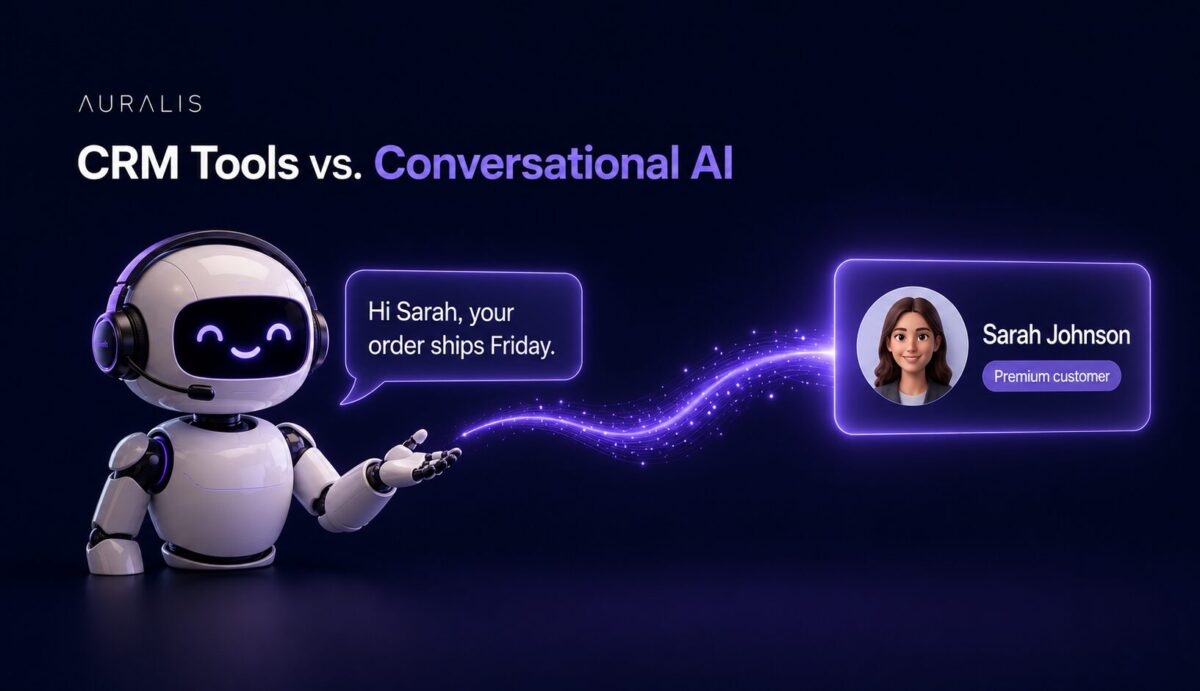
While CRMs keep all your customer data in one place, conversational AI creates instant, meaningful touchpoints. When integrated, they bridge the gap between back-end efficiency and front-end satisfaction. 

In this blog, we’ll explore why this integration is essential for businesses that want to stand out. 

What Are CRM Tools? 

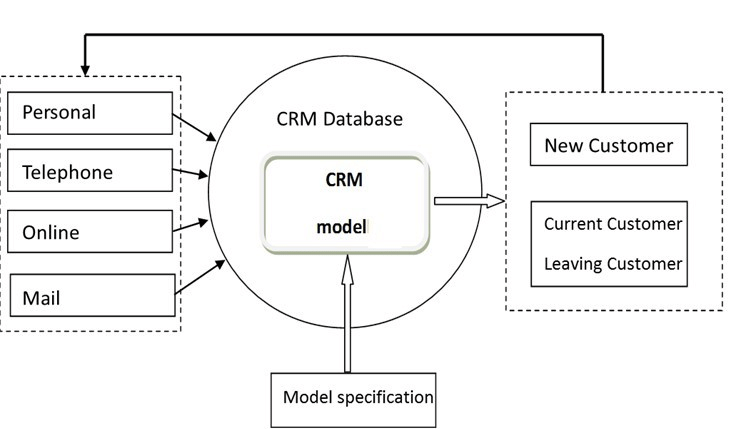
CRM (Customer Relationship Management) tools are software systems designed to help businesses manage their customer data, interactions, and relationships. They serve as the central hub for all customer information, like tracking sales pipelines, managing leads, logging support tickets, and even automating follow-ups. 

In sales workflows, CRMs ensure reps know exactly where each prospect stands and what to do next. In support workflows, they help agents see a complete customer history, so they can resolve issues faster and with more context. 

However, traditional CRMs come with a key limitation: they’re primarily built for internal teams. While they’re excellent at storing data and orchestrating processes, they don’t directly engage customers in real-time. 

There’s no conversational interface that allows customers to interact with this data independently, meaning human intervention is always required to access or act on the insights stored within. 

What Is Conversational AI? 

Conversational AI refers to technologies like chatbots, virtual assistants, and AI-driven messaging tools that can simulate human-like conversations. These systems use natural language processing (NLP) and machine learning to understand queries, provide realtime AI support responses, and even carry out tasks like booking appointments or processing returns. 

It can handle customer queries instantly, deliver personalized interactions based on past exchanges, and learn over time to get better with each conversation. It’s what makes 24/7 support, scalable customer engagement, and frictionless self-service possible. 

But on its own, conversational AI has a critical blind spot. Without access to the rich, structured data stored in a CRM, it operates with limited context. It might answer FAQs brilliantly, but it won’t know that a customer recently made a high-value purchase or logged a complaint, missing opportunities to truly personalize the experience. 

Why Integration Between CRM and Conversational AI Matters 

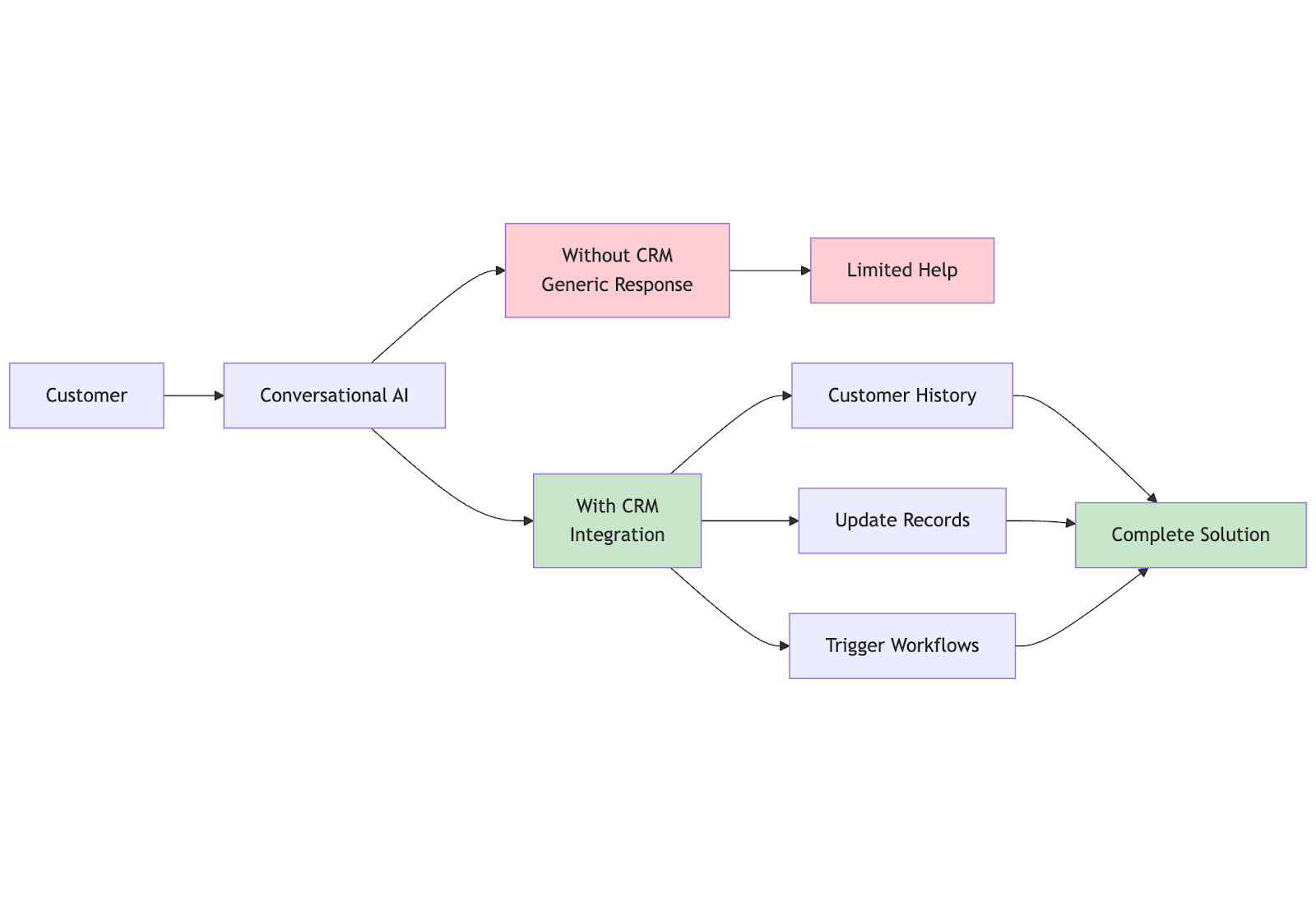
So, how does integrating CRM tools with conversational AI actually work? In simple terms, it connects your rich customer database (the CRM) with your real-time interaction layer (the AI). 

This means your chatbot or virtual assistant doesn’t operate in a vacuum; it can pull customer history, update records instantly, and even trigger workflows, all while interacting live with your customers. 

Here’s why this matters so much:

1. Provides AI agents with customer history 

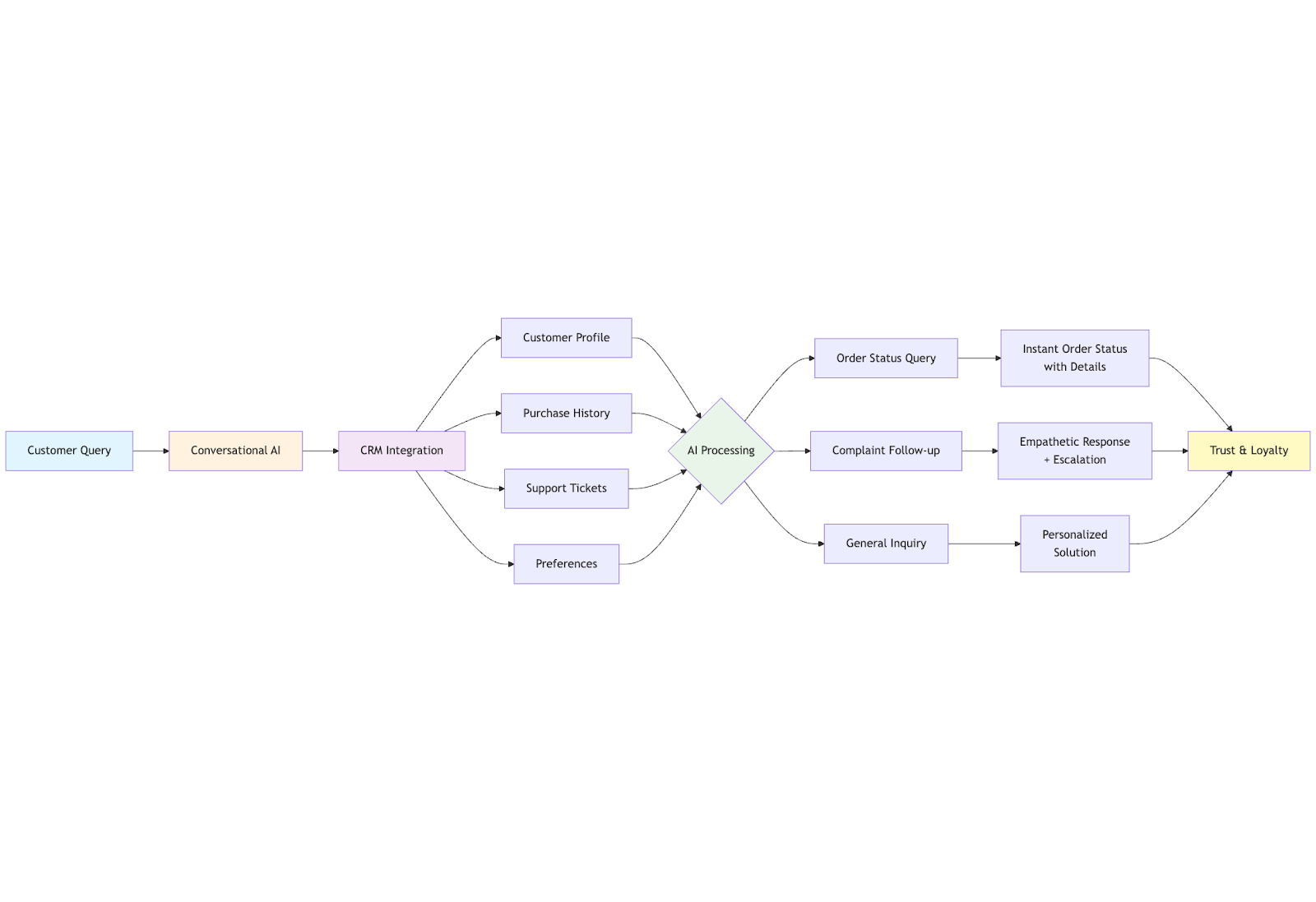
When your conversational AI is integrated with your CRM, it can use detailed customer profiles, including purchase history, support tickets, preferences, and more. So, instead of giving generic answers, your AI can respond with tailored solutions. 

For instance, if a customer asks about an order, the chatbot can instantly pull up the latest status. If someone reaches out after logging a complaint, the AI knows to prioritize empathy and escalate. This level of personalization isn’t just impressive; it builds trust and loyalty. 

2. Reduces data entry and sync errors 

A major headache in many organizations is data living in silos. Without integration, your support team might manually note customer issues in one system, while sales updates live in another. This opens the door to mistakes, outdated records, and endless back-and-forth. 

By connecting conversational AI with your CRM, every interaction, whether it’s a customer changing their shipping address via chatbot or inquiring about a product, automatically updates in the CRM. This keeps all teams aligned and automates repetitive support task with AI

3. Enables proactive outreach 

A combined CRM + conversational AI setup can proactively engage customers. For example, if your CRM flags that a subscription is due for renewal, your AI assistant can reach out with a friendly reminder or even guide them through the renewal process. 

The same goes for sending service reminders or exclusive loyalty offers based on past purchases. This turns what could be forgotten tasks into seamless, automated touchpoints that delight customers and drive repeat business. 

4. Enhances both agent and customer experience 

Ultimately, this integration creates a smoother journey for everyone. Customers get faster, more personalized support without repeating themselves at every turn. Meanwhile, human agents aren’t stuck digging through multiple systems to get context; they have a complete view at their fingertips if a conversation needs to be handed over. 

This results in faster resolution times, less frustration, and a consistent brand experience across all channels. 

Use Cases of Integrated CRM + AI in Action 

Here are three practical scenarios that show the importance of connecting your CRM with conversational AI. 

1. AI accessing CRM for personalized product recommendations 

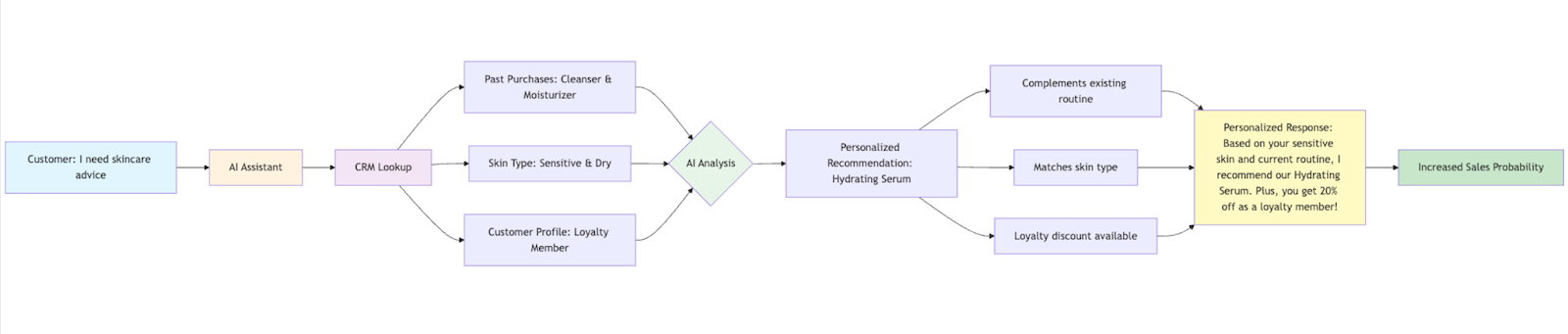
Imagine a customer chatting with your AI assistant about skincare products. Instead of offering generic suggestions, the assistant taps into the CRM, sees the customer’s past purchases and skin type data, and recommends a serum that complements their existing routine. It can even point out that there’s a loyalty discount available, making the interaction feel truly personal and increasing the chance of a sale.

2. Automating appointment bookings based on CRM data 

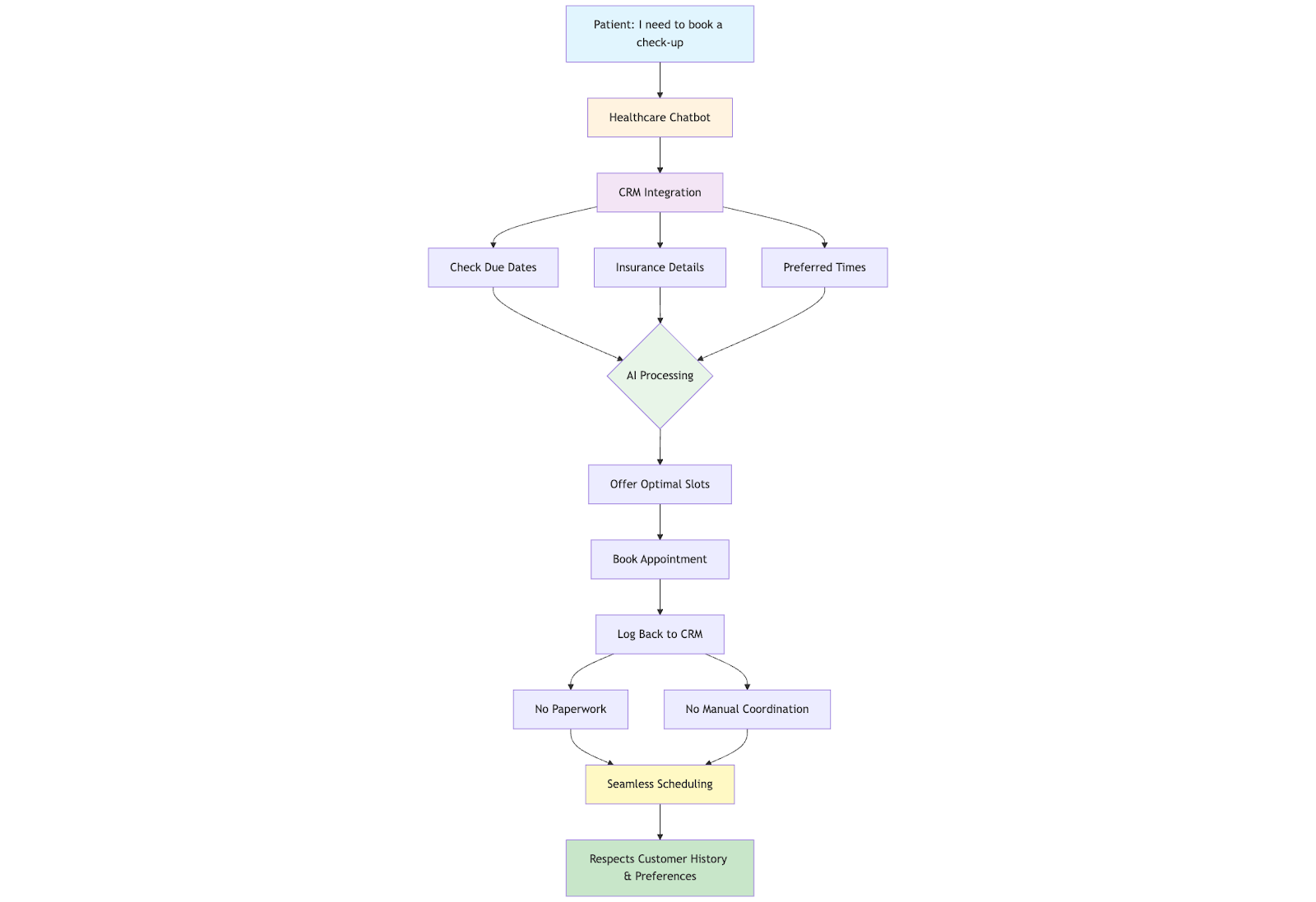
In service industries like healthcare and automotive, an integrated system can be particularly helpful. A patient messaging your chatbot to book a check-up? The AI checks the CRM for due dates on past appointments, insurance details, and preferred times. 

It can then offer slots that work best, book the appointment, and log it back into the CRM. This needs no paperwork or manual coordination. Just seamless scheduling that respects the customer’s history and preferences. 

3. Updating CRM records after AI-assisted chats 

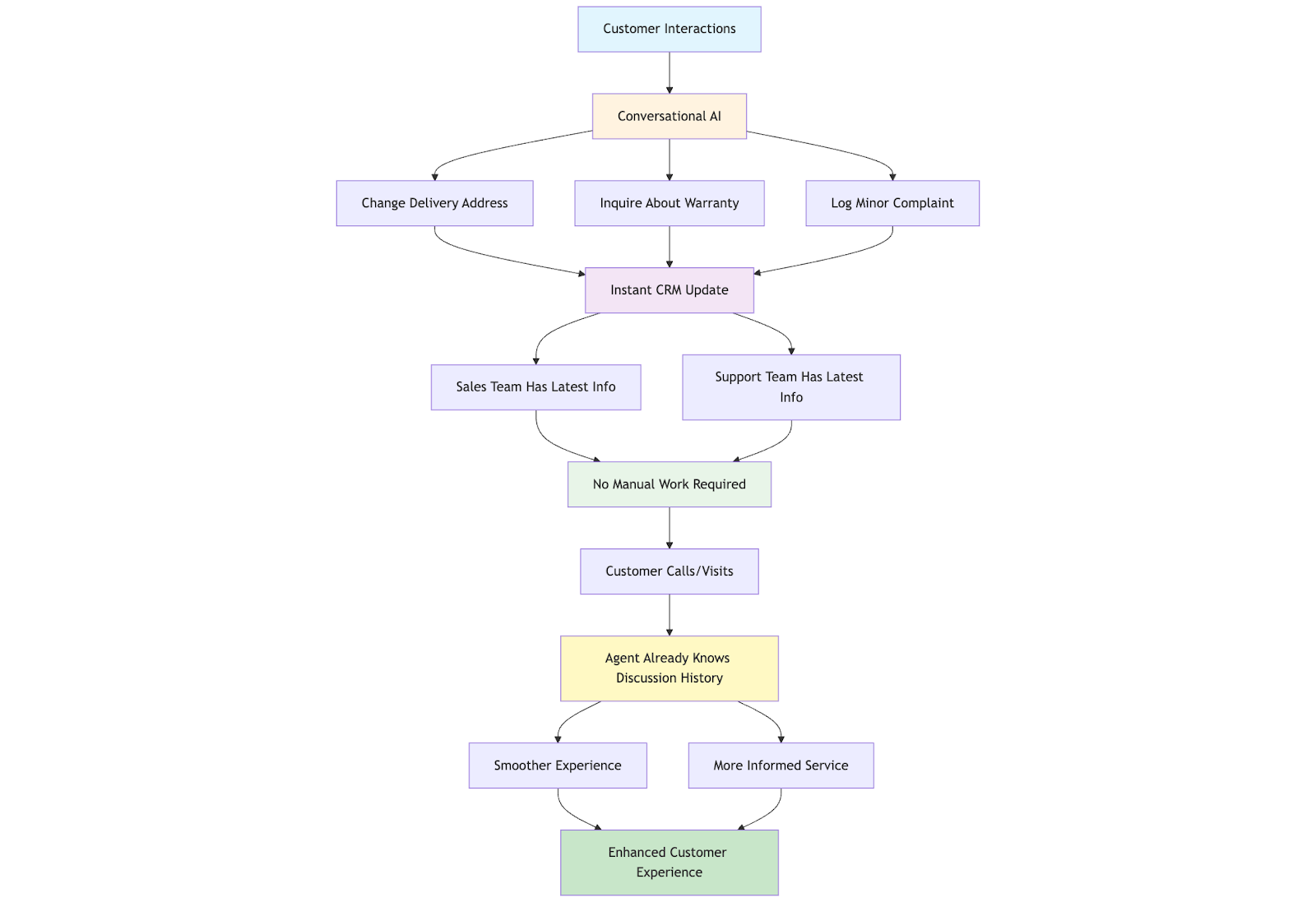
Every time a customer interacts with your chatbot, whether to change a delivery address, inquire about a warranty, or log a minor complaint, the conversational AI can instantly update the CRM. 

This means your marketing, sales and support teams should always have the latest information without lifting a finger. The next time the customer calls or visits, the agent already knows what’s been discussed, creating a smoother, more informed experience. If you’re aligning teams around a unified journey (not just tools), this is where customer experience management becomes important.

How Auralis Enables Seamless CRM-AI Integration 

Businesses using Auralis AI automate over 70% of internal support tasks, keep CRM records consistently up-to-date, and deliver highly personalized experiences across channels. 

Here’s how Auralis makes AI chatbot and CRM integration effortless and powerful: 

Ingests and acts on CRM data 

Auralis connects directly to your CRM, pulling in detailed customer histories, past purchases, tickets, and preferences, so your AI agents can respond with context. Every chat, resolved ticket, or new case updates the CRM in real time. It ensures that there is no fragmented data or missing customer details; everything remains centralized and up-to-date.

Automates CRM-related workflows

You can finally say goodbye to repetitive data entry. Auralis automatically logs conversations, updates contact records, creates new cases, and syncs issue statuses back to the CRM. This drastically reduces manual work for your teams and cuts down on errors that come from juggling multiple systems. 

Enhances CRM-powered personalization 

Because Auralis AI understands CRM data, it tailors responses on the fly. It knows if a customer recently purchased a product or filed a complaint and uses that to drive personalized conversations and recommendations. That means smarter, faster resolutions and interactions that feel genuinely customer-first. 

With built-in integrations, CRM integrations like Zendesk, HubSpot, Intercom, Freshdesk, etc. Auralis ensures that your CRM and AI work hand in hand, creating a unified, intelligent support ecosystem. 

Conclusion 

Integrating CRM tools with conversational AI is a shift that was bound to happen. It’s how companies are building AI-powered support automation, delivering hyper-personalized experiences, and proactively nurturing relationships at scale. 

From tailored product recommendations to automated chat support and instant CRM updates, this synergy is redefining what “customer-centric” truly means. 

Being an early mover in CRM-AI integration can help you improve operational efficiency and delight customers with interactions that feel personal and seamless. Because expectations are only rising in our digital-first world. 

Auralis enables this evolution by bridging your CRM systems with advanced conversational AI. Our platform is built to ingest your customer data, automate backend processes, and drive consistently tailored experiences across every channel. 

Ready to turn fragmented workflows into a unified, intelligent customer journey? 

Book a demo of Auralis AI today.

How Auralis AI is Transforming Helpdesk Workflow

Be it resolving a high volume of tickets or answering repetitive queries, modern IT helpdesks are constantly under tremendous pressure. To add to the frustration of the support teams, they constantly need to meet the customer demand for fast and accurate resolution. You falter, and you risk damage to your brand reputation or even losing your revenue to your competitor. 

That’s where Auralis AI steps in to boost your customer support game.

By automating routine tasks, delivering context-aware responses to customers, and streamlining ticket handling, Aurali AI can transform your IT helpdesk into an efficient problem-solving system.

Let’s find out how. 

The daily challenges of IT helpdesk workflow for agents

Let’s understand the challenges IT helpdesk agents face every day: 

1. Mental fatigue

IT helpdesk agents often find themselves overwhelmed by high volumes of tickets that need to be resolved quickly and accurately. This led to mental fatigue and burnout among team members. It also negatively impacts overall efficiency, making it hard to meet service level agreements and customer satisfaction. 

2. Repetitive tasks

Doing repetitive tasks like sorting tickets, categorizing, prioritizing, and drafting responses takes up a significant portion of an agent’s day. Agents can use their time more strategically if they are relieved from doing repetitive tasks. 

3. Inconsistent and inaccurate resolutions

As the human agents are constantly subjected to work pressure, they are prone to make errors like misassigning tickets, providing incorrect solutions, or missing critical details. Inconsistent and inaccurate resolutions can lead to customer dissatisfaction. 

4. Longer resolution time

Due to the lack of real-time knowledge, many agents struggle to access critical information at the right time. This can lead to unnecessary escalations or spending extra time looking for the right answer. All these contribute to longer resolution time and an inefficient support workflow. 

5. Longer onboarding process

Bringing new agents up to speed is often a costly and time-intensive process as they need to learn the internal workflows, understand common issue patterns, and familiarize themselves with protocols. This puts more pressure on the existing team members, too. 

The Auralis AI solution: A four-step transformation

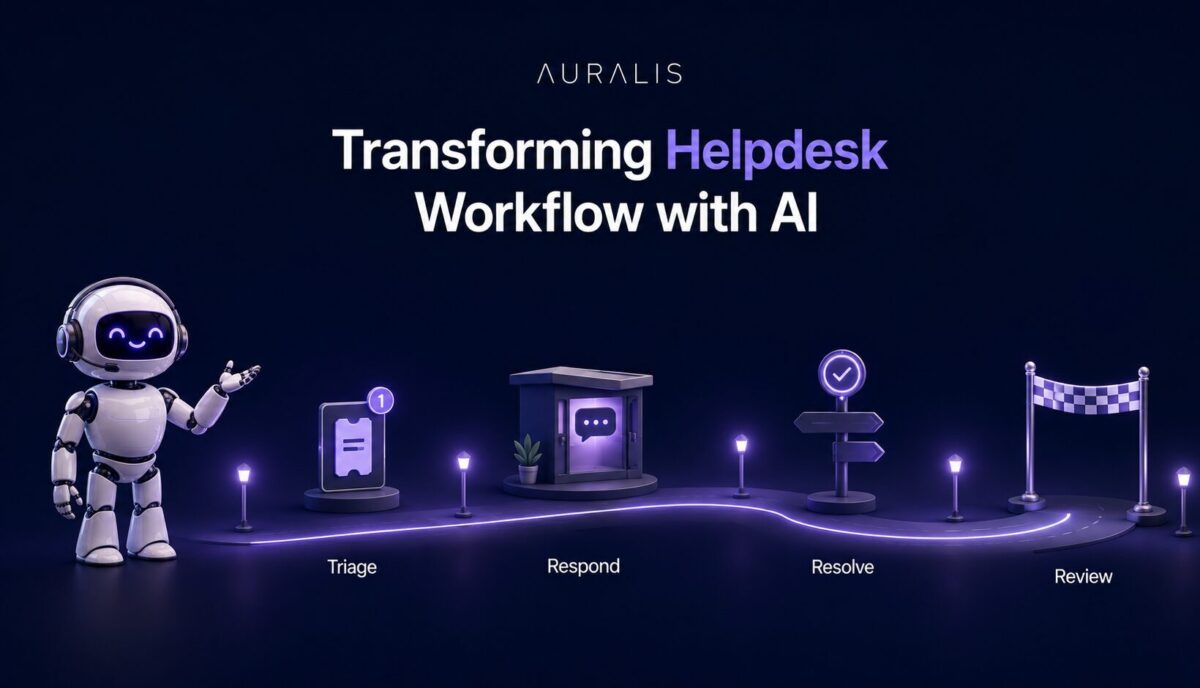
However, with the help of the right tool and automation, you can make your support team productive. Here’s a four-step process to help you get started. 

Step 1:  AI-powered triage: Smarter, faster ticket handling

With modern AI-powered tools like Auralis AI, helpdesks can instantly classify incoming tickets based on their issue type, historical data, and priority. This type of automation ensures no extra time is spent on deciding which ticket goes where. Neither does it keep any room for misclassification.

The system can automatically flag and route urgent issues to the right SME, thus reducing any escalation delay, while straightforward requests like password reset are resolved by the AI without the involvement of a human agent. 

Impact: All these can significantly reduce manual workload, speed up response, and prevent agent burnout.

Step 2: AI-generated responses: Instant, reliable answers

Responding to IT tickets can be faster with AI-suggested pre-drafted responses using knowledge bases, FAQs, and past resolutions. The AI chatbots can analyze context and draft an appropriate response to common IT queries that agents can review and approve in seconds, ensuring accuracy. 

Impact: Significantly reduces the response time and improves consistency, thus ensuring customer satisfaction. 

Step 3: AI-assisted resolutions: Empowering agents with knowledge

Access to the right information during a live interaction is crucial. This is where AI comes in handy, guiding agents through escalations with recommended steps and relevant resources. 

Along with instant retrieval of knowledge from past tickets, SOPs, and technical documents, AI tools can also help human agents detect emotions and thus tailor their responses. 

For example, if a frustrated tone is detected, AI can help draft the response with more empathy, thus diffusing any potential conflict. 

Impact: Reduces errors, shortens resolution times, and enhances user satisfaction.

Step 4: Real-time coaching and quality auditing: Continuous improvement

Consistent quality and continuous learning are vital to a high-performing IT helpdesk. With CX Coach, AI agents can be monitored and coached as they respond to any tickets. 

Once an issue is resolved, the Quality Auditor AI reviews resolved tickets for accuracy, compliance, and consistency. All these ongoing feedback mechanisms help agents improve and maintain high standards without feeling overwhelmed. 

Impact: AI ensures quality is met while also supporting agent development and adhering to compliance requirements. 

How the four steps work together: The end-to-end journey 

The modern-day IT helpdesk is no longer a reactive process. It needs a seamless flow from ticket arrival to resolution with high speed and quality assurance.

That’s exactly what this AI-powered four-step framework does. 

From triaging tickets to drafting responses, handling escalations when needed, and final step review of the responses, AI ensures that no time is wasted throughout the entire process. 

AI-assisted tools guide the human agents with real-time coaching and quality auditing, ensuring every response meets compliance requirements and customer satisfaction. With its continuous learning approach,  AI tools can adapt to new issues, feedback, and evolving workflows, offering a better response every time. 

The result – A smarter, faster, and more resilient helpdesk.

Key benefits for IT teams and organizations 

With a dedicated AI partner like Auralis AI, which can handle up to 70% of your customer requests,  you’re all set to have a smarter and more productive IT helpdesk.

  • By introducing automation and intelligent support tools to your workflow, you can significantly reduce the workload and burnout of your support staff. AI and automation can handle all repetitive tasks, such as ticket triaging, routine diagnostics, and password resets, while human agents can focus on more strategic and high-value items. 
  • As AI can identify issues correctly and route them in the appropriate path, resolutions happen faster with minimal downtime. 
  • Automation brings in standardization of processes, ensuring a consistent and high-quality support experience for users every time. Such consistency helps build trust and satisfaction among the users. 
  • By leveraging analytics, the product team can gain insight into recurring issues that can help them improve the product experience. On the other hand, the support team can use the analytics report to understand the resolution time and workflow and proactively address them for a better support experience. 
  • Finally, AI enables businesses to scale support and handle the increased demand without adding to headcount. 

Real-world impact: What IT teams can expect from helpdesk workflow automation  

Partnering with Auralis AI means the team can expect to have streamlined workflows, centralized knowledge bases, and intuitive support tools. All these help to onboard new IT agents quickly. 

While this helps improve productivity, it also ensures continuity is maintained during periods of turnover and growth. 

  • With improved ticket intelligence and decision-support tools, frontline agents are better equipped to resolve issues at the first point of contact. This reduces escalations while also improving user experience. 
  • Agents feel empowered when they have access to the right tools. At the same time, removing the repetitive tasks and giving agents some autonomy builds a positive work environment. This significantly improves agent morale and retention.
  • AI helps with early diagnosis and the correct routing of tickets, enabling agents to take prompt action by pulling out all the critical information, such as past history and knowledge base documents, during live calls. All these help achieve faster resolution and build higher user satisfaction and trust in IT support.
  • Automated logging, centralized documentation, and standardized procedures help adhere to all compliance requirements and keep the team audit-ready. 

Implementation tips: Getting started with Auralis AI 

Start by identifying current pain points and workflow bottlenecks to identify where automation can deliver the most value. Whether it’s triaging, resolution delays, or repetitive queries, Auralis AI can address them effectively.

Integrate Auralis AI with your existing ticketing tools and knowledge bases to ensure seamless operations and allow the AI to access relevant context.

Train the AI using historical ticket data, common queries, and internal scenarios so it can deliver accurate, organization-specific responses from day one.

Set up feedback loops where agents can flag or rate AI-generated responses. This helps fine-tune performance and enables continuous learning.

Finally, monitor performance through key metrics such as average resolution time, customer satisfaction (CSAT), and agent productivity. Use these insights to fine-tune AI capabilities and maximise ROI.

Best practices for a successful AI-powered helpdesk 

Here’s what you can do to maximize the success of an AI-powered helpdesk.

  • Keep the human agents in the loop for complex or sensitive issues that require empathy, critical thinking, or discretion beyond AI’s scope.
  • Regularly update knowledge bases and SOPs to ensure AI tools access the most accurate and current information.
  • Foster a culture of learning and feedback where agents can refine AI performance and grow through collaboration.
  • Prioritize transparency and explainability in AI decisions so agents understand how suggestions are made and can trust the outcomes.
  • Measure success with clear KPIs such as resolution time, CSAT, and agent productivity to evaluate impact and guide improvements.

Conclusion

Auralis AI redefines helpdesk operations by automating repetitive tasks, offering real-time support, and driving continuous improvement. It empowers agents to focus on high-value work while ensuring faster, more consistent resolutions. 

The result is a smarter, more responsive support system that boosts efficiency, enhances user satisfaction, and scales effortlessly with growing demand.

Book a demo of Auralis AI today

Understanding How to Implement Multi-purpose AI Agents

While we have become pretty much comfortable using voice assistants like Alexa or Siri, the next-generation multi-purpose AI agents are taking customer support to the next level. 

They’re capable of supporting business operations by delivering versatile and intelligent assistance across multiple domains. 

Here’s how they work and how you can implement them for maximum impact.

What are multi-purpose AI agents?

Multi-purpose AI agents are a network of AI agents that can collaborate with each other to support operations and decision-making better.  Here, each AI agent specializes in a particular task, coordinates with other AI agents to exchange data, and coordinates actions. 

Unlike single-function bots that operate independently, focusing on a single task, multi-purpose agents share knowledge and collaborate to perform a complex task. 

Single agents can be compared to siloed helpers, while multi-purpose agents can adapt and interact across multiple business operations. 

As businesses become increasingly complex and improving the customer experience becomes a primary concern for brands, AI takes center stage in customer experience and support ecosystems. 

And that comes as no surprise because in this hyper-connected world, customers no longer want to wait for a resolution. 

They want support that’s fast and accurate. And thus, versatility becomes the new standard for AI-powered assistance, where multi-purpose AI agents just seem to fit right. 

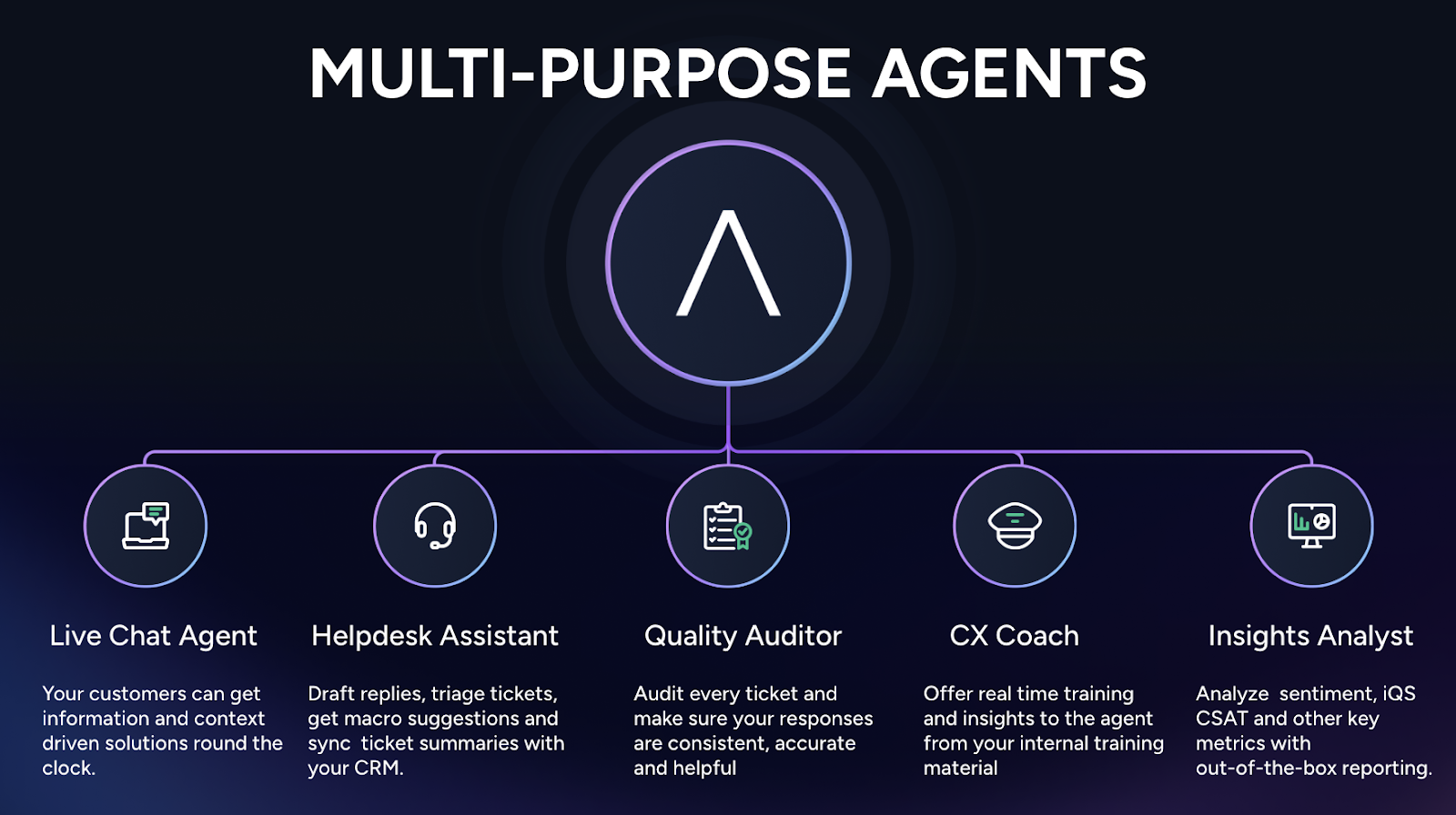
The five pillars of multi-purpose AI agents

Modern businesses need more than reactive support agents. They need smart, on-time agents that can support efficiency and speed without compromising on quality at every instance. The five pillars of multi-purpose AI agents play a crucial role in delivering exactly that. 

1. Live chat agent

As the name suggests, the job of a live chat agent is to provide real-time, context-driven information and solutions to customers. 

It’s available 24/7 and offers a personalized response based on previous interactions, user behavior, and system data. 

It’s beneficial for troubleshooting, answering product queries, and assisting customers with completing a transaction. 

Key capabilities

  • 24/7 availability across channels 
  • Personalized, context-aware responses
  • Handling a wide range of queries, including both technical and non-technical queries

Business impact

  • Reduced wait times
  • Improved customer satisfaction
  • Consistency in support quality

2. Helpdesk assistant

A helpdesk assistant comes in handy in streamlining internal support workflows for agents. They work behind the scenes, helping the human agents improve their efficiency, minimize errors, and improve their productivity.

These assistants are good at keeping the CRM records up-to-date, drafting responses, and triaging incoming tickets. 

Key capabilities

  • Drafting replies and triaging tickets
  • Offering macro suggestions for faster resolution
  • Syncing ticket summaries with CRM systems

Business impact

  • Boosting agent efficiency and productivity
  • Faster ticket resolution with minimal human intervention
  • Seamless integration with existing support tools

3. Quality auditor

This agent ensures quality and compliance are maintained at all times. Its main responsibility is to flag any inconsistencies in messaging, compliance, or other inaccuracies. 

Key capabilities

  • Acts as a real-time auditor, auditing every ticket for accuracy and helpfulness
  • Identifying inconsistencies and knowledge gaps
  • Providing actionable feedback for continuous improvement

Business impact

  • Ensuring higher-quality interactions consistently
  • Reducing error rates, thus minimizing the risk of compliance issues or reputational risks
  • With stronger compliance, you can build better customer trust

4. CX coach

The CX coach offers real-time training and upskilling to support agents. It provides contextual guidance to the human agent during live calls, facilitating better understanding, retrieving helpful resources from the knowledge base, and supporting continuous learning. 

Key capabilities

  • Delivering insights from internal training materials on demand
  • Real-time feedback and guidance during live calls
  • Adaptive  coaching based on agent performance metrics

Business impact

  • Ensures faster onboarding for new agents
  • Enables continuous skill development for the existing agents
  • Ensures there is a consistent customer experience across all touchpoints

5. Insights Analyst

The role of the insight analyst is to turn support data into actionable business intelligence. It analyzes customer sentiments, performance metrics, and feedback, helping decision-makers refine their product and customer support strategies. 

Key capabilities

  • Analyzing sentiment, CSAT, and other key metrics is a key capability of this agent
  • Providing out-of-the-box reporting with pre-built reports
  • Identifying trends and areas for improvement 

Business impact

  • With better insight into customers’ pain points and needs, it enables more informed, data-driven decision-making
  • Enhanced customer experience strategies
  • Visibility into support performance and customer needs, and better cross-functional collaboration 

Key benefits of deploying multi-purpose AI agents 

As multi-purpose AI agents are nuanced with deep specializations as compared to the standard solutions available, they offer multiple benefits. 

  • Multi-purpose agents help break down silos by reducing the common obstacles of complex processes. Thus, it ensures there’s a unified user and customer experience across platforms. 
  • With AI agent automation, you can save costs drastically, as it eliminates obstacles caused by operational challenges and errors that typically occur in manual processes. Plus, as it promotes cross-functional collaboration, operational efficiencies are further improved. 
  • AI agents are adept at handling more queries without increasing headcount, empowering companies to expand in a cost-effective manner. Additionally, it enhances operational efficiencies. 
  • Multi-purpose AI agents thrive on data, learning and adapting over time. Every time it receives a user interaction, it learns from it and refines its subsequent responses, thereby becoming more relevant and accurate. 
  • The versatility of multi-purpose AI agents enables customers to receive support 24/7 with proactive recommendations, thus reducing the need to wait for a human agent for support. On the other hand, these AI agents support internal teams with contextual information, coaching, and the automation of repetitive tasks. All these factors help improve efficiency and productivity. 

Implementation roadmap: How to deploy multi-purpose AI agents 

With thoughtful integration and coordination, AI agents can achieve their full potential. Here’s how you can go about it.

1. Assessing business needs and identifying use cases

Start with identifying your workflows and bottlenecks where AI agents can drive maximum value. Whether automating repetitive tasks, answering customer questions, or routing tickets, identifying the use cases is the first step to ensure you’re using AI agents where they’re needed most. 

2. Choosing the right AI platform or vendor

Choosing the right vendor is equally important as it will ultimately impact your purpose of implementing AI agents. 

Some of your key considerations should be

  • What purpose do you want to solve with the AI agents? Is it data analysis, automation, or improving the overall customer experience?
  • See if there’s sync with the platform’s capabilities and your needs.
  • Look into the vendor’s customer support facility. Do they offer hands-on training to use the tool better?

3. Integrating with existing systems 

As AI agents need to interact seamlessly with your current tech stack, choose a solution that allows easy integration with your existing CRM, ticketing system, and knowledge base. For example, Auralis AI enables easy integration with the most popular enterprise tools. 

4. Training AI agents with company-specific data and scenarios

The performance of AI agents largely depends on how they are trained to handle specific business scenarios. Training them on context-rich company-specific data and scenarios helps build a solid foundation to ground their decisions and actions. 

5. Setting up feedback loops for continuous improvement

A feedback loop allows your AI agent to learn from every interaction and user behavior. This can improve the overall customer experience significantly over time. To make it work, establish a feedback loop and make it easy for users to share their feedback. For example, a simple “thumbs up or thumbs down” can gather the user’s sentiment. 

6. Monitoring performance and iterating based on analytics

Just implementing multi-purpose AI agents is not enough. You need to continuously measure, analyze, and optimize the performance of your agents. Identify the weak intents or the misunderstood prompts from the interaction log. 

Integrate A/B testing and the AI behavior based on new prompt styles. Doing this repeatedly helps you understand what’s working and where your AI agents are making mistakes. 

Best practices for success 

For the optimal performance of the multi-purpose AI agents, follow these tips.

1. Start with clear objectives and KPIs 

Know your objectives before implementing the multi-purpose AI agents. Is your primary goal to improve customer satisfaction, reduce ticket volume, or support the internal teams? Once you have identified the goals, determine your measurable KPIs for each one. 

2. Ensure seamless handoff between AI and human agents

AI agents are designed to support human agents, not replace them. Hence, you must design your workflow in a way that allows smooth transitions from AI to human agents when necessary, with complete context handover.

This helps in minimizing friction while ensuring faster resolution, especially when the issue is complex and needs to be dealt with empathy.

3. Invest in data quality and regular training updates

Performance of AI largely depends on the quality of the data it’s trained on. So, invest in data quality, ensuring it’s up to date, accurate, and involves real-world business scenarios. This will help your AI agents perform better and produce accurate results.

4. Foster a culture of feedback and learning

Encourage customers and partners to share feedback on their AI usage. Use this feedback to train your AI in refining its tone, behavior, and accuracy of results. 

5. Prioritize security, privacy, and compliance

Data privacy and compliance are a serious concern, particularly within the context of AI-powered customer support. Ensure you adhere to all industry-set guidelines to build trust among your users. For example, Auralis AI ensures that all sensitive data and PII is pre-processed. 

Common challenges and how to overcome them 

While multi-purpose AI agents have significant benefits on business operations, there are a few hurdles that you need to overcome.

1. Resistance to change among staff

Introducing AI in your existing workflow can cause resistance among the staff members. This may arise from the fear of losing a job, adding more complexities to the workflow, or a lack of control. 

However, you can overcome such apprehension easily. 

Clearly communicate that AI is here to enhance operational efficiency and improve agent productivity, not to replace their jobs. Offer intensive training on how to use the AI agents within the existing workflow. Remember, effective change management and communication are the best ways to build trust and encourage early adoption. 

2. Data silos and integration hurdles

To perform optimally, AI needs to access all available data within your company, including product documents, internal knowledge bases, and past interactions. Fragmented data can hinder the performance of the AI agent. 

However, by choosing a friendly AI tool, you can easily overcome such a challenge. For example, Auralis AI enables integrations with the most popular CRMs, ticketing tools, and enterprise databases. 

3. Balancing automation with the human touch

While automation helps in scaling up with faster resolution, too much automation can make it feel impersonal. To strike the right balance, design AI workflows that include human intervention for complex or sensitive issues. 

Ensure smooth handoffs with full context so users feel heard and supported. Personalizing automated interactions using past data and tone adjustments can also help maintain empathy and trust.

4. Ensuring transparency and explainability in AI decisions

To build trust and drive adoption, it’s important that users understand how AI agents make decisions. Implement explainable AI models that can justify outcomes in simple terms. This ensures accountability and helps users feel more confident interacting with AI-powered systems.

Conclusion

Multi-purpose AI agents are changing how businesses offer support and gain insights. They handle tasks, improve customer service, and help teams work better. When trained well and used with clear goals, they boost speed, accuracy, and results.

Ready to see it in action? Book a demo of Auralis AI today

Complete Guide to Using AI for Delivering Device Support

AI has been a game-changer in device support. Powered by AI, devices can now offer instant, efficient, and personalized assistance. From automating diagnostics to enabling self-service, AI helps minimize downtime while improving resolution speed. 

Whether you’re supporting complex industrial machinery or smart devices, AI supports operations at every step. 

In this guide, we’ll explore how to harness AI for seamless device support and superior customer experiences.

The evolution of device support: Why AI is essential

Traditional device support has been a slow and reactive process where technicians overly rely on manual troubleshooting, mostly in a siloed system where finding a document is hard. As a result, customers often receive delayed support, inconsistencies in services, and repeated handoffs. 

This is especially true for complex products. 

On the other hand, customer expectations are constantly rising. Today’s customers demand instant support in their preferred language, via their preferred mode, and at their preferred time. 

A delayed and generic response is no longer acceptable to a customer. 

That’s where AI comes in to bridge the gap through automation, real-time responses, and actionable insights. 

Benefits of AI-powered device support

AI-powered device support brings in multiple benefits, including:

  • 24/7 availability via voice and text, across 100+ languages, making customer service more inclusive and globally accessible.
  • AI helps deliver instant, accurate, and consistent answers every time for both users and partners, thus leading to higher customer satisfaction and trust. 
  • AI and automation come in handy for responding to repetitive queries, thus freeing up human agents who can focus on more complex issues. This can help improve operational efficiencies while also cutting down costs. 
  • AI can personalize the user journey by proactively reminding users about their device maintenance, tracking usage patterns, and prompting refills or reorders. 
  • With every user interaction, AI systems become efficient in understanding context while delivering faster and accurate resolutions. 
  • AI has the capability to identify upsell opportunities, recommend complementary products, and guide users in making informed purchase decisions through product differentiation. 

Key features to seek in AI device support solutions 

While there are several AI device support solutions available, look for a solution that has these key features. 

Seamless integration 

Go for a solution that offers seamless integrations with other platforms, CRMs, and your ticketing systems. 

For example, Auralis AI offers integrations with over 150 platforms into your workflow. Be it Zendesk, Freshdesk, or any other enterprise solution, your AI device support solution must ensure smooth data flow across platforms. 

This ensures faster resolution, more context for the agents, and a unified view of the customer journey. 

Multimodal support

Reach your users wherever they are in whatever mode they prefer. Choose AI support that offers voice, chat, and real-time agent training.

For example, Auralis AI offers all three to ensure users and agents get consistent, intelligent assistance across channels, reducing friction and improving accessibility.

Security-first, cloud-optimized, and on-premises options

Opt for a solution that offers flexible deployment models, like cloud, hybrid, or on-premises, to meet your organization’s compliance and data security needs. 

Auralis AI, for instance, supports industry standards like HIPAA, GDPR, and ISO.

Robust analytics

Look for AI platforms with built-in sentiment analysis, CSAT tracking, trend reporting, and audit trails. 

These features help identify support gaps, improve agent performance, and drive better product decisions. 

Transforming the patient and partner journey

AI has completely reshaped the way patients and partners interact with devices and support systems.

Before AI, users often struggled to locate manuals or troubleshoot issues, faced delays in reordering essential supplies, and were frustrated by fragmented support with no clear feedback channels. 

These pain points led to dissatisfaction and poor engagement.

After AI, the experience is faster, smarter, and more personalised. 

Users get real-time answers in their preferred language, enjoy automated refills and usage tracking, and can provide instant feedback that fuels product innovation. 

AI also helps partners demonstrate device value more clearly through data-driven insights.

Real-world impact: Metrics and case studies 

This is how we have seen numbers improve for clients of Auralis AI across different industries and use cases:

Operational cost reductions 

By automating routine support tasks and reducing the need for manual intervention, Auralis AI clients have reported a significant reduction in operational costs by as much as 28 – 33%. 

Decrease in repetitive tasks 

AI takes over the bulk of recurring and low-complexity queries, such as device setup, common troubleshooting, or supply reorders. 

This has led to a 30% drop in repetitive tasks, freeing teams to focus on other tasks.

Boost in first-contact resolution

Clients using Auralis AI have seen first-contact resolution rates increase by up to 45-65%. With AI offering real-time, accurate, and context-aware responses, many issues get resolved instantly.

Reduction in average handle times 

AI-assisted interactions significantly cut down the time it takes to resolve tickets. With quicker access to the right information and contextual prompts, average handle times have decreased by up to 55 – 73%.

Faster onboarding and weekly time savings 

New agents trained with Auralis AI tools ramp up nearly five times faster, thanks to on-the-job learning prompts, knowledge base suggestions, and guided workflows. 

Existing agents also save more than 15 hours a week as repetitive tasks are handled autonomously.

Improved customer satisfaction and retention

AI support leads to smoother, more personalised user journeys, resulting in measurable improvements in CSAT and NPS scores. Clients have reported fewer complaints, higher user trust, and a notable boost in customer retention.

Step-by-step guide to implementing AI for device support

Implementing AI doesn’t have to be overwhelming. Here’s a structured, step-by-step approach that teams can follow:

Data extraction and cleanup from manuals, tickets, and feedback

Start by collecting key documents like manuals, past tickets, training materials, and customer feedback. Clean and organize this data to ensure it’s structured, consistent, and ready for model training. A well-prepared dataset lies the foundation for reliable AI performance.

Training AI models on your unique data

Train the AI models using your product-specific language, workflows, and support scenarios to ensure optimal performance. Custom training helps the AI understand your domain and deliver accurate, contextual answers that feel human and relevant.

Integrating AI with existing support systems

Integrate your AI with existing CRMs, ticketing tools, and device monitoring platforms. This ensures real-time data access, allowing AI to support seamless customer interactions across systems.

Ongoing monitoring, auditing, and quality assurance

Once live, continuously track AI performance with regular audits and QA checks. Monitor metrics like accuracy, sentiment, and resolution time to fine-tune the system.

Continuous maintenance and model updates as products evolve

Keep the AI up to date by retraining it as your products evolve. This ensures long-term accuracy and adaptability.

Best practices for maximizing AI support success

To make the most of your AI investment, adopt these key best practices:

Prioritise human-centric user experiences

AI should make support feel more human, not less. Focus on natural language interactions, empathetic tone, and a frictionless experience. Offer smooth handovers to human agents when needed, especially for sensitive or high-impact issues.

Maintain continuous feedback loops with users and agents

Feedback from users and agents helps identify blind spots and improve AI performance. Make it easy to collect and incorporate this feedback.

Foster collaboration across product, engineering, and support teams

Involve all key stakeholders. Remember, each team brings in its expertise. For example, the product team brings domain insights, engineering ensures integration, and support teams validate real-world effectiveness.

Ensure scalability and flexibility in your chosen solution

Choose an AI solution that grows with your business. Whether you’re adding new devices, expanding to new regions, or handling larger volumes, your AI must be able to scale, without needing a complete overhaul or additional headcount.

The future of AI in device support 

The future looks promising. Here’s what to expect: 

Predictive support and hyper-personalization

From reactive support, AI is enabling us to offer predictive and hyper-personalized support. For example, AI can now anticipate issues using real-time data from the device, past records, and usage patterns. 

This enables predictive maintenance, thus minimizing downtime. Further, hyper-personalization can customize the support journey based on the individual’s behavior and preference. 

AI-driven product innovation

As AI gathers more and more user information, it can then be used in the future for new product development.

For example, brands can analyze the common pain points, look into the new feature requests, analyze the usage patterns, and develop more intuitive solutions. This will help bridge the gap between user expectations and product capabilities. 

Sustainable operations and cost reduction

AI will continue to drive sustainable operations that will reduce site visits and improve uptime. Smart automation will enable the utilization of fewer resources and more efficient workflows that will save operational costs while delivering faster results. 

Scaling support without scaling headcount

As businesses grow, the support demands will rise too. AI will enable companies to scale support without adding any additional headcount. 

Whether it’s resolving tickets or triaging issues, AI can extend support, while human agents can focus on more complex issues. 

Conclusion

AI-powered device support is no longer a future trend, it’s a competitive advantage. With the right strategy, tools, and cross-functional alignment, businesses can streamline support, reduce costs, and deliver faster, more personalized experiences. 

The result? 

Happier users, empowered teams, and long-term growth.

If you’re seeking one such solution that could improve your AI support for  your business, book a demo of Auralis AI today

Guide on How to Use AI Field Support for Complex Products

From long diagnostic cycles to frequent site visits, customer support for companies with complex products is not easy. 

Whether you’re a company offering medical imaging devices, additive manufacturing tools, or industrial machinery, customers expect faster resolution and minimum downtime. 

However, with increasing product complexity, traditional service models are falling short. 

That’s where AI steps in. 

From intelligent triage to smarter resolution planning and even post-visit engagement, AI is transforming field service operations. 

In this blog post, we’ll see how to use AI for field support and improve customer satisfaction. 

What is field support for complex products?

Field support for complex products is not just limited to technical assistance for complex, high-value systems, but goes beyond it. 

It includes training the customers on how to use the products efficiently, conduct regular maintenance check-ups for the optimum functioning of the product, and offer recommendations to the customer for any upgrades and improvements. 

Some of the common industries that extensively use field support include healthcare (MRI, CT), additive manufacturing (3D printers), aerospace systems, heavy industrial machinery, lab automation, etc. 

What makes field support challenging in such complex industries is high variability, multiple configurations, limited expertise, long diagnostic and resolution cycles. Here, even a small issue can lead to significant downtime affecting the company’s revenue. 

Effective field support ensures minimal disruption, maximizes uptime, and provides the expert care these sophisticated systems demand to function without any hiccups.

The challenges of traditional field support models

With the growing customer demands for faster resolution, the traditional field support models are no longer efficient enough to meet the desired service quality, resolution time, or customer satisfaction. 

Manual ticket triage slows first response

In the traditional model, the support tickets are routed manually, which delays the resolution time. For example, a ticket might be routed to the wrong team or misprioritized, thus delaying the response time.

High dependency on SMEs (subject matter experts) and superusers

Traditional models heavily rely on subject matter experts for resolution. This means that when these SMEs are unavailable, resolution becomes delayed, risking customer dissatisfaction. 

Technicians often arrive with incomplete context

Many times, the technicians arrive on the field site with incomplete context, like previous resolution attempts or the machine’s configuration history.

Lack of context means the technicians need to spend time gathering the basic inputs before they can actually begin troubleshooting. 

Documentation is scattered, leading to longer diagnosis/resolution

In manual support models, documentation like technical manuals, troubleshooting guides, or past service records is often stored in a scattered way. This means that the technician has to scout through paper files and storage to find the relevant document, leading to longer resolution time. 

Feedback from field visits rarely closes the loop

The manual support model lacks a structured feedback system. As a result, the feedback from the field visits does not reach the product team or the service playbooks. So the organization misses the opportunity to learn and improve its products/services. 

Scheduling inefficiencies, especially with limited engineer availability

Scheduling engineers can also be challenging, especially for companies with limited engineer availability. Such scheduling delays can further add to customer dissatisfaction.

However, you can turn the table and change this narrative with the help of technology and AI. From optimizing technician workflow to improving customer experience, AI brings productivity, accuracy, and efficiency in field support for complex products. 

How AI transforms the field support workflow

Let’s understand how you can use solutions like Auralis AI at every step in field support: 

Pre-Visit

AI algorithms can analyze support tickets, past data, and equipment telemetry and predict the need for an on-site visit.

AI can also recommend targeted diagnostic steps remotely before dispatching an engineer. For example, remote resets or software updates can be conducted for complex systems like CT/MRI scanners and reduce the resolution time. 

Technicians can be well-prepared with AI-curated probable issue paths and relevant documentation before arriving in the field.

During Visit

AI guides field engineers with contextual KBs, step-by-step guidance, and interactive troubleshooting flows in real-time based on the inputs captured during diagnosis. 

Conversational AI can support engineers by answering technical questions, retrieving circuit diagrams, and initiating escalations. 

As the technicians carry on their job, a smart documentation system logs all the actions taken along with customer feedback. All these notes can be auto-captured and fed into the system, eliminating the need for any manual documentation. 

Post-Visit

Post the engineer visit, AI logs insights from service notes into structured formats, updates the knowledge base with resolution details, and triggers follow-up support or client feedback surveys as necessary. 

Key AI capabilities that improve field support

Here’s what makes AI an enabler: 

Intelligent ticket triage and routing

AI helps to tag tickets accurately by analyzing the priority of the issue, product category, and even customer sentiments. 

AI-powered knowledge retrieval

AI helps engineers to retrieve useful information easily by analyzing the ticket query. Not just that, it continuously evolves itself through ongoing learning, becoming more accurate and efficient over time.. 

On-site technician assistants (Chat/Voice)

Voice and chat-enabled assistants allow engineers in accurate diagnosis and resolutions. 

Predictive maintenance and failure detection

One of the biggest capabilities of AI is to predict future problems. This helps to address issues on time, avoiding the risk of failure and system downtime. 

Automated documentation and feedback capture

AI helps in real-time note capturing and gathering customer feedback, which is then shared back with the key team members. It helps to close the feedback loop so no data gets misplaced. 

Benefits of AI-Enhanced Field Support

Some of the significant benefits of AI-powered field support include:

Faster first-time resolution rates

AI enables efficient scheduling and routing of technicians based on the real-time data available. Since technicians have immediate access to all the relevant documents/data, customers can expect faster resolutions with minimum downtime. 

Reduction in time-to-dispatch and visit preparation

AI plays a significant role in reducing dispatching and visit preparation. Using smart scheduling and optimization algorithms, AI can check for technician availability, skills, location, and job urgency to build the most efficient schedules in real time. 

Lower repeat visit rates and escalations

From forecasting potential failures to assisting engineers with instant access to technical manuals and past service records, AI allows engineers to work more efficiently without the need for escalations. 

Improved field engineer productivity and satisfaction

With AI-powered mobile apps, driven by machine learning and Natural Language Processing (NLP), technicians no longer need to enter data manually on spreadsheets. 

AI can automatically pull key information from equipment sensors, customer databases, and past service records to populate real-time apps. 

With NLP and voice recognition, technicians can easily access critical data, update job statuses, and manage tasks hands-free. 

All these result in better efficiency, fewer errors, productive engineers, and happier customers. In fact, a study found that integrating AI with mobile tools boosts field service productivity by 30% to 40%, proving just how transformative this technology can be.

Reduced support costs and downtime

AI and machine learning work great in asset service management through predictive analytics. With different statistical modeling and data mining techniques along with sensor readings and past data, AI can predict equipment failure and schedule proactive maintenance. This helps to minimize downtime and reduce support costs. 

Continuous improvement through feedback loop automation

Through AI-powered tools, engineers can enter all the valuable customer feedback that can then be sent to the product team and customer success team. Automating this process helps the company to work on customer feedback proactively to improve its process and offer better customer care. 

Example of use cases across industries

AI can help field support across various industries, including:

  • Medical Devices: AI comes in handy for triages of CT/MRI scanner tickets and recommends if remote resets can solve the issue, or it dispatches for escalation.
  • 3D Printing: In the 3D printing industry, AI guides engineers in recalibration, nozzle replacements, and post-processing troubleshooting, etc. 
  • Industrial Automation: AI is largely used in the industrial automation industry to pre-load service histories and wiring diagrams before dispatch.
  • Lab Equipment: For lab equipment, technicians can use voice-guided AI support to handle in-situ repairs in regulated environments.

What to look for in an AI field support solution

If you’re ready to explore AI-powered support solutions for your complex and regulated product/service, here are some breakdown of capabilities for you to consider. 

Choose an AI  solution that seamlessly integrates with your ERP, ticketing, and knowledge systems. This will ensure that the field engineers can have real-time access to parts inventory, job histories, and customer data from a single solution. 

Go for a solution that offers offline support or caching. This comes in handy, especially in remote locations or infrastructure-heavy locations. This way, technicians can still access crucial documents even without the internet. 

Enterprise-grade security and compliance (SOC 2, HIPAA, etc.) is non-negotiable, especially in regulated industries. So choose an AI solution that offers encryption, audit logs, and role-based access control while adhering to industry regulatory guidelines. 

AI solutions that offer multi-language and multi-modal access via web, mobile, and voice ensure a consistent user experience irrespective of location, device, or language. 

Field service workflow varies from industry to industry. So, go for an AI solution that lets you do customized workflow to support specific operational standards. 

Conclusion

Be it intelligent triage or real-time guidance, AI enables companies to streamline their field support for complex products while improving their efficiency.  

If you’re seeking one such solution that could build out custom workflows tailored to your business, book a demo of Auralis AI today

A Complete Guide To IT Service Management (ITSM) 2025

What’s the secret that’s helping companies ace their IT service management? Competitive and modern businesses are increasingly incorporating AI-based ITSM systems to meet the needs of their end customers. 

Today, customers expect quick responses, real-time support, and human-like support to complex IT issues. Therefore, traditional ITSM is not enough. The solution? AI-based IT service management.

If you’re struggling to keep up with your ITSM, looking to transform it, or curious about whether AI can help you, this blog is for you.

What Is ITSM? 

IT Service Management (ITSM) is the strategic approach businesses use to design, deliver, and manage the IT services they provide to end users. For instance, providing IT support to customers is a core process. Think incident management that requires quick resolutions, and planned changes or upgrades required to IT systems.

ITSM includes processes and procedures that ensure customers’ IT needs are met. Let’s look at some core factors of ITSM:

  • Incident management, for example, service disruptions
  • Routine service requests, such as those that are periodical
  • Upgrade requirements to IT systems
  • Problem management to address root causes

Effective ITSM ensures that businesses are able to provide technology support and keep customers’ work going. Providing reliable and accessible ITSM keeps customers satisfied. It also optimizes operational efficiency. 

The lack of ITSM can lead to customer dissatisfaction, service outages, and security issues, among other problems.

Challenges of traditional ITSM

Let’s face the truth. Traditional ITSM is not efficient. Long waiting lists, piling tickets, slow resolution times, and unhappy customers, leading to churn. Traditional ITSM has several challenges. Here are some: 

1. Slow resolution times and ticket backlogs

Traditional ITSM systems often create bottlenecks that leave users waiting for days or weeks for resolution. For instance, manual ticketing process, manual resolutions, and teams overloaded with service requests are some of the common issues. 

Even simple password resets or software upgrades can take a long time to get resolved. This can frustrate customers and have a negative impact on their work. Besides, it leads to bad customer experience and damaged brand reputation. 

AI-based ITSM can reduce resolution times and ticket pile-ups. For example, a quick review of Auralis AI-based ITSM revealed the average ticket handle time for customers to be two minutes, which is almost unthinkable via traditional methods.

2. Inconsistent workflows and manual triage 

Traditional ITSM processes that are dependent on human intervention have a higher chance of inconsistency. For instance, different agents may categorize the same issues differently, apply varying priority levels, or follow different resolution methods. Such manual triage decisions can lead to unpredictable outcomes. Customers might not receive the best solution to their issues. Auralis AI-based ITSM has led to 57% reduction in human errors for customers.

3. High operational costs and agent burnout 

ITSM done the traditional way involves many expenses, such as hiring human agents, training the agents, office space, equipment, and other overheads. Moreover, with traditional ITSM methods, support agents might end up spending hours in fixing small issues, such as password resets. 

This leads to increased costs for your business. Moreover, it can also lead to agent burnout. Conversely, 90% of businesses that use AI-based customer support systems report time and cost savings.

4. Poor SLA adherence and employee satisfaction 

Meeting Service Level Agreements (SLA) with manual ITSM processes can be a struggle. That’s because companies often miss their committed response and resolution times. This can lead to penalties and negatively impact customer relationships. Moreover, customers may lose confidence in your IT services. Auralis customers have reported a 21% decrease in negative support experiences.

Why AI is reshaping the future of ITSM 

Artificial intelligence (AI) is changing how businesses conduct service management, including ITSM. Tasks that take days and weeks with the traditional or manual methods can be completed within hours with AI. 

AI not only digitizes manual processes, but also adds a layer or multiple layers of intelligence that can easily understand patterns, contexts, and make informed decisions based on data. This adds proactive capabilities to IT service teams. While AI does not replace ITSM workflows, it definitely enhances processes and performance. 

Consider these statistics:

  • 93% of AI users believe it enables them to focus on higher-level tasks
  • 83% of AI users say AI amplifies human creativity
  • 87% of service decision makers say technology helps them better serve customers

Here’s a graph that shows how AI will reshape customer service and how it covers all aspects of ITSM:

Source

AI capabilities for ITSM

Whether you’re looking to save costs or struggling to provide more accurate IT support, AI capabilities are increasingly promising to help address every ITSM challenge. Here are some AI capabilities specifically useful for IT support management.

1. Automated ticket triage and classification

AI-based systems can analyse tickets and requests in no time, understand and easily categorize issues with higher accuracy compared to human agents. Machine learning (ML) algorithms recognise patterns from data and identify incident types, priority levels, and correct solutions. This reduces delays and inconsistencies of manual triage. This way, critical issues can get attended to immediately. 

2. Smart response suggestions and knowledge retrieval

AI-based systems can easily search vast data within seconds. It can assess ticket histories and documentation repositories, and provide human agents with relevant and helpful information as well as responses. AI systems have the ability to differentiate between issues and suggest relevant and tailored solutions. For instance, it can make suggestions based on the user’s location, previous history, etc. 

3. Predictive insights and proactive service

With AI systems, you can predict future problems based on past patterns. For instance, AI systems can analyse system logs, user behaviour, and historical data and flag potential issues, such as hardware failures, or security gaps. This way, IT teams can schedule preventive maintenance.

4. 24/7 multilingual support

Another notable capability of AI-based virtual ITSM agents is the ability to provide assistance and support 24/7. Moreover, AI ITSM tools are designed to understand multiple languages. The tools manage all kinds of requests, routine and escalate complex issues to human agents. These systems provide support regardless of timezones or languages. 

With AI ITSM systems, you can ensure proactive service, adding value to your customers. Rather than waiting for problems to occur and then reactive, with AI, you can identify, predict future issues, and provide personalised solutions. 

How Auralis enables ITSM

Many businesses are turning to AI-powered IT service management for their customers. Customers who use Auralis have noted its ability to provide proactive support, personalized service based on location and language, and timely services whenever customers need it. Here are some Auralis features that enhance ITSM.

1. Helpdesk Assistant

Auralis’s Helpdesk Assistant feature helps with drafting responses to queries, suggesting solutions, and sharing relevant information. Agents have to simply send the pre-written responses. This reduces response time. It also reduces the need for agents to be trained thoroughly. 

2. Quality Auditor

With the Quality Auditor feature, you can automate ticket reviewing for compliance, accuracy, and completeness. The feature checks if the responses adhere to organizational policies, regulations, and best practices. It also flags any issue with these factors. With this feature, you can avoid compliance violations and maintain high quality standards.

3. CX Coach

Another effective way in which Auralis helps with ITSM is via its feature, CX Coach. This feature provides support in real-time. For instance, it provides suggestions during customer interactions, helps human agents during complex scenarios, and provides comprehensive onboarding support. It provides coaching as well as feedback to new hires.

4. Live Chat AI Agent

Human touch is the cornerstone of customer support. Even with digitalization and AI, more than 70% of customers want to interact with human agents. That’s where Auralis Live Chat AI Agent helps. The feature provides human-like support across channels, such as chat, voice, and email. This AI agent can handle queries just like human agents, maintaining conversations and ensuring users receive support on all channels.

5. Insights Analyst

Auralis Insights Analyst feature provides dashboards that track SLA performance, CSAT scores, and other metrics. With predictive analytics, this system helps businesses identify upcoming trends, predict needs, and make data-driven decisions. Insights Analyst provides actionable insights that helps with service improvements. 

The measurable impact of AI in ITSM

We collated how AI is impacting ITSM based on numbers from companies that are using Auralis for IT service management. And the results are promising:

  • Businesses have reported 60% cost savings through automated processes that have enhanced manual systems and reduced the need for additional support staff.
  • Support agents have reported saving 15 or more hours per week that were previously spent on routine tasks like password resets, basic troubleshooting, and information gathering. 
  • Companies have saved an average of 32 hours per new hire through AI-powered training and real-time coaching systems provided by Auralis.
  • Automation capabilities have enabled businesses to resolve up to 60% of tickets without human intervention.
  • These automated resolutions happen instantly, 24/7, providing users with immediate assistance regardless of time zones or staff availability. 
  • Auralis customers have reported a 21% reduction in negative user experiences. 

Why IT leaders are choosing Auralis over traditional ITSM tools

From lower resource requirements to higher accuracy to the ability to make strategic data-based decisions, there are several reasons why IT companies are choosing Auralis and doing away with their traditional ITSM systems. Here’s a comparative table that shows why businesses are choosing Auralis. 

Traditional ITSMAuralis AI ITSM
Manual and reactive processes that fail to identify issues before they occurAI-driven, proactive systems that predict problems, making it easy to address them before they occur
Human-based processes that are more error-prone Intelligent automation processes bringing consistency in resolution compliance
High costs due to resource requirements Automation scales without additional hiring, reducing costs
Dependent on human resource, hence limited scalingAI has the ability to handle unlimited simultaneous requests and problems
Static dashboards with historical reportingReal-time, predictive insights that enable proactive decision-making
Basic security with manual compliance processesSOC II, HIPAA, GDPR compliant with automated security features

Here’s an infographic that explains why AI-based ITSM is the way forward.

Source

Transform your ITSM with Auralis

ITSM systems are evolving and transforming, from traditional, manual processes to digitized and AI-based. In such a scenario, if you do not change with the times, you might get left behind in the industry.

There are many AI-powered ITSM solutions in the market. Among them, Auralis is leading the change in ITSM. 

Auralis features that can enhance ITSM for you:

Increase ticket resolution speed

Auralis provides AI-powered triage and auto-generated responses that reduce handling and resolution time.

Higher agent efficiency and accuracy

Auralis tools draft responses, suggest macros based on historical data, ensure compliance, provide real-time coaching and automate onboarding, increase productivity and accuracy.

24/7 human-like support

Auralis is designed to meet customer need for human touch with a live chat feature that is available 24/7, supports multiple languages, and learns and improves based on context and intelligence.

Auralis is designed to enhance your ITSM system and help your human agents, not replace them. This is one reason teams using Auralis do not feel threatened by it, but rather, feel more encouraged to use the tools to improve their productivity and quality of work.

If you’re looking for an AI-based ITSM system for your business, Auralis is here to help.

Book a demo of Auralis today!

The Complete Guide to ERP Support in 2025 

ERP implementation gets all the attention, but it’s post-go-live support that dictates long-term success.

Most businesses that survived implementation face post-launch challenges like user confusion with workflows, an influx of support tickets, and a spike in costs. Traditional ERP support models fall short of these challenges because they are reactive, inefficient, and difficult to scale.

That’s where AI-powered ERP support stands tall, offering smarter, faster, and more proactive solutions that help teams troubleshoot issues, onboard users, and optimize system performance.

In this guide, we’ll explore how you can build a more effective, future-ready support strategy that boosts ERP adoption, enhances user experience, and cuts down operational costs.

What is ERP support and why it matters after go-live

ERP support process kicks in post-implementation. It is to ensure there’s companywide awareness, adoption, and utilization of the enterprise resource planning (ERP) systems. 

The team responsible for ERP adoption handles everything, like answering user queries, resolving technical issues to maintain system performance, and rolling out feature updates. An effective support strategy ensures the ERP system delivers long-term value, beyond a successful launch.

ERP implementation is not the end goal, it is the post-go-live phase that puts its success to the test. It’s a phase where users face unfamiliar interfaces, new workflows, and steep learning curves, and need support navigating through all these challenges. 

The weight now falls upon the support teams. They get flooded with support tickets, ones that must be solved on priority because any delay in resolution can disrupt business operations. Without the right support strategy, productivity dips, adoption stalls, and costs escalate.

Whatever the choice of your ERP software is, SAP, Oracle, Microsoft Dynamics 365, or NetSuite, strong ERP support is essential to keep your system running smoothly and your users confident and productive.

5 common ERP support challenges companies face after go-live

Here are five common challenges after go-live, where companies discover that supporting an ERP system is just as complex as implementing one:

High support ticket volume for routine questions

Just as learning a new software is meant to be, users face trouble understanding new workflows, even the most basic ones like running reports, finding data, or simply, the next steps, and reach out to the support team. Support desks face a flood of such basic user queries, which firstly, stall urgent issues, and secondly, burn out support teams.

Overdependence on internal experts or superusers

Because implementation has the spotlight, organizations rely heavily on a few internal ERP experts or superusers, counting on them to help keep the system running smoothly. Sure, it helps with costs and immediate support, but it’s a risky bet for the long haul, especially when they are unavailable, leave the company, or become stretched thin.

Slow onboarding for new users and departments

Onboarding isn’t a one-time event, it’s an ongoing process. As new employees join or additional departments adopt the ERP system, they need guidance and training. Without the right tools or support, these users often face confusion, poor adoption, and reduced productivity. 

Limited visibility into system adoption or training gaps

Insights into ERP adoption can be a major breakthrough to success, but not all companies have access. It is difficult to improve support and adoption without insights on training gaps, the most complicated workflows, modules that are underused, and so on.

High external support costs and long resolution times

When the internal support function isn’t sufficient, companies go around trying to hire external help, which includes either consultants or vendors. But, seeking support externally is not only time-consuming but also expensive. They take days to resolve tickets, which in turn disrupts operations and confidence in the system.

How AI is transforming ERP support across the user journey

AI-powered ERP support takes a detour from conventional help desks that users must reach out to. Rather than adding an extra step or friction, AI-led ERP support brings help right into the user’s workflows, whether on the web, within ERP apps, via chat, or even through email. 

These systems use natural language processing, machine learning, and behavioral data to understand user intent and deliver real-time, contextual support automatically, and the right blend of human support in the mix. Platforms like Auralis are leading this evolution, making ERP support more proactive, scalable, and user-centric.

Let’s understand how AI is reshaping ERP support at every stage of the user journey:

Answering common ERP questions in real time

AI assistants are deployed at different touchpoints along the workflows, so users do not have to log a support ticket and wait for resolution, but can rather seek instant support from the assistant.

For instance, if a user is unable to fetch order and invoice details, they can simply turn to tools like Auralis Assist and ask “How do I generate a purchase order?” or “Where can I view open invoices?” and the AI agent can instantly point the user in the right direction practically. It not only improves user satisfaction but also frees internal teams to focus on high-impact issues.

Helping users navigate complex workflows

ERP system-related workflows are not always simple, they can get complex with multi-step/layer processes. AI has the capability of walking users through every step in the process, carefully and with clarity, reducing errors and confusion. 

So, with tools like Auralis AI, users can independently navigate through complex workflows confidently without constant back-and-forth with IT or superusers.

Delivering personalized onboarding based on role

ERP use cases differ among roles and departments, and a standard training material for all of them would barely help. With AI, companies can personalize onboarding experiences according to each user’s role, department, and tasks.

Suggesting documentation or training resources

Beyond answering basic queries, AI can also provide greater context and understanding by suggesting relevant support content like a video walkthrough, a knowledge base article, or a system tip.

Benefits of AI-powered ERP support for IT, HR, and Operations teams

Here’s how AI-powered ERP support helps internal teams that manage, enable, and depend on ERP systems:

For IT: Reduce ticket volume, scale support, and monitor usage trends

IT teams are typically the first to feel the pressure post-ERP launch, with a hike in support tickets and user issues. AI takes the burden off by handling high volumes of repetitive queries through self-service agents embedded directly into the ERP interface.

Beyond ticket deflection, AI enables IT teams to scale support without scaling headcount. AI assistants are available 24/7, serving hundreds of users simultaneously. And with built-in analytics, platforms like Auralis give IT visibility into system usage, recurring issues, and training gaps, helping them proactively optimize both support and ERP configurations.

For HR: Improve training efficiency and accelerate employee onboarding

HR, the team responsible for ERP adoption, can benefit a great deal from AI-driven ERP support in training and onboarding new employees. As opposed to the conventional, standard onboarding for all teams, AI can help deliver personalized, in-context guidance in real-time.

Some of the AI-powered support functions specific to HR teams include role-based walkthroughs, smart tips, and reminders inside the ERP itself, without depending upon live trainers or lengthy documentation. 

For Operations and Finance: Increase ERP adoption, reduce downtime, and improve process compliance

Inconsistent ERP usage is a tie-break for operations and finance teams because errors and delays can cause bottlenecks and financial constraints. AI can iron out these hiccups by embedding intelligent nudges and workflow support that guide users toward correct processes.

For example, they can use AI-powered ERP support to reduce inconsistencies in procurement, invoicing, reporting, or approvals. All of it results in greater adoption, reduced delays, financial accuracy, and better compliance with internal processes.

Key features to look for in an AI ERP support solution

Here are the key capabilities that define a high-impact AI-powered ERP support platform:

Context-aware AI chat for ERP platforms

An AI assistant shouldn’t just understand language. Understanding context is just as important. The right solution would integrate deeply into the system and offer answers based on user role, screen, and task. 

For example, if a user is stuck in the purchase order module, Auralis would pick up the issue exactly and provide detailed next steps, not a link to a generic knowledge base article.

Embedded self-service directly within the ERP interface

A separate support workflow defeats the point of timely help, as it pulls users out of the ERP system and interrupts their work. Embedding self-service into the day-to-day workflows will foster real-time support

Role-based learning paths and resource recommendations

One-size-fits-all training is not valuable for all teams, say, providing the same training to a finance analyst and warehouse manager, especially in complex ERP environments. Effective AI solutions like Auralis deliver dynamic, role-specific guidance to enhance productivity and understanding and reduce friction.

Analytics for support trends, adoption gaps, and user sentiment

Detailed insights on ERP usage can help maximize workflows that are working and fix any gaps in adoption. Tools like Auralis offer visibility into how users interact with the system via dashboards that track support volumes, resolution rates, common issues, feature adoption, and even user sentiment, to take corrective actions.

Compliance (GDPR, SOC 2, HIPAA for Healthcare/Life Sciences)

Agent support or AI-driven support, compliance is non-negotiable because it includes user data and critical systems. It is especially true in regulated industries like healthcare or life sciences, where an AI ERP support solution must meet standards like GDPR, SOC 2, and HIPAA. 

Auralis is built with enterprise-grade compliance in mind, ensuring data security and privacy standards are upheld at every step of the support experience.

Real-world results: What AI can deliver in ERP support

Here’s what companies that have adopted intelligent AI-driven support platforms into their operations are seeing in the real world:

Support ticket volume reduced by up to 30%

Industrial Scientific, a global leader in gas detection and safety solutions, adopted Oracle’s AI-powered service desk to automate support operations. Using advanced AI capabilities resulted in time saving of over 185 hours, improved customer experience, a 30% operational efficiency gain, and enhanced data-driven decisions.

Onboarding time cut in half

Motion Industries, a major industrial parts distributor, had a hard time categorizing millions of products and adopted AI to put products in the right categories. The adoption slashed the onboarding time by half, showcasing how AI can expedite training and integration processes.

Hours saved per support staff every week

According to a study by Freshworks, employees who have embedded AI tools into their workflows are reported to save an average of 3 hours and 47 minutes per week. They use AI to handle the most mundane tasks like summarizing issues and handling repetitive activities, freeing up time for higher-value work.

Improved user satisfaction with lower friction

A case study featured on Parsimony highlighted a retail company’s experience using AI chatbots to improve both customer service and back-end operations. The combined implementation led to a 30% increase in customer satisfaction and a 15% improvement in overall operational efficiency.

Reduced reliance on external support vendors

Grant Thornton, in an audit report, revealed how the project implementation turned into a cautionary tale of project mismanagement, highlighting critical failures in governance, technical oversight, and vendor management that continue to impact the council’s core operations. It shows how important building internal capabilities is, and AI can be used to reduce this dependency.

Conclusion

ERP implementation isn’t the last step, companies face real challenges after the go-live phase.

Users need help navigating new software and workflows, while organizations need support to drive ERP adoption across departments and reduce operational costs. Traditional support models simply weren’t built to scale with this complexity.

AI-powered ERP support offers a smarter, more scalable alternative. 

By automating routine queries, guiding users in real time, and surfacing insights that help teams improve continuously, solutions like Auralis empower companies to support their ERP systems without adding headcount or compromising user experience.

Book a demo today.