

Get Auralis running in HubSpot - in minutes
Follow this step-by-step guide to install, configure, and start using Auralis Smart Assist inside your HubSpot workspace.
What is Auralis Smart Assist?
An AI powered assistant built specifically for support teams working directly inside HubSpot, not alongside it.
Instant Reply Generation
Generate high quality, context aware responses directly inside HubSpot conversations and tickets, with no need for copy pasting between tools.
Real-Time Agent Assistance
Agents receive AI suggestions while they work. Auralis stays in the background until it is needed.
Reduced Repetitive Work
Stop answering the same questions manually. Auralis handles repetitive queries so your team focuses on complex cases.
Consistent Support Quality
Every response your team sends meets the same standard, regardless of who is on shift or how busy things get.
Auralis works with your agents, not instead of them, as a support assistant built for real workflows that is designed to improve speed and quality without disrupting how your team already operates.
How it works
Three steps from installation to your first AI assisted reply.
1. Install and connect
Install Auralis directly from the HubSpot App Marketplace and securely connect your account in just a few clicks. No developer setup required.
2. Configure your workspace
Choose where Auralis appears, in conversations, tickets, or both, and adjust the mode, whether manual or automated, to match your team's workflow.
3. Start assisting
Agents can trigger Auralis to generate a reply on demand, or let it proactively suggest responses as new messages come in. You are live.
Install & Connect Auralis
Follow these steps to install Auralis from HubSpot and link your account.
1. Click "Install on HubSpot"
Head to the Auralis HubSpot integration page and click the Install on HubSpot button. A new window will open so you can keep this guide visible.
2. Log into your HubSpot account
Use your usual HubSpot credentials, with no separate Auralis logins to manage, as your existing HubSpot account is all you need.
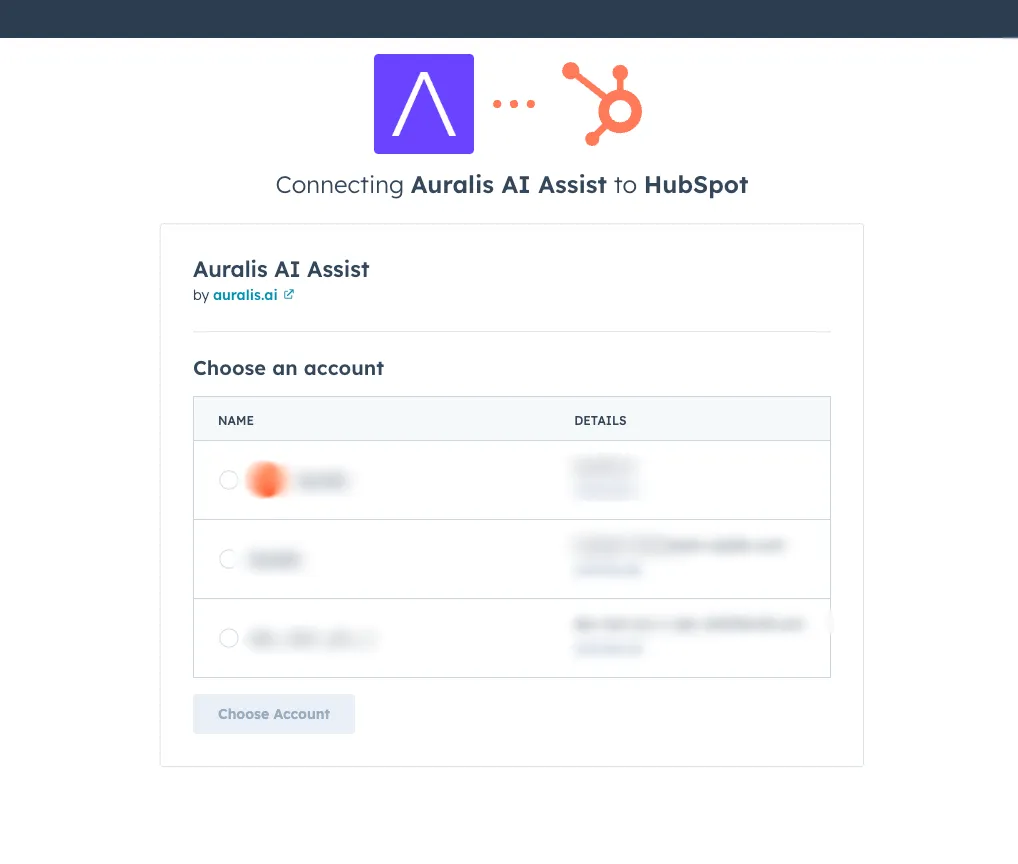
3. Select your HubSpot account
If you manage multiple HubSpot portals, select the one you want to connect Auralis to. If you only have one account, this step is skipped automatically.
4. Approve required permissions
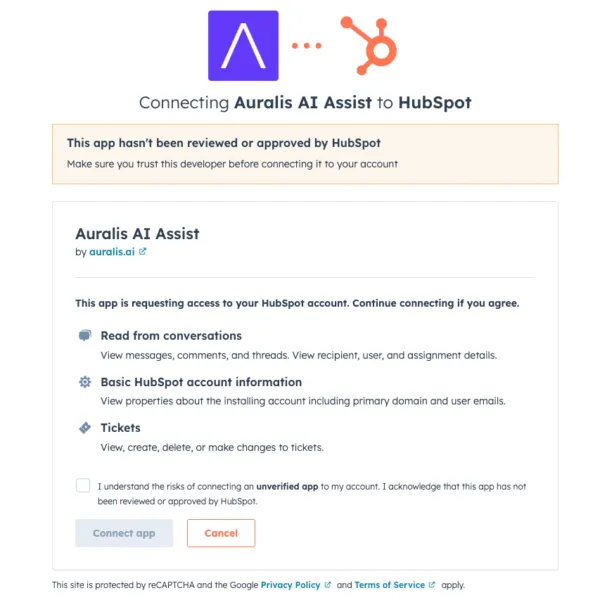
Auralis needs access to your HubSpot conversations and tickets to deliver AI assistance. Review the listed permissions and click Approve to continue. Your data stays under your control at all times.
5. Installation complete
Once permissions are approved, Auralis is immediately available inside your HubSpot workspace. No restart or additional steps required.

Configure Your Workspace
Auralis works out of the box, but a few quick settings help tailor it to your team's workflow.
1. Open Auralis from your HubSpot dashboard
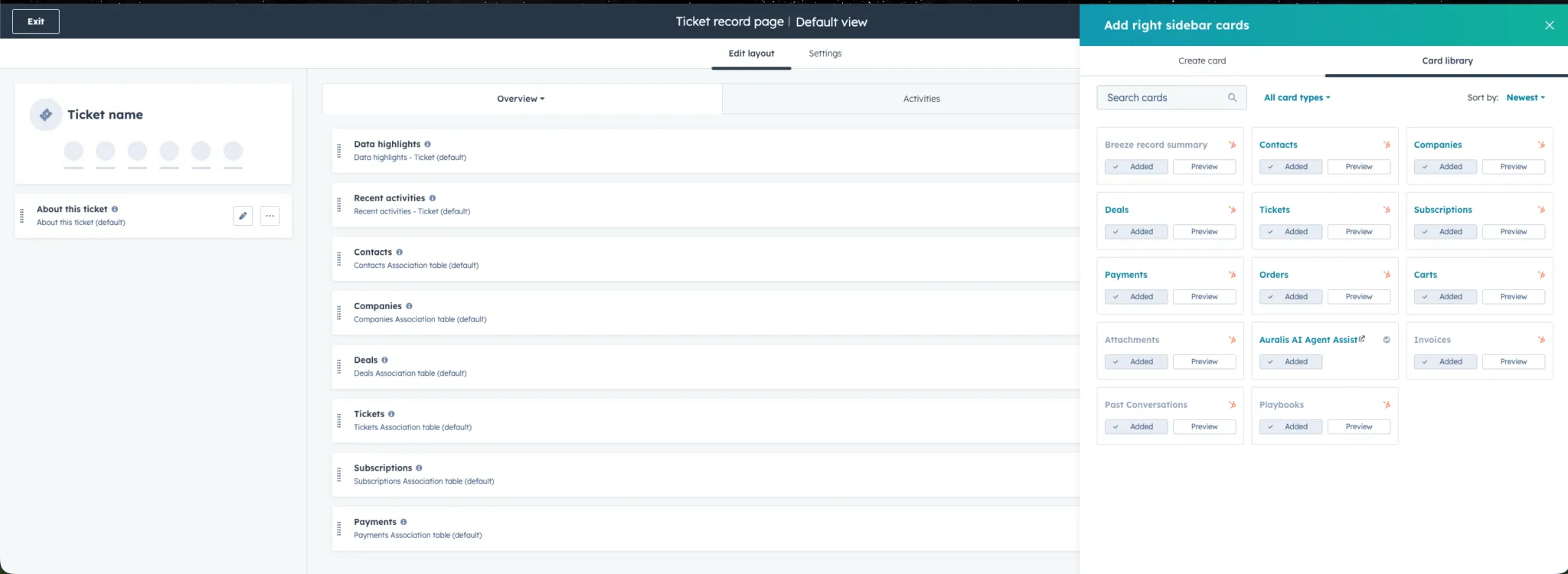
After installation, find Auralis in your HubSpot sidebar. It will appear within any active Conversation or Ticket view.
2. Choose where Auralis appears
Enable Auralis in conversations, tickets, or both, depending on where your team spends the most time, and update this anytime from Settings.
3. Adjust workflow preferences
Select whether your agents use Auralis in manual mode (trigger on demand) or automated mode (proactive suggestions). See the Manual vs Automated section below for guidance.
4. No complex setup required
Auralis is designed for immediate use. Most teams are fully configured and sending AI assisted replies within 5 minutes of installation.
Start Assisting
Your team can begin using Auralis immediately after setup. Here is what to expect.
1. Open any conversation or ticket
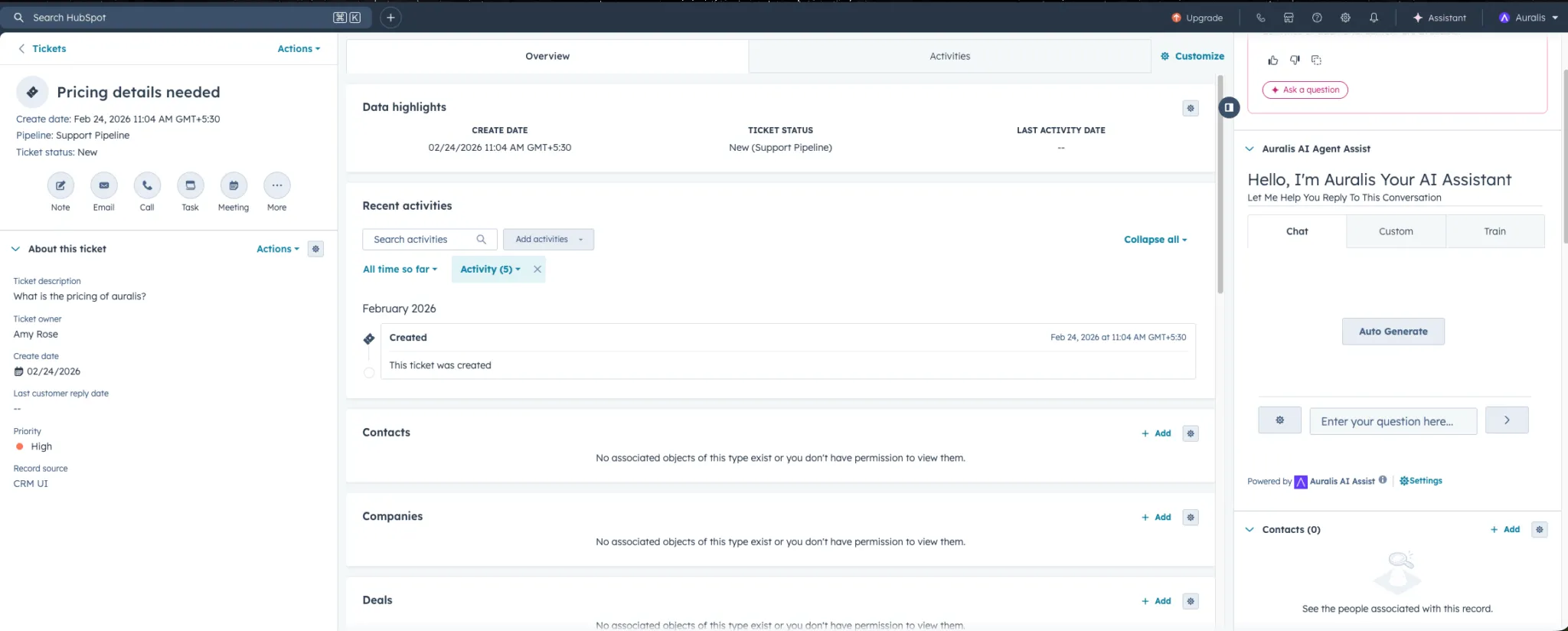
Navigate to an open conversation or support ticket inside HubSpot. Auralis will be available in the sidebar or reply composer area.
2. Trigger a reply suggestion
In manual mode, click the Auralis button to generate a context aware response, review the suggestion, edit if needed, and send, or discard it and write your own.
3. Let Auralis assist in the background
In automated mode, Auralis reads incoming messages and proactively prepares response drafts. Agents can accept, modify, or ignore suggestions without breaking their flow.
What Auralis does inside HubSpot
Purpose built features for support teams that need to move fast without sacrificing quality.
AI Reply Suggestions
Generate accurate, context aware responses directly inside HubSpot, without switching tabs or copying from another tool.
Real-Time Assistance
Agents get AI help while actively working on a conversation. Auralis stays embedded in the workflow, not layered on top of it.
Native Workflow Integration
Works directly within HubSpot conversations and ticketing. No external dashboards or parallel tools to manage.
Consistent Support Quality
Every reply Auralis suggests is aligned with your team's tone and standards, reducing variance across agents and shifts.
Scalable Support Operations
Handle significantly higher conversation volume without growing your team proportionally. Auralis absorbs the repetitive load so your agents can focus on what requires a human touch.
Manual vs Automated Assistance
Auralis supports two modes of operation. You can switch between them at any time.
Manual (agent controlled)
Agents decide when to use Auralis. They trigger a reply, review it, and choose to send or edit before anything goes out.
Automated (AI assisted)
Auralis reads incoming messages and prepares draft responses automatically. Agents can accept, edit, or ignore at a glance.
Manual (agent controlled)
Best for:
- Complex or sensitive queries
- High touch customer interactions
- Teams new to AI assistance
Automated (AI assisted)
Best for:
- Repetitive or FAQ style queries
- High volume support workflows
- Teams scaling without headcount
Start in manual mode to build agent familiarity and confidence with Auralis suggestions. Transition to automated mode once your team is comfortable with the quality and accuracy.
How Auralis handles your data
Auralis is designed with data minimization in mind, with customer data used only when needed and never retained longer than necessary.
| Data practice | Policy | Covered |
|---|---|---|
| Data processed for AI assistance | Only used to generate and serve reply suggestions | ✓ Yes |
| Long term data storage | No long term storage of customer conversation data | ✗ No |
| Data retention period | Data is retained for 30 to 60 days and then permanently deleted | ✓ Yes |
| Data access after uninstall | Access to HubSpot data is immediately revoked upon uninstall | ✓ Yes |
| New data processing after uninstall | No new data is processed once Auralis is uninstalled | ✗ Never |
Disconnecting & Uninstalling Auralis
You can disconnect or fully remove Auralis at any time from your HubSpot settings. No data will be affected beyond the retention period.
1. Go to HubSpot Settings
Open your HubSpot portal and click the Settings icon in the top navigation bar.
2. Navigate to Connected Apps
Go to Integrations, then Connected Apps to see all apps connected to your HubSpot account.
3. Select Auralis and click Uninstall
Find Auralis in the list, click on it, and select Uninstall. Confirm when prompted.
What happens to your data after uninstall
- Access to your HubSpot data is immediately revoked, and Auralis can no longer read conversations or tickets.
- No new data will be processed after uninstallation.
- Any existing data held by Auralis is permanently deleted within the standard retention period of 30 to 60 days.
If you ever want to reconnect Auralis, simply revisit the integration page and follow the installation steps above. All configuration will need to be re-applied after a fresh install.
Ready to start handling support faster?
Install Auralis on HubSpot and start assisting your team in minutes, with no complex setup and no extra headcount required.